Option to assume as an agent | The place for Zendesk users to come together and share
Skip to main content
Accepted

Option to assume as an agent

Related products:Support
  • October 8, 2021
  • 28 replies
  • 16 views

As of now, Zendesk only allows us to assume as end user. It would be nice if we have a feature/option to assume as an agent (to manage some settings option for agents, particularly Zendesk views, to have fewer groups and to avoid multiple views created by different groups). Also, it would be easy for admins to troubleshoot agent facing issues, without having agents involved. Thanks.


 

28 replies

Sam15
  • October 8, 2021

Note from the Zendesk Community Team: Sam's instructions here are out of date, as they predate the move of this functionality to Admin Center. However, user @pam12 has provided updated instructions in her comment below, here. Thanks Pam!

---

Hi @johnny11! It is possible to do this through a workaround. To do so:

  1. Open Zendesk Support
  2. Go to Admin -> People
  3. Right-click on "Agents" and open the page in a new tab (you can also go to this link - replace the subdomain w/ your own Zendesk subdomain: https://subdomain.zendesk.com/users?role%5B%5D=4&role%5B%5D=2 )
  4. On the older-style Agent page, hover over the row with the agent you'd like to assume
  5. To the right, next to edit, you should see an assume link appear
  6. Click on the link to assume the agent user


  • Author
  • October 8, 2021

Samuel Mosher you are awesome! Thank you very much for your help:) 

Wondering, if there's an option to revert identity after we get into agent's dashboard page. I can only see the option to sign out. Any help is much appreciated. 


Sam15
  • October 8, 2021

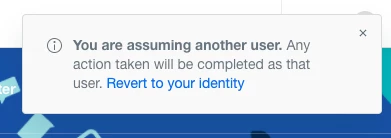
@johnny11 Yes! If you go to Guide, a box should appear to revert identities.


  • Author
  • October 11, 2021

Great, thank you again @sam15


Jacob20
  • Newcomer
  • December 23, 2021

Hi @johnny11

You should be able to revert your identity from the Guide product or by visiting https://your-domain.zendesk.com/users/revert


  • June 22, 2022

This article needs updating.  Here are the instructions we were given

To assume an agentidentity:use the URL: [yoursubdomain].com/users

  • You'll be taken to a list of users
  • Click on Agents below the search bar
  • Find the agent you want to assume the identity and hover your mouse close to the edit button
  • Click on the Assume button
  • You will be taken in the Guide page, click on the products button upper right (four squares icon)
  • Go to Zendesk Support and test tickets, etc 
  • To leave the assuming mode, go again to the URL: [yoursubdomain].com/users
  • There will be a yellow message on the top of the page with an option to end assumption mode

  • Author
  • June 23, 2022

Great, thanks for sharing this Pam.


Dave12
  • Employee
  • June 30, 2022

Thanks for providing updated instructions, @pam12


Jahn11
  • Newcomer
  • July 8, 2022

Let's make it simple

To assume:
URL: [yoursubdomain].zendesk.com/users - then select which agent to assume identity

To revert:
URL: [yoursubdomain].zendesk.com/users/revert 


  • July 8, 2022

John,

That did not work for us.  We have multiple brands and it caused me to get locked out of the system.  It may work if you only have 1 brand but for us, having multiple brands, it does not work.  (We had our Zendesk implementation person on the call walking us through it)  


Jahn11
  • Newcomer
  • July 11, 2022

Hi Pam, we also have multiple brands and not sure why it does not work for you but I am assuming you are an admin as well? 


Maureen11
  • Employee
  • September 29, 2022

To assume:
URL: [yoursubdomain].zendesk,com/users - then select which agent to assume identity

To revert:
URL: [yoursubdomain].zendesk.com/users/revert 


Jean-Baptiste11

Team, any plan to add this feature in the current UI? This is a very useful tool.


Anastasia11

+ 1 to add this feature to the current UI


Atanas
  • Newcomer
  • August 15, 2023

+1

Will be amazing to see this with the current UI of ZD


Arnaud11
  • February 13, 2024

+1

L'alternative est de créer un agent light mais les fonctionnalités sont drastiquement réduites


  • March 17, 2024

Would love this to be part of the modern UI.


Additionally, we used this to create API tokens via an account that wouldn't be turned into an end user nor deleted if someone moved on from the team. Now, we receive an error message directing them to contact the instance owner. The instance owner receives the same message. This is a critical use case for us.


Rudolph11
  • September 23, 2024

Please add this to the current UI of Zendesk.


Sean43
  • Employee
  • September 30, 2024

Thank you all for the feedback.  I'd like to understand the use case a bit more.  I know this is a fairly long running thread.  Just be clear, are you requesting the ability to assume as an agent directly from the UI?  Also, is this so you as an admin can get a view of your agent's specific setup / account?


Anastasia11

Hi Sean,

Exactly. This functionality is needed to troubleshoot and verify on agents tech issues sometimes. 

Will be beneficial to have it available as part of native UI. 


Mackenzie13

Yes @Sean.  The ability to assume as an agent directly from the UI would be really helpful. For my usecase, yes, it's so I can see  and troubleshoot my  agent's specific setup / account. 


For instance, when setting up an agent with groups  it is hard to verify  what tickets I am setting them up to see when there are multiple dependencies. I  had to screen share with an agent while updating multiple settings to see if they could see the subset of tickets that I wanted them to see. It would have taken 5 minutes if I could assume the identity myself.  


  • November 20, 2024

Hi Sean, echoing what the others have said, having the ability to view an agents setup would be extremely helpful when it comes to troubleshooting issues agents may be having as well as being able to visualise how different agents are set up with different workspaces etc


  • February 25, 2025

It would be nice to add this to understand what a regular agent see, when they ex. create their own views ect. We admins see it abit differently


  • March 16, 2025

Hi all,


I've just published a free app that makes impersonating/assuming and then ending the session much easier. Here's the link:

Impersonate Agents App Integration with Zendesk Support
 

If you have any questions or suggestions, just reach out to me at twothumbapps@gmail.com and I'll be happy to chat!


Ben


Patrick57
  • June 17, 2025

There is a workaround now! 


While an admin is in the Support product, pulling up an agent's profile does NOT allow you to assume into their account. You can only assume into an End User's account this way.

Instead, while the admin is already logged in, go to https://Subdomain.zendesk.com/users, search for the agent you want to assume, and then when you hover over the Edit link, the Assume link should display next to the Edit link.

This method gets glitchy though if you need to jump into a bunch of different people's accounts, so clearing cache/cookies is useful if you run into trouble. 


This needs to be updated in order to be accessible for Admins from the Support profile page though. It would make life simpler.