Inline code formatting in Zendesk communities | The place for Zendesk users to come together and share
Skip to main content
Accepted

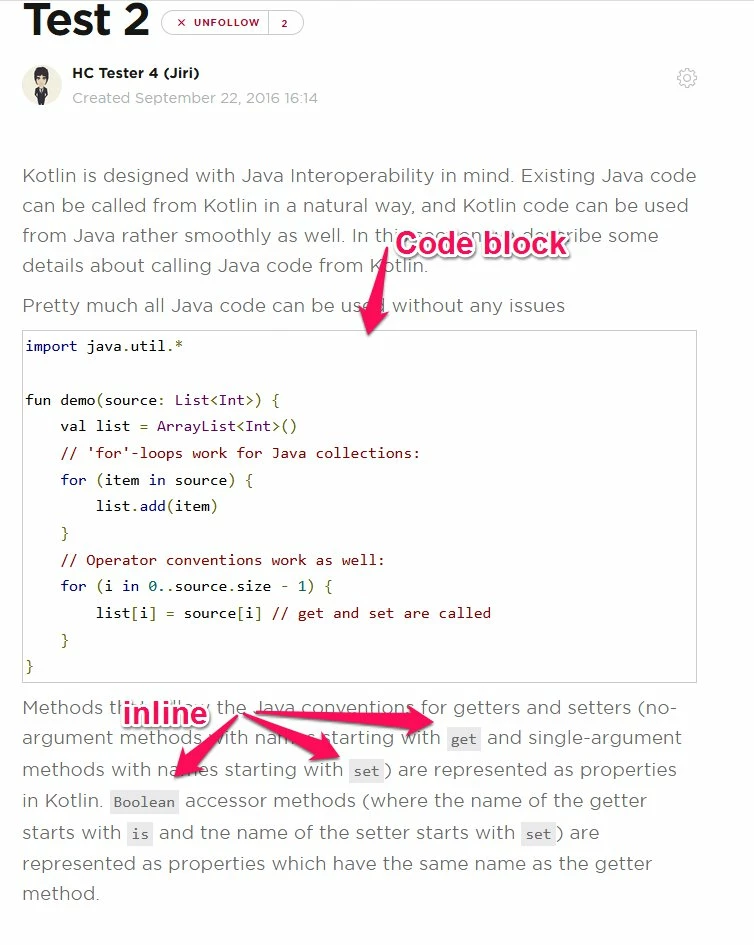
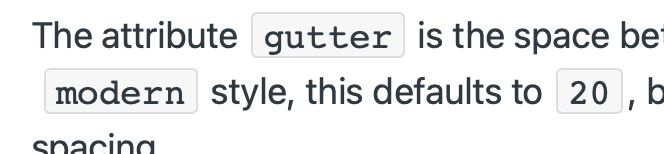
Inline code formatting in Zendesk communities

Related products:Community
  • August 9, 2017
  • 29 replies
  • 17 views

Show first post

29 replies

Hiedi11
  • Employee
  • May 12, 2023
Hi Matthias,
 
I'm afraid that we are currently not able to support this functionality However, I do agree that it would be a nice feature to have, and I'm happy to pass your feedback to our Voice of the Customer team for further discussion.
 
Please feel free to let me know if I can help with anything else!
 
 
Cheers,

  • November 1, 2023

Just a plus-one to this request. It's been six years since the original request, and it's an extremely common need for technical documentation to be able to have inline code formatting. As others have mentioned, it's notable that it's available in tickets (via markdown, single backticks), but in Help Center, arguably a more formal communication platform where formatting is even more important, this simple functionality is not supported. 

I know we can create a style in our template to support this, but it's *extremely* tedious to have to modify html every time we stick a file or folder name in our documentation, and that comes with the limitation that the formatting wouldn't show up in the WISIWYG editor, only the published article, which is super confusing. 


  • December 3, 2023

Another vote for this feature.


Right now, I'm copying and pasting the inline code formatting from other articles when I need it, but it's a hassle.


Nick66
  • March 28, 2025

This is easy to do: click the code button and use the `<code>` tag instead of `<pre>`. 

Zendesk just didn't add a WYSIWYG button for it, but the HTML tag still works.