

Tip: How to make a Table Of Contents (TOC) For Article Template | The place for Zendesk users to come together and share
Skip to main content
Ifra
Community Expert
Sep 1, 2021 5:15 PM UTC

Tip: How to make a Table Of Contents (TOC) For Article Template

Prerequisite:

File Name: article_page.hbs, style.css, script.js file

Time To Read: Max 2 min

Time To Embed: Max 4 min


Here's a way to create a table of contents in your Article template, that ensures subheadings will be properly indented instead of aligned with the main headings


2 min read to learn how to customize the theme.


You can use the free plugin by Nikhil Dabas. You can embed easily in your theme, see the below steps:

1). Download the plugin and unzip.

2). Upload the JS files into your assets folder of your Help Centre. See the below screenshot.
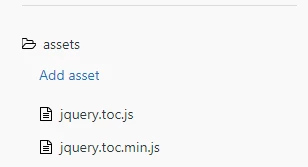
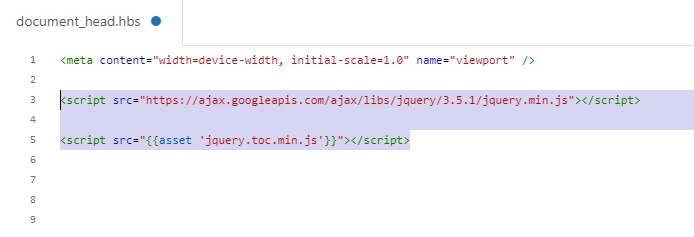
3). Now, link the jquery.toc.min.js file and the jQuery library onto your document_head.hbs file, the plugin is jQuery based.
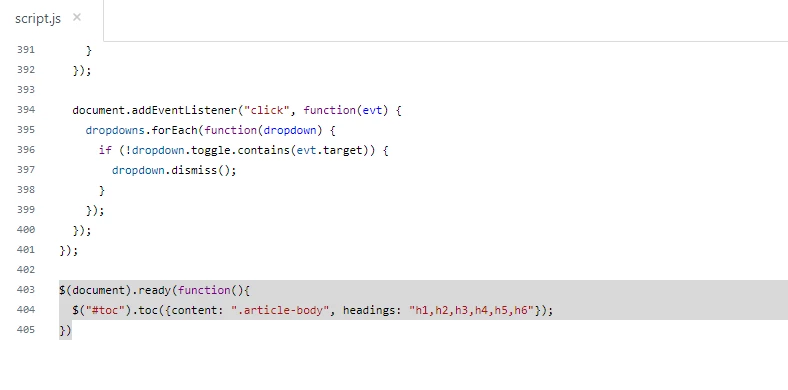
4). Call the TOC function on your script.js file at the bottom area under the Document function.
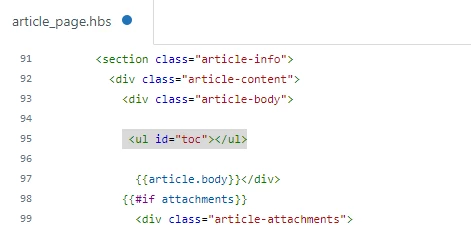
5). At the end, add the div to show the TOC on the article template.
 

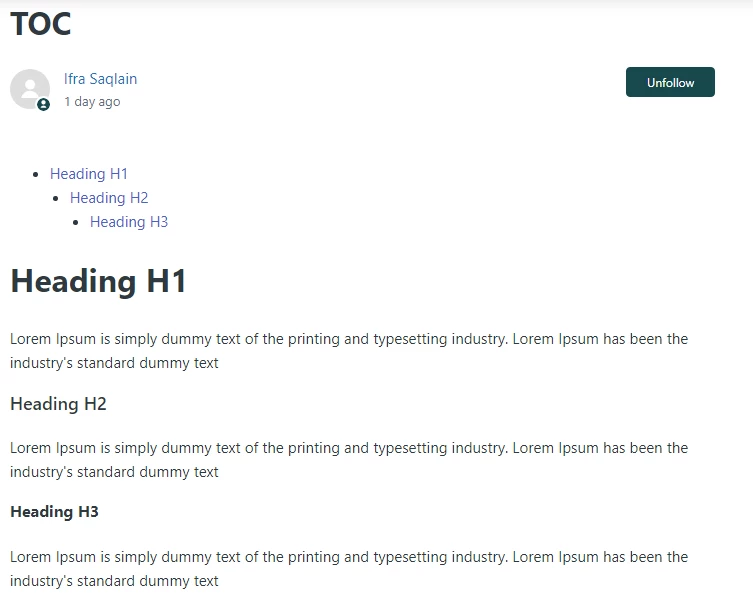
The output is:


Thanks


51 replies

Jaïs
Sep 2, 2021 8:30 AM UTC

Hello,

Thanks for sharing. I did a similar thing using the following code:

- in script.js:

!function(a){"use strict";var b=function(b){return this.each(function(){var c,d,e=a(this),f=e.data(),g=[e],h=this.tagName,i=0;c=a.extend({content:"body",headings:"h1,h2,h3"},{content:f.toc||void 0,headings:f.tocHeadings||void 0},b),d=c.headings.split(","),a(c.content).find(c.headings).attr("id",function(b,c){var d=function(a){0===a.length&&(a="?");for(var b=a.replace(/\s+/g,"_"),c="",d=1;null!==document.getElementById(b+c);)c="_"+d++;return b+c};return c||d(a(this).text())}).each(function(){var b=a(this),c=a.map(d,function(a,c){return b.is(a)?c:void 0})[0];if(c>i){var e=g[0].children("li:last")[0];e&&g.unshift(a("<"+h+"/>").appendTo(e))}else g.splice(0,Math.min(i-c,Math.max(g.length-1,0)));a("<li/>").appendTo(g[0]).append(a("<a/>").text(b.text()).attr("href","#"+b.attr("id"))),i=c})})},c=a.fn.toc;a.fn.toc=b,a.fn.toc.noConflict=function(){return a.fn.toc=c,this},a(function(){b.call(a("[data-toc]"))})}(window.jQuery);
if ($("#toc").length>0){
$("#toc").toc({content:"div.article-body"});
}

- in style.css:

.toc-list ul, .toc-list ol {
list-style-type: revert;
}
.toc-list ul li, .toc-list ol li {
margin: 0px 0 0px 10px;
}
.toc-list ul li a {
border-radius: 4px;
color: $text_color;
display: block;
font-weight: 300;
padding-left: 10px;
/*margin-bottom: 10px;*/
}

.toc-list ul li a:hover {
background-color: $brand_color;
color: $brand_text_color;
text-decoration: none;
}

- in article_page.hbs:

{{#each article.labels}}
{{#is identifier "show_toc"}}
<section class="toc-list">
<strong>{{dc 'in_this_article'}}</strong>
<ul id="toc"></ul>
</section>
{{/is}}
{{/each}}

I found this last part great because it actually triggers the TOC section on articles ONLY if I had the show_toc label in the article, which is a customization I wanted.

Translate
Ifra
IfraAuthor
Community Expert
Sep 2, 2021 4:19 PM UTC

Thanks I think you read this one also to add the title above TOC list items:

https://support.zendesk.com/hc/en-us/community/posts/1500000064241-Using-Section-Headings-to-create-a-Table-of-Contents

Translate
Thank You :)
Mark33
Jan 25, 2022 1:29 AM UTC

@ifra the screen shots for steps 2 and 3 are identical. Is that intentional?

Translate
Ifra
IfraAuthor
Community Expert
Jan 25, 2022 10:40 AM UTC

Hello Mark, thanks to ping, that's not intentionally, there should have been the  document_head template screenshot.

Translate
Thank You :)
Mark33
Jan 27, 2022 1:27 AM UTC

Thanks, @ifra! Got the dynamic TOC working with the jQuery plugins.  

One question: I added an "In this article" heading. I modified the Javascript snippet to only pull <h2> headings. Is there a way to hide the "In this article" heading if there are no <h2> headings in the article?

 <section class="article-info">
        <div class="article-content">
          <div class="article-body"><h3> In this article:</h3><ul  id="toc"></ul>{{article.body}}</div>
          {{#if attachments}}
            <div class="article-attachments">
              <ul class="attachments">
                {{#each attachments}}
                  <li class="attachment-item">
                    <svg xmlns="http://www.w3.org/2000/svg" width="16" height="16" focusable="false" viewBox="0 0 16 16" class="attachment-icon">
                      <path fill="none" stroke="currentColor" stroke-linecap="round" d="M9.5 4v7.7c0 .8-.7 1.5-1.5 1.5s-1.5-.7-1.5-1.5V3C6.5 1.6 7.6.5 9 .5s2.5 1.1 2.5 2.5v9c0 1.9-1.6 3.5-3.5 3.5S4.5 13.9 4.5 12V4"/>
Translate
Ifra
IfraAuthor
Community Expert
Jan 27, 2022 4:50 AM UTC

Hello Mark, you can add a class-name in your h3 heading tag: toc-title, and check the length of li in th ul, then hide the toc-title.


Solution:

1). Add class-name in h3.


2). Check the li length in the ul.


3). Now test your TOC and if any issue please do let me know :)


Thanks


Translate
Thank You :)
Feb 8, 2022 9:37 PM UTC

Thank you for the solution. Works fine. 

I'm trying set TOC as transparent callout.

Add this code:

     <div class="article__body" itemprop="articleBody">
                <div class="callout callout--transparent">
                              <h5 class="toc-title">IN this article:</h5>
                                  <ul id="toc"></ul>
                                </div>
            {{article.body}}
          </div>

and

$(document).ready(function(){
      $("#toc").toc({content: ".article__body", headings: "h1,h2,h3,h4"});
  
  if($("ul#toc").has("li").length === 0){
     $('.toc-title').hide();
    $('.callout callout--transparent').hide();
     }
})

If there is no heading in article TOC is hide, but borders of this callout are still there. What should I do? 

Translate
Ifra
IfraAuthor
Community Expert
Feb 9, 2022 4:25 AM UTC

hii, because you forgot to add a dot for the class in your script code:

Your code:

$(document).ready(function(){
      $("#toc").toc({content: ".article__body", headings: "h1,h2,h3,h4"});
  
  if($("ul#toc").has("li").length === 0){
     $('.toc-title').hide();
    $('.callout callout--transparent').hide(); // hasn't dot for the class
     }
})


Fixed: Apply this.

$(document).ready(function(){
      $("#toc").toc({content: ".article__body", headings: "h1,h2,h3,h4"});
  
  if($("ul#toc").has("li").length === 0){
     $('.toc-title').hide();
  $('.callout.callout--transparent').hide();
     }
})
Translate
Thank You :)
Feb 9, 2022 12:49 PM UTC

Indeed. Thank you. And the last question:

how can I change:

if($("ul#toc").has("li").length === 0){

to hide TOC if article has less than 2 headings? 

Translate
Ifra
IfraAuthor
Community Expert
Feb 9, 2022 4:50 PM UTC

hey Jakub :)

Use this script code for your query:

to hide TOC if article has less than 2 headings? 

$(document).ready(function(){
    $("#toc").toc({content: ".article__body", headings: "h1,h2,h3,h4"});
    $('.callout.callout--transparent').hide();
  if($("ul#toc li").length >= 2){
    $('.callout.callout--transparent').show();
     }
})
Translate
Thank You :)