
Holiday auto-responses made easy | The place for Zendesk users to come together and share
Skip to main content
January 13, 2017

Holiday auto-responses made easy

  • January 13, 2017
  • 16 replies
  • 106 views

CHALLENGE: Emails are sent to us via a number of different email addresses. We have different (customized/relevant) auto-responses for each of these addresses. When a holiday rolls around, altering all of the triggers manually takes time. And then you have to edit them again after the holiday. Drag.

SOLUTION: Utilize the ability to schedule holidays. Then add holiday conditions to triggers.

HOW?

(1) Set up all holidays.

In brief: Admin > Settings > Schedule > Holidays > Add holiday
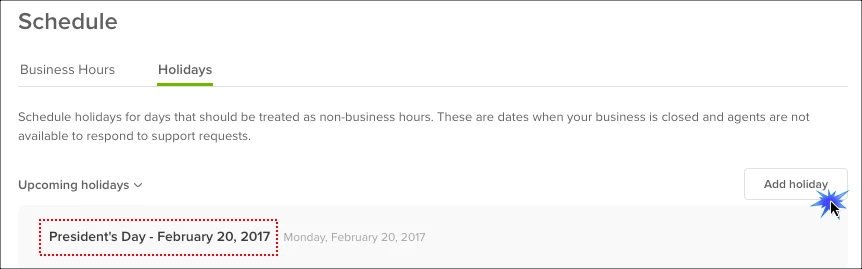

More detailed instructions in Zendesk article: Setting your schedule with business hours and holidays

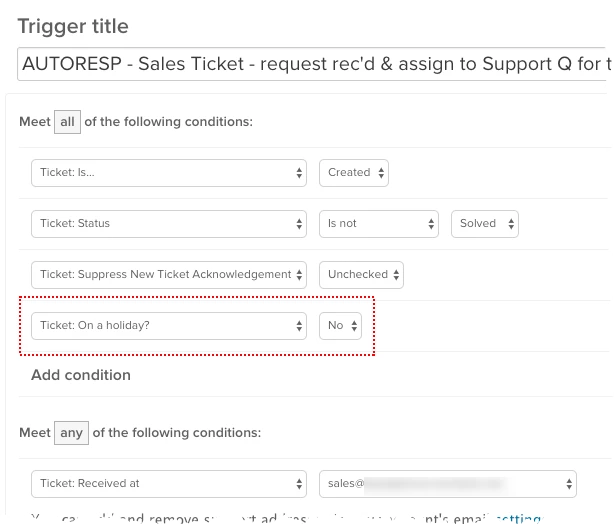
(2) Edit your existing triggers to show that they should be used other than when it's a holiday - by adding the condition "Ticket: On a holiday?" and "No". Looks like this:

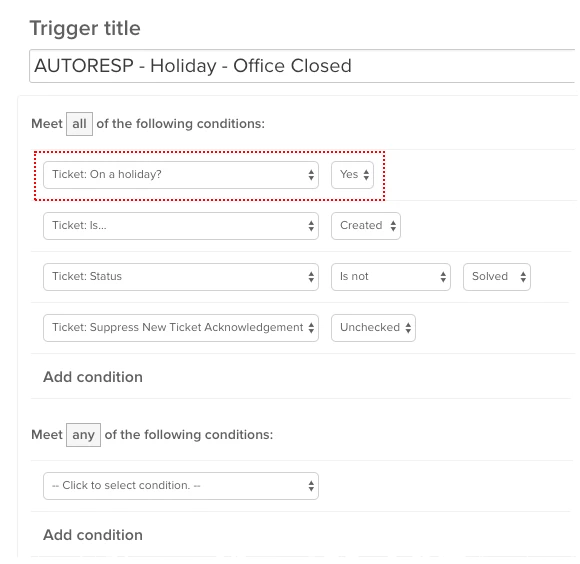
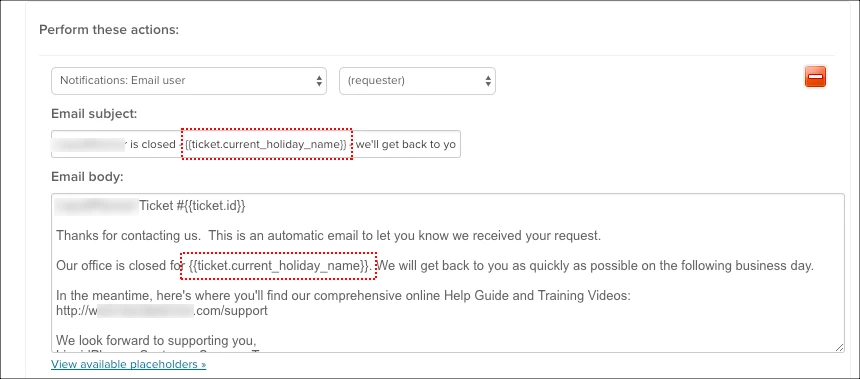
(3) Create one holiday trigger to be used for all holidays. That trigger must have the condition "Ticket: On a holiday?" and "Yes". You can also use a ticket field to insert the name and date of your holiday automatically.
 

16 replies

October 10, 2022

Lou,

I do, did it right before I tried to setup a holiday message. Was sure to refresh pages as well. 

Mark

Lou11
October 10, 2022

@mark104

Weird. What plan do you have?

I have schedules set up even though we don't use them yet, and I see the condition. We have Enterprise plan, so maybe that has something to do with it.

October 10, 2022

Lou - Professional IIRC

Chelsie
December 22, 2022

Would love it if there was a placeholder like {{ticket.current_holiday_dates}}. Otherwise we have to manually update the auto-reply every holiday to specify which dates we will be closed.

Ian41
November 15, 2023

@chelsie I know this is almost a year later, but just in case it helps someone else! I ended up modifying the name of the holidays so it makes sense in the context of the email. For example, I have a holiday named "Thanksgiving Break from Nov 23 - Nov 24" which will show up in the email as:


Our office is closed for Thanksgiving Break from Nov 23 - Nov 24. We'll get back to you as soon as possible on the next business day!

Nicole17
Employee
November 16, 2023

Thanks for sharing, Ian!