[Explore] Enter Financial Quarters or Years | The place for Zendesk users to come together and share
Skip to main content
July 18, 2022
Question

[Explore] Enter Financial Quarters or Years

  • July 18, 2022
  • 6 replies
  • 71 views

Has anyone figured out a way to enter custom date groups/ranges? I'm looking to create some reports but with the financial year and quarter being used on the X axis but struggling.

I've tried creating groups for the months, and naming them Q1, Q2... but the idea falls over because our financial quarters overlap the calendar years (2022 May 1st to 2023 April 30th).

Kind regards,


    6 replies

    Amy37
    July 19, 2022

    Following this one! We also use Financial year and doing Explore dashboards and schedule reports is a complete nightmare right now!

    July 26, 2022

    @amy37

    Hey Amy, I just thought I'd share a solution. You can use the following:


    FISCAL_YEAR(_date,_start_month) or FISCAL_QUARTER(_date,_start_month) to create custom attributes e.g. FISCAL_QUARTER([Ticket created - Date],"April") will start Q1 with April. You can then add the same for FISCAL_YEAR. You can then do the same for ticket solved, ticket updated etc.

    More info here: https://support.zendesk.com/hc/en-us/articles/4408834558746-Explore-functions-reference

    Brett Bowser
    Community Manager
    July 27, 2022

    Thanks for taking the time to share this @mitchell12!

    July 28, 2022

    @brett13 credit goes to Gavin and your tier 3 who helped!

    April 17, 2025

    Hi all,

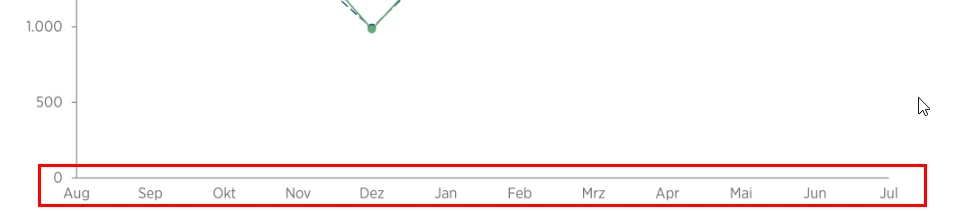
    is there a way, to custom sort the months on the X-axis based on the start month of the fiscal year?

    Our fiscal year starts on August, so in a monthly report, it should look like this:

    As an additional attribute for sure, we use FISCAL_YEAR(_date,_start_month)  on the line level.

    Thanks

    Stefan

    Elaine14
    Employee
    June 21, 2025
    Hi Stefan,
     
    Thanks for your question. To custom sort the months on the X-axis starting from August for your fiscal year, you might want to try using ordered sets in Zendesk Explore. Ordered sets allow you to define a custom sort order for your dimension values, which would work perfectly for this use case.
     
    Here is a helpful article on how to use renamed and ordered sets to change displayed values and sort order in Explore:
    Explore recipe: Using renamed and ordered sets to change displayed values
     
    Using an ordered set, you can specify the month order beginning with August and have your report display the months correctly along the X-axis.
     
    I hope this helps!