
Explore: How to show two standard calculated attributes (Updates history) in the same row? | The place for Zendesk users to come together and share
Skip to main content
Karan12
March 22, 2024
Question

Explore: How to show two standard calculated attributes (Updates history) in the same row?

  • March 22, 2024
  • 6 replies
  • 76 views

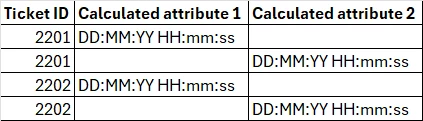
Hi, I have created two calculated attributes in the "Support: Update history" dataset. The results are coming out just fine, the only issue is that the output is coming up in separate rows. I really want to create a report where every ticket accounts to only one row and all the default attributes plus the calculated attributes are shown in just one row.

Expected output:

Actual output:
 

    6 replies

    Elaine14
    Employee
    March 31, 2024
    Hi karankuwarbidxb,
     
    Thank you for reaching out to our community!
     
    I'm curious about the attributes that were used and led to the results breaking. I'll go ahead and create a ticket for you to delve deeper into this. You can expect an email from me very soon.
    September 17, 2024

    I am experiencing the same challenge when using calculated attributes, along with using the calculated attributes to create calculated metrics.  Is there a solution to put these in one row per ticket id?

    Elaine14
    Employee
    October 4, 2024
    Hi Andy,
     
    I'll be creating a ticket for us to further investigate and see if we can do some workarounds! 🙂 
    October 6, 2025

    I'm experiencing the same issue with calculated attributes. Has this been fixed? Or is there a workaround available?

    Jonathan73
    November 9, 2025

    Hello, 


    This issue is also plaguing my reports. Having two calculated attributes creates a second row which should not be there. Any ideas how to fix?

    Employee
    December 8, 2025
    Hi Jonathan, 
     
    Thank you for sharing this to us. 
     
    I'll go ahead and create a separate ticket on your behalf so I can get more account-specific details to troubleshoot this issue. You may expect an email shortly with the ticket information.
     
    Thank you.
