
Hide the Metric label | The place for Zendesk users to come together and share
Skip to main content
Rockford
May 16, 2022
Question

Hide the Metric label

  • May 16, 2022
  • 4 replies
  • 79 views

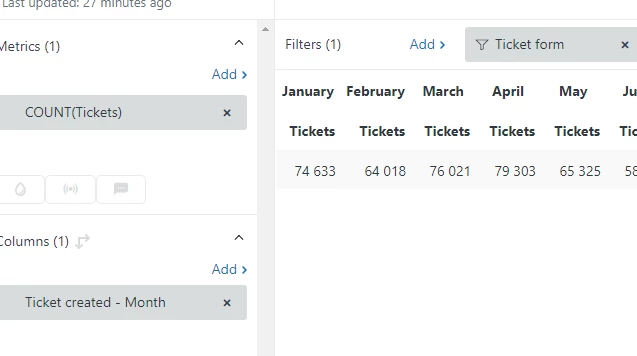
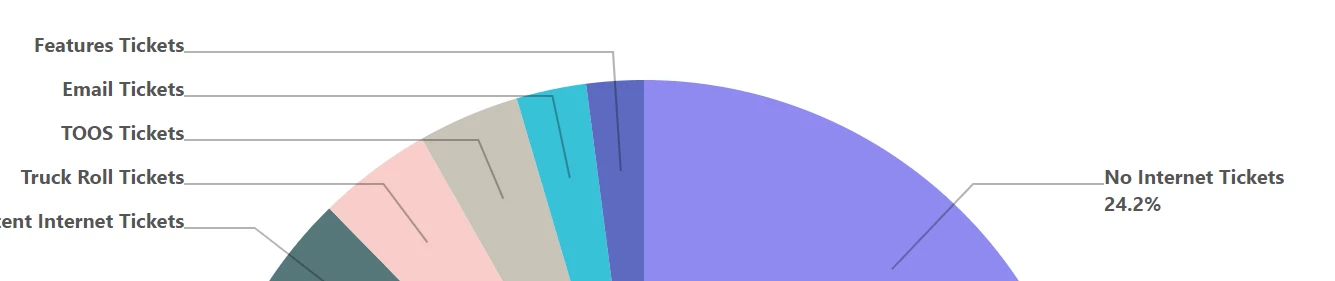
Is it possible to hide the Metric label when the color legend is disabled? In this case, the word "Tickets" appears after every category. It seems a bit redundant in this visual, but I suppose it may not be possible without affecting all of the other chart types. A table visual with the month in the columns will have a 2 level header - month on top and the word tickets below it. Both visuals would be cleaner without this behavior.
    4 replies

    CJ95
    May 16, 2022

    For the first one, yes, but it's definitely in the "hacky" category. There's only one toggle for headers, and it toggles all of them. Well, that gets rid of "Tickets" but it also gets rid of the months. That's not super helpful! So, to get around this, we'll need to move one set of the headers. 

    To do this, you can select "Chart Configuration" (the paint brush icon), then check "metrics on rows". 
    Now, your report should look more like this: 


    That's better but still there's that Tickets word hanging out. If you want to get rid of that, we can, but this is the really hacky part. Open the paintbrush icon again. Select the color for the "Row Headers", and slide the slider all the way to transparent: 
    Now the "Row Header" for Tickets is invisible, and only the top months remain: 


    Dave12
    Employee
    May 17, 2022
    Thanks for sharing this solution, CJ!
    Rockford
    RockfordAuthor
    May 17, 2022

    Thanks, CJ! I didn't know about the metric on rows checkbox. This is a good solution for tables, but I guess there isn't one for the pie chart.

    Edit: I found the setting. I should try all settings on all visual types when tinkering. Label elements: Only attributes

    Dave31
    February 1, 2023

    Hi

    Same sort of issue but I had rows already I didn't want to hide - I just did the move metric to row and this gave me 3 columns and so I made that 3rd column invisible