
Remove/Hide data filter values | The place for Zendesk users to come together and share
Skip to main content
January 9, 2019
Question

Remove/Hide data filter values

  • January 9, 2019
  • 14 replies
  • 75 views

In Good Data there is a way to remove filter options that do not apply. I'm trying to figure out how to do this in Explore.


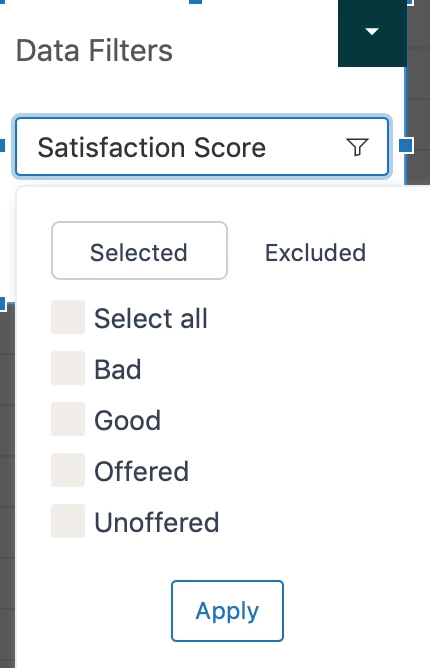
Use case: I have a report that only shows data for rated surveys (good or bad). However, when I apply the Data Filter: Ticket Satisfaction Rating, it shows options for Bad, Good, Offered, Unoffered. I would like to remove Offered and Unoffered from the filter options, since they do not apply.
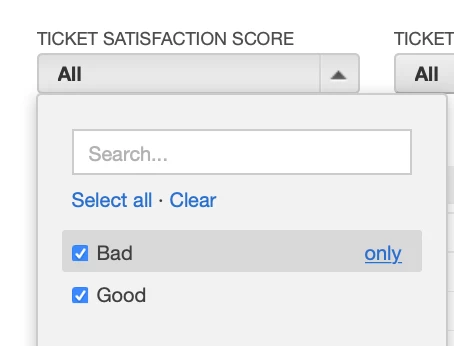
Here is a screenshot of how I have the Good Data version of the dashboard set up
    This topic has been closed for replies.

    14 replies

    Brett Bowser
    Community Manager
    February 19, 2019

    Thanks for sharing your solution Stacy! This is super helpful :)

    June 26, 2019

    @Stacy - perhaps I'm missing something...

    You wanted to exclude certain values from a dashboard filter - what is called "Data Filer". 

    I understand how to create custom groups and sets but as far as I can tell, those are at the query level. How did you bring that back up to the dashboard level?

    My use case is that I'm creating a dashboard for agents to use in their weekly reports. They will need to choose a time period, choose their group and view the queries. I can add the Data Filter for "Ticket group", however, the list of groups have a number of values that are unnecessary and I would love to filter out. 

    Thanks!

    Stacy15Author
    June 26, 2019

    @Ayal,

    A Data Filter is a specific type of dashboard filter.

    You create the custom group and custom set in the report. When you add the dashboard filter you can find the custom set by searching for it. I like adding "(set)" to the end of my custom sets. So when I search I just have to type in "set".

    Remember, you need to have the right 'Choose data filter dataset' selected. If you cannot find your custom set in the selected data filter dataset try the other one.

    I hope this helped

    June 27, 2019

    Got it, thanks!