
Ticket type in explore report is incorrect | The place for Zendesk users to come together and share
Skip to main content
Stephanie29
May 6, 2022
Question

Ticket type in explore report is incorrect

  • May 6, 2022
  • 5 replies
  • 32 views

I created a Row in a Query (report) using Explore for "Ticket type". However, the data in this field is showing up differently from what shows inside the ticket. 

Here is what my report looks like. Note that "Ticket type" is showing as "Incident"
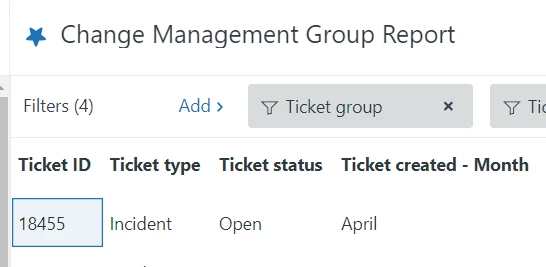


But in that same ticket the "Ticket Type" is showing "Change".
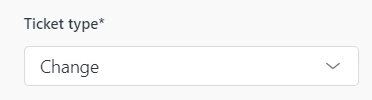
How can I get the report to match the true ticket type that is showing inside the ticket?

Thanks for your help!

    5 replies

    Zendesk13
    Newcomer
    May 7, 2022

    Hi @stephanie29, can you please confirm that this "Change" value for Ticket Type was added by the Change Manager app?

    Additionally:

    • Does this happen to all tickets whose Type is "Change", or just this particular ticket? 
    • Depending on what Explore plan you're on, dataset synchronization might vary. Could it be that the ticket type changed in Support but Explore still hadn't refreshed when you consulted?

    Thanks in advance for clarifying!

    Stephanie29
    May 9, 2022

    Hi Pedro,

    It is set up under the Admin "Objects and Rules" section. (not the Change Manager App)

    It happens for all tickets whose "Ticket type" is "Change".

    I have monitored this over days/weeks/months so I do not believe this is a synchronization issue.

    Let me know if you need more information. 

    Thank you!

    Zendesk13
    Newcomer
    May 13, 2022

    Hi @stephanie29, apologies for the late reply. As we know, in Support there is a native/system field named "Type". When we're editing it, Zendesk confirms that it's a system field:

    When we go to Zendesk Explore, this system field "Type" is renamed as "Ticket type" by default.

    What I think could be happening: someone created a custom field named "Ticket type" in your Support account, which means you now have two "Ticket type" fields in Explore (one is the system's, the other one is a custom field).

    Can you please confirm?

    Stephanie29
    May 13, 2022

    Hi @zendesk13

    Correct, "Ticket type" is set up as a custom field.

    I think you helped me find the solution. When I add a new row to my report, I have to select the "Ticket Type" that appears under "Ticket custom fields". I've added a screenshot in case it helps someone in the future with the same problem.

    Appreciate your help Pedro!

    Zendesk13
    Newcomer
    May 13, 2022

    You're welcome, thanks for confirming 😀