

How can I provide feedback for the App Builder Closed EAP? | The place for Zendesk users to come together and share
Skip to main content
Feedback submitted

How can I provide feedback for the App Builder Closed EAP?

Related products:Platform
  • December 10, 2024
  • 16 replies
  • 59 views

Paul Von

Guide on providing your feedback to the development team 

Feedback is very important to us as we're developing the App Builder to help you! We believe that this user forum is a valuable channel to share your feedback and suggestions for improvements. The user community allows us to be as collaborative and social as possible while everyone can benefit and contribute.

How to add feedback?

There are two ways to leave your feedback in this user forum:

  • Create a new post
  • Comment on an existing post

Have a look at the existing posts in this forum, and see if you can benefit or contribute to the feedback that others are discussing. If no existing posts seem relevant, then feel free to create a new post. 

Suggested guidelines for giving feedback

We value your feedback, no matter what it is. We encourage you to tell us what you like, dislike, and where you could see improvements. We'd like to see a healthy forum for discussion, but we can't do that without just a little bit of effort from everyone. 

Here are a couple of pointers that will really help us understand your feedback and work with you to make the App Builder its best for you:

  • When you see something you dislike or see something you'd like improved, write it down and think about it for a little while
  • Try to be as clear as possible in your feedback; explain why you like/dislike something, and how it could be improved. If you can do screenshots easily, we'd love to see them
  • Be patient when waiting for responses from Zendesk
  • Don't use sarcasm, be rude to other customers or staff, and don't use strong language. We will moderate forum posts where we think reasonable

Ultimately, we want the feedback forums to be a place where any customer can come and give feedback. We look forward to hearing from you!

16 replies

María32
  • March 14, 2025

Hi there,


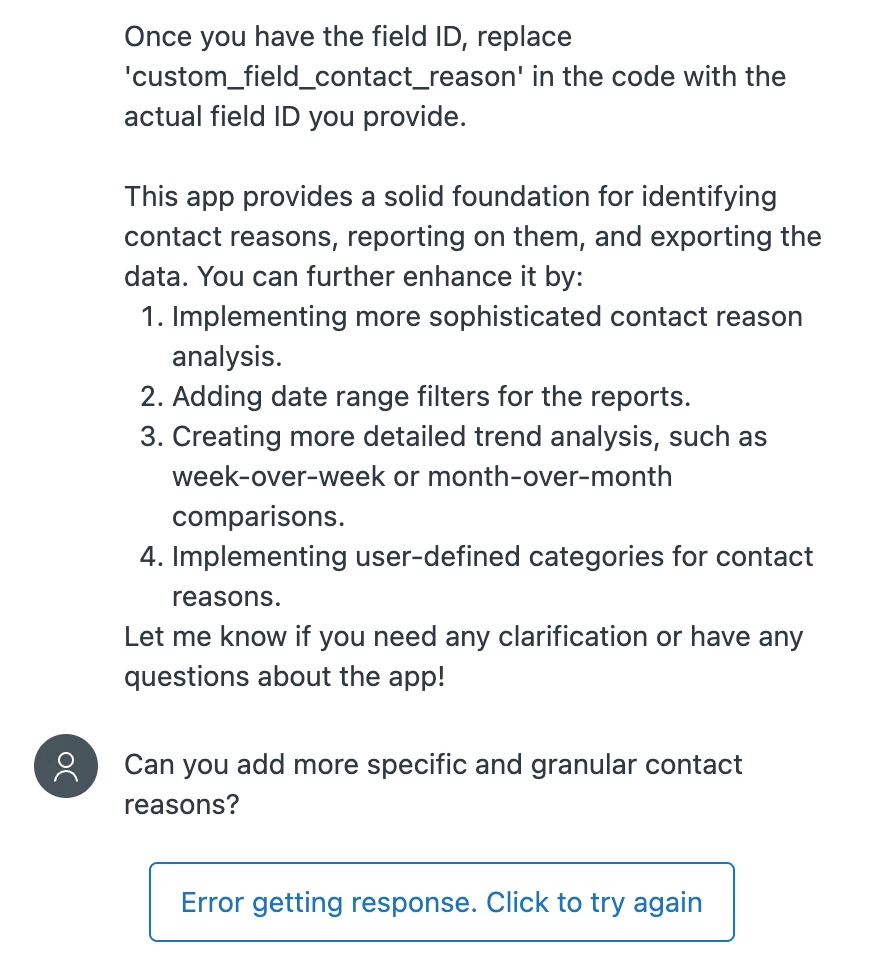
I'm trying the feature since yesterday, I intend to build an app that analyses ticket data (contact reasons).

When I add prompts to the conversation, it mostly gives me an error:


María32
  • March 18, 2025

If an app is published but then you want to add features, how can it be done?


Kate35
  • July 10, 2025

I'm currently building an app that is designed to parse selected attachments for specific types of errors etc. and display those quickly for agents to see.  The app itself seems to work great with the mock data, but when trying to use it against production data, I am consistently getting download errors, and it suggests that there are api security restrictions in place.  Looking at our API we aren't seeing anything obvious here to change.  Any assistance would be great!  I have the full conversation available if needed


  • August 6, 2025

I have a project underway with the app builder that I am having trouble refining. I am using App Builder to create a program that “listens” to field selections and conditional formatting to make adjustments. For example: Field 1 = “Food Categories”, when I select “fruits” as my answer for Field 1, I will then see Field 2 = “Fruit types”, when I select “grapes from field 2, I see Field 3 = “type of grapes” ect……. Now, If I change my value from ”fruits" in Field 1 = "Food categories" to “ vegetables”, I need the values of Field 2 and Field 3 to be set to “null”. I am close to having this finalized but I have some hang ups


Seth16
  • August 28, 2025

Not sure if the entire dev docs are in the LLM training, but the ZenDesk App Builder doesn't know proper API methods seems off.

I see the issue! The error indicates that the Zendesk App Framework (ZAF) doesn't recognize the storage keys we're using. In Zendesk apps, we need to use the proper ZAF storage API methods. Let me fix the storage implementation.

Also, I'm unsure of the intended or target user, but when things go wrong or don't work, it's not great at troubleshooting. I know to open the console logs and look for errors and that helps. 


  • September 12, 2025

Is there an official release date yet?


  • September 23, 2025

I’m currently working on developing an app that generates a weekly Jira issue summary email, sent to a designated address. The email includes all tickets with four specific custom statuses and displays the development status. In App Builder’s preview mode, the app appeared to function correctly. However, during testing, it failed to recognize the custom statuses, resulting in no tickets being retrieved. The behavior is inconsistent between the preview and test environments.


Luis36
  • October 9, 2025

I'm trying to create an app that pulls specific information from PlanHat. Initially, I started with just pulling information matching the Zendesk ticket organization and the ph's account name. I added a search option for whenever the ticket doesn't have an organization.
While testing it, the app is not pulling anything up, either using the ticket organization or the search option.

On the EAP welcome email is mentioned that you can share the conversation to add eyes to it and get help. Where can I share it?


Jennifer Yim
  • Product Manager
  • October 13, 2025

@maría32 In the case of getting that error message, you would simply click the box to have AI retry building. If an app is published but then you want to add more features, you can navigate to the conversation for the app at anytime to further refine it. 


Jennifer Yim
  • Product Manager
  • October 13, 2025

@kate35 - If you're still stuck on getting that attachment parser app to work, please submit a Z2 ticket with details on the app name, conversation ID (founda the end of the URL when on the conversation page), screenshots of the specific error messages you see, etc. Most likely, it would be due to incorrect API key credentials to access/download the PDF. 


Jennifer Yim
  • Product Manager
  • October 13, 2025

@jeff71 - Great to see this use case as we've seen some users build an app that manages dropdown fields and uses conditional formatting to show specific options based on what they previously chose. It's definitely doable in App Builder. Are you still having hangups? If so, please submit a Z2 ticket with the app name, conversation ID (found at the end of the URL when on the conversation page), screenshots of the specific error messages you see, what is working vs. not working, etc. 


Jennifer Yim
  • Product Manager
  • October 13, 2025

@seth16 Thanks for your feedback and agree with your sentiment it seems off! The team is aware of this improvement area and plans to train AI by feeding additional dev docs that are lacking today so it has all the context it needs to build the right apps. 

Although App Builder is also accessible by Zendesk employees and developers, the primary persona group is admins. Since not all admins would know to look for errors in the console logs and troubleshoot that way, one of the improvements we plan to do is surfacing error messages that are readable to admins vs. raw error status codes today. 


Kate35
  • October 13, 2025

@jennifer20 I did submit a ticket back on July 10th and it was escalated to the EAP team..I have heard nothing in response, including when I reached out to follow-up in September.


Jennifer Yim
  • Product Manager
  • October 13, 2025

@casey32 App Builder is now officially GA for all customers! Check out our social post and this quick sizzle reel — it’s fast, fun, and the perfect way to see what all the buzz is about! Customer onboarding training is coming very soon this week, and I’ll share an update here once it’s live.
 

We'd really love your feedback on the GA version of App Builder! You can share thoughts directly through the in-product feedback form or this Community forum. Thanks for being part of this exciting milestone!


Jennifer Yim
  • Product Manager
  • October 13, 2025

@kathleen11 - The behavior is supposed to be different in the preview and test environments, because AI uses mock data for a safe first look at the layout, data flow, and interactive elements (Preview is intended for your quick check on the look and feel of your app) vs. AI uses real Zendesk instance data and API responses for testing of your app with real data before deploying it (Test is intended for your testing with real data to guarantee it works before deploying it for others to use). It seems like AI is having trouble recognizing ticket's custom statuses. You can re-prompt to further clarity to AI as if clarifying for a developer on your team. I recommend clarifying it to use this API GET /api/v2/custom_statuses to get custom ticket statuses. You can find its dev doc here. If you still can't get it to work, please submit a Z2 ticket with error-specific details and screenshots. Thanks!


Jennifer Yim
  • Product Manager
  • October 13, 2025

@luis36 If you're still really stuck, you can share the conversation and all the error-specific details by submitting a Z2 ticket. Z2 ticket is our best recommended route for reporting any bugs - thank you!