
Allow requestors to add emails to be CC'd on their support form request | The place for Zendesk users to come together and share
Skip to main content
Parked

Allow requestors to add emails to be CC'd on their support form request

Related products:Support
  • January 10, 2022
  • 18 replies
  • 139 views

Lisa17

We have clients that need to include other members of their team in their requests. We could have them just email the emails we created, but then we do not collect all of the information we would like to from our forms to avoid back and forth questioning.


I do not see a way to add a ticket field that allows them to cc additional people to their request?

I would like to enter a request for this feature. Or if anyone has suggestions on how to do this with the ticket form that would be greatly appreciated!

18 replies

ZZ59
  • January 18, 2022

Lisa

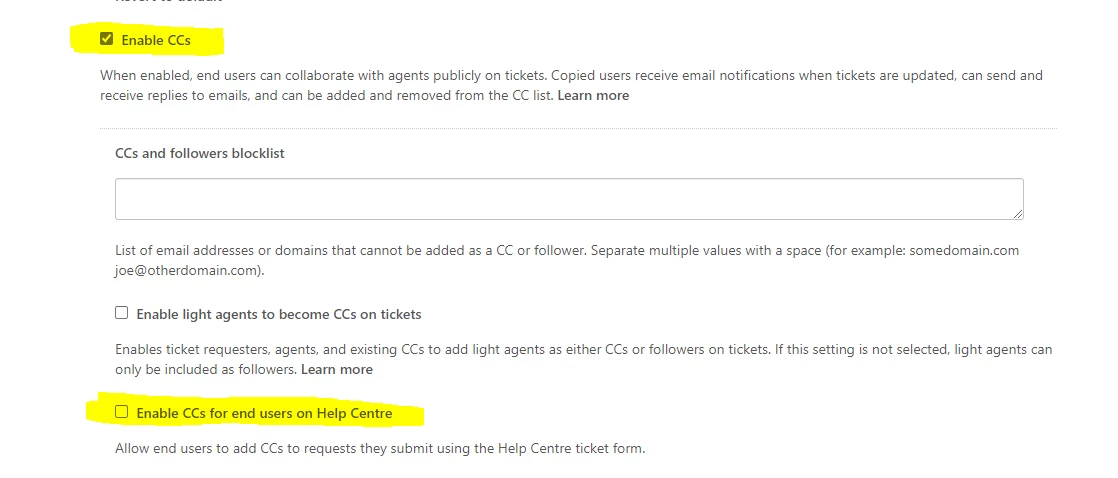
Just checking that I understand your request. There is an option within the ticket setting to allow end users to CC from the help centre.

Hope that helps.


Lisa17
  • Author
  • January 18, 2022

Thank you @zz59 that was very helpful! When I was trying to search for this feature in the Zendesk Help Center I could not find it.

Is there an additional step that needs to be taken after checking that box? I checked it and saved it, but when I checked our form there still is not a field for end-users to CC someone on the form?


ZZ59
  • January 18, 2022

Lisa

if you assume the identity of an end user then visit your help centre, that should confirm that the field is present. 


Lisa17
  • Author
  • January 20, 2022

Hi @zz59. I went to our submit form on an incognito browser, not logged in, just like an end-user would and the field is not there. Here is a link to our form: https://crowdblink.zendesk.com/hc/en-us/requests/new


ZZ59
  • January 20, 2022

Lisa

Are you on a trial account? This feature is not available on trials.


Lisa17
  • Author
  • January 20, 2022

@zz59 No, we have been on a Professional Zendesk Suite membership for a few months now.


ZZ59
  • January 21, 2022

Lisa

I am really sorry, but I am not sure why that would be.

I would not expect to see the CC field added to the available options when editing your form. It is not a filed that you can move around like the others.

But when I change the ticket settings to enable CC for end users, it appears on the help centre.

You may have to refresh your browser before assuming the end user's identity. Or just log out of Zendesk, close your browser, then log back in, then assume the identiy.


Lisa17
  • Author
  • January 21, 2022

@zz59 I am accessing the form on an incognito browser so it's not cached. Can you please have someone else assist me? There is clearly an issue here that needs to be resolved, please.


ZZ59
  • January 21, 2022

Lisa

One more thing. The end user has to be signed into your Zendesk to see the CC field.

When I preview the Help Centre as an Anonymous user, the CC field is not visible.

When I preview as an End User, it is visible.

Does that help?


Lisa17
  • Author
  • January 24, 2022

@zz59 yes that detail helps.


  • November 14, 2022

Is there a way to show CC field on the web form for non logged in users?


  • November 17, 2022

Why do users have to be logged in to show the CC fields on forms? Please change this so anyone can cc using the forms.


  • Employee
  • December 23, 2022
Hi Ricardo,

Sadly, only signed-in users that have been added in your account can add CCs:

For reference, please see this article: Configuring CC permissions and notifications
 
I hope this helps in understanding. Please, let me know if I can assist further!
 

  • May 19, 2023

How can I turn on auto-complete feature on for CCs field where email addresses that are used before can be auto populated?

End users now have to manually enter full email address in CC section. It would be great if the auto complete feature is on so users just have to select the email address from the suggestions displayed, like in outlook.


  • May 19, 2023

Please update so that you don't have to be logged in to add CCs.


  • January 21, 2025

@gabriel32 @zz59 Is there any update to having the CC field available for nonsigned in users? Also, what is the reason behind not allowing non-signed in users to add a CC? 

Our requests often need the account executive CC'd on them to help manage and track their account requests but if they can't be added that means our agents have to manually identify and add them to the ticket. 


Workvivo
  • February 17, 2025

Plus one on this. It's very limiting if users have to be signed in in order to CC a colleague. Our Help Center is public and will remain public long term. Thank you


Matthew14
  • Newcomer
  • November 12, 2025

We have a separate group that handles general support that are not Zendesk agents, and that generally don't assist customers that would use our help center. When the other group creates tickets, they need the ticket to list the actual end user as the requester, but they may need to check back in on the ticket. Setting them up as CCs would allow for this. 


However, they cannot submit the ticket OBO the customer if they're signed in (it automatically lists them as the requester), and CC'ing the end user doesn't make much sense.


We also have instances where multiple people are working on an issue (ie negotiating a contract) where CC's are necessary. However, those users aren't able to CC their colleagues - they need to be added later.


Allowing for non-auth users to submit a ticket while including CCs would solve both of these issues and allow our L1 support to follow up on tickets, and simplify customers working on an issue while including their colleagues from the start.
