Add option to copy email address to user's email address dropdown | The place for Zendesk users to come together and share
Skip to main content
Parked

Add option to copy email address to user's email address dropdown

Related products:Support
  • January 14, 2019
  • 14 replies
  • 26 views

It would be really nice (and simple to implement) to add an option on the dropdown on a user's email address (Send Email, Edit Email, Make Primary, etc.) to copy the email address. There are times we need the address to send an email not through ZD (scheduling a meeting for example) and it's cumbersome to either start an email just to copy and close, or edit the email just to copy and hopefully not accidently change. 

A drop down option of "Copy Address" would be awesome. 

Thx,

-W

14 replies

Nicole17
  • Employee
  • January 14, 2019

Thanks for the feedback, Walden. Can you give us an example from your workflow of when and how you would use this?


  • Author
  • January 15, 2019

Really whenever we need to copy the email address for a user. I just did it to schedule a Zoom meeting with someone. Yes, I know there's Zoom integration in ZD, but that's just an example.

This is a simple to implement addition of "Copy Email" to the dropdown that would eliminate several otherwise cumbersome steps. 


  • January 18, 2019

Same here! We use a database system that we need to copy the email address from Zendesk User to then paste in our our database system to locate their account.


Dan Cooper
  • Contributor
  • July 12, 2019

I would love to see this.  I regularly edit/copy email addresses in order to get an email address off of a user profile.

It looks like there are two places (customer context & user data app) where this is available, but I'd love to see it in more places like the requester address.


  • July 27, 2020

This would be incredibly helpful - I very often attempt and fail(!) to copy the ticket requester's email address to the clipboard in order to paste into other systems (e.g. check subscription status, check user account profile, paste into customer ops tools etc.). Right now, it's very fiddly indeed.


Jeremy20
  • April 26, 2021

Agree. The ability to copy the email address would be wonderful. The email address for a user is too buried currently in the ticket flow.


  • July 18, 2022

I assume this still hasn't been implemented because I can't figure out how to do it. I have to copy email addresses to paste in our order management system all the time and I can't find a way to do this. Seems very odd.


Marijn11
  • September 8, 2022

We would love this too. Now we have to do 4 clicks to get to copy the email address.


Martin18
  • January 28, 2023

Ok, it looks like with the new agent workspace, user E-Mail adresses in tickets are not visible anymore? Can we get them back please?


  • January 30, 2023

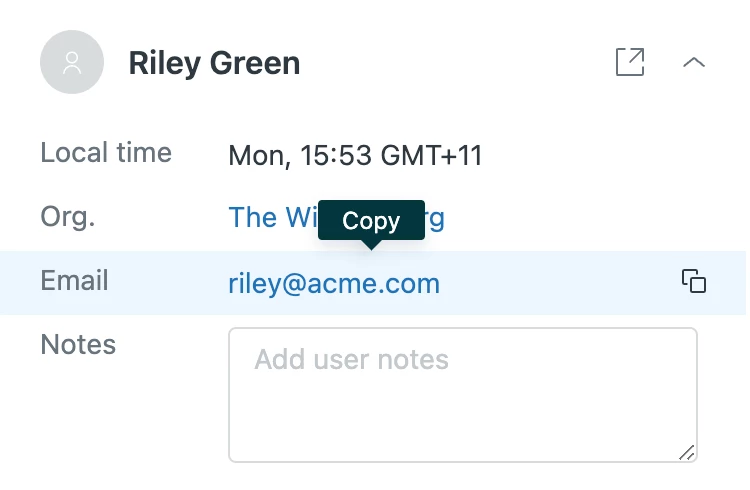
@martin18 - I think it's there: check the User tab at the top right when viewing a ticket. If you point your mouse at the email address, there's a copy button shown.


Martin18
  • January 30, 2023

Thanks @stephen54!


Anne17
  • Employee
  • January 31, 2023
Hi Martin,

you can copy it from the user's profile which can be easily accessed from the ticket.


While having the ticket open, you can then copy and paste the address from the profile.


Matthias16
  • February 9, 2023

I can quickly and unambiguously assign my existing customers to their accounts based on their email address. Copying is extremely helpful for quickly finding them in my database and resolving their issue.

The current method through the user profile is possible, but it can be improved.


  • Product Manager
  • March 18, 2024

Hey folks, James here from the Zendesk Product Team

Thank you for taking the time to provide us with this feedback. I apologize for the delay on our end in providing you with a response to your feature request.

While it is not entirely user friendly, nor discoverable, double clicking on the email address on the user profile and copying, will copy the entire email, even if it appears to be truncated. 

Something more user friendly, the Customer Context panel on the Ticket does provide a copy email feature. Simply hover over the email address, and click the copy icon (two overlapping squares). 

I appreciate that the original post referred to the user profile page, so for the time being, I'm going to mark this post as “not planned”, but leave it open for further comments and upvotes.

Please let me know if this solves your workflow, and thank you again for your feedback and for being a valuable customer with Zendesk.