



Quick guide:
Welcome to Zendesk product feedback
Your space to share feedback, influence our roadmap, and help shape the products your team uses every day.
You can suggest improvements, support others’ feedback, and follow progress. Your input helps our product teams understand real needs and prioritize what to build next.
What can you do with Zendesk product feedback?
- Submit new feature requests
- Share feedback on existing posts
- Upvote feedback you believe in
- Add use cases to strengthen requests
- Track the status of feedback from submission to delivery
Every piece of feedback is reviewed and recorded, even if it doesn’t make it into development.
How to get involved
- Log in to participate. You can browse feedback without signing in, but to post, comment, or vote, you’ll need to log in.
- Search before you post. Many posts come in each month. Use the search bar, browse by product, or check tags to avoid duplicates. Staying in existing threads helps gather support and keeps the community organized.
- Support ideas by upvoting. Upvotes help guide our teams to the most impactful requests. Instead of posting “+1”, please upvote and add details on your specific use case.
You can upvote once per feedback post and remove your vote anytime.
Submitting a new feature request
If your feedback doesn’t already exist, here’s how to submit it:
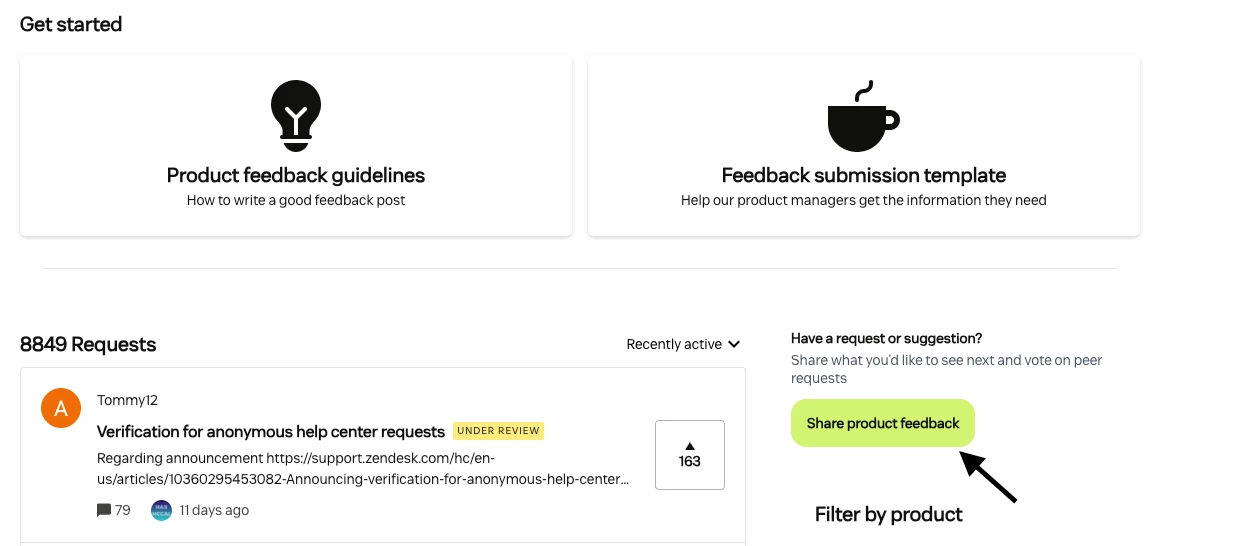
- Click “Create a post” in the top-right navigation bar, or “Share product feedback” on the Product feedback landing page (make sure you’re logged in).
-
- Fill out all required fields. This structured format helps our Product Managers understand and review your request clearly.

Writing strong feedback
Focus on the problem and its impact, rather than just the solution. Answer these briefly:
- What is your request? Who does it affect in your organization? (2–3 sentences)
- What problem would this solve? (1–2 sentences)
- When did this issue last affect you? How often does it happen, and what impact does it have on your work? (3–4 sentences)
- Are you using any workarounds? If yes, explain briefly. (1–2 sentences)
- What would your ideal solution look like? (1–2 sentences)
Feel free to add screenshots, examples, diagrams, or links. The more context you share, the easier it is to evaluate your feedback.
Track your feedback’s progress by its status:
You can track where your idea stands by its status:
- Feedback submitted: Your feedback is new and awaiting review.
- Under review: A product manager is evaluating it.
- Accepted: The feedback is being considered for development. This doesn’t guarantee it will be built.
- In early access: The feature is available to test for a limited group.
- Parked: The feedback is valid but not a current priority.
- Delivered: The feature is live and available.
- Existing functionality: The request can be fulfilled with current features.
Stay informed with notifications
You can subscribe to your feedback requests or any others you care about. Subscriptions notify you of status changes or product team updates.
Keep it respectful and constructive
We welcome honest, helpful feedback. Please be professional and kind. Disrespectful or personal remarks about our employees, partners, or community members won’t be allowed. Your voice is strongest when it’s constructive and clear. See our Community guidelines [link] and Code of Conduct [link] for more information.
Bug reports belong elsewhere
If you encounter a bug or technical problem, contact Zendesk Customer Support. The product feedback space is for feature requests and improvements, not support cases.
What to expect
All feedback posts are read and logged by our Product Managers. However:
- Not every post will get a reply.
- Submission doesn’t guarantee the feature will be built.
- We don’t share specific release dates.
- Status updates aim to align with our quarterly roadmap planning.
Feedback with no activity for six months may be archived, but they remain visible internally and can reappear if interest grows.
Characteristics of great feedback
The most helpful feedback posts:
- Define the problem clearly
- Explain the impact on your business
- Provide real examples and measurable effects (like time saved or productivity gains)
- Avoid vague or wish-list language
- Present a clear outcome focused on solving the problem
Think of your suggestions as strong business cases, not just a feature request.
Thank you for shaping Zendesk with your feedback. By posting, upvoting, and sharing use cases, you help us build better products that serve your teams and customers well. We appreciate your partnership and look forward to hearing from you.