

Guide Tip: Category page with (conditionally) expandable section lists
Hi again! I wanted to make some changes to our category pages.. there are several sections where Zendesk provides a "See all N articles" link when the full list is only 2 or 3 articles longer. I dislike getting shuffled off to another page just to see their titles. Even worse is when there's only 1 more article and it could have just been listed where the "See all..." link is! So let's change all that with some JavaScript. :-D
My help centre has one particularly enormous section, so there's also a size limit on this which you can change to suit your tastes. Depending on your CSS, it'll look something like this:
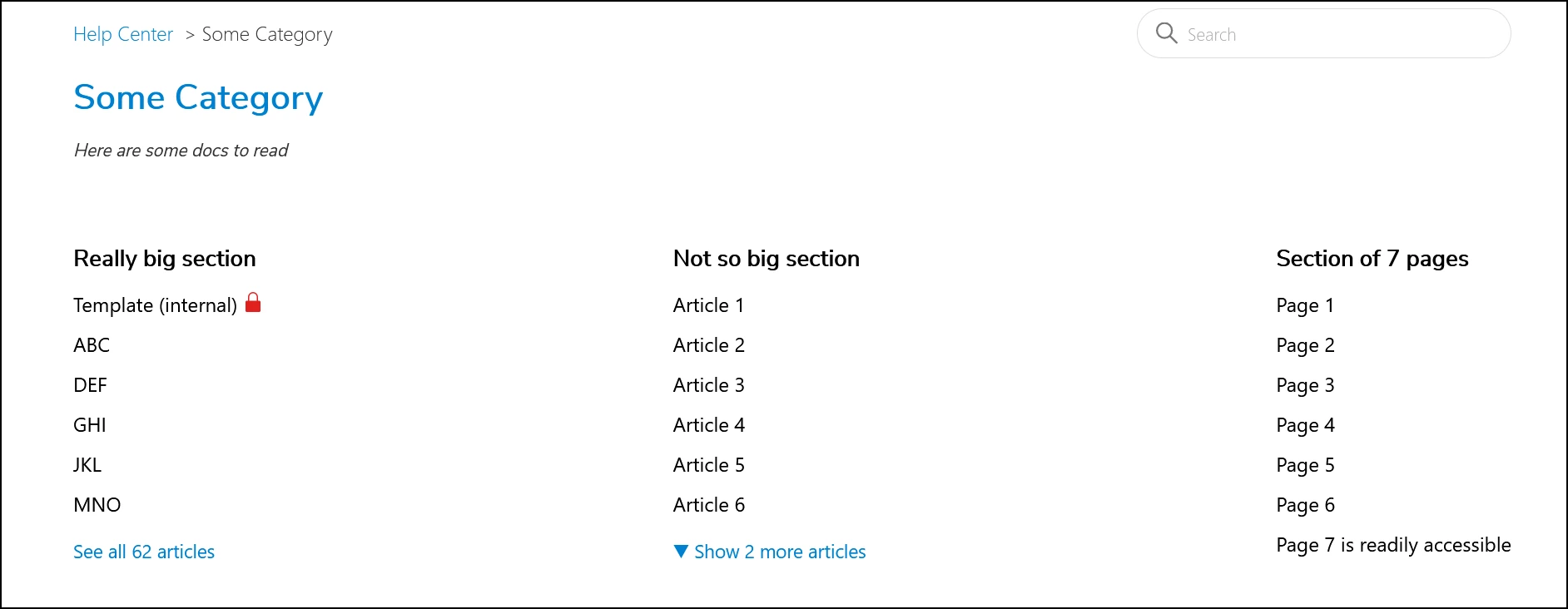
And here's the magic to add to your 'script.js' file:
// Zendesk Guide category pages with expandable listings
// author: Ashleigh Rentz, koresoftware.com
// license: https://mit-license.org/

window.onload = function() {
  expandCategoryPage();
};

function expandCategoryPage() {
  // Only execute this if we're on a category page.
  if (document.getElementsByClassName("category-content")[0] == null) return;

  const max_size_to_expand = 12;  // Fall back to normal behaviour if larger.
  const default_quantity = 6;  // Zendesk default, unsure if it can be changed.

  // Find the "See all N articles" links to (potentially) expand.
  const see_all_array = document.getElementsByClassName("see-all-articles");
  for (let i = 0; i < see_all_array.length; i++) {
    var number_articles = see_all_array[i].innerText;
    number_articles = parseInt(number_articles.match(/[0-9]+/));
    if (number_articles <= max_size_to_expand) {
      // Change text ASAP (\u25BC is unicode down-pointing triangle).
      if ((number_articles - default_quantity) > 1) {
        see_all_array[i].innerText = '\u25BC Show ' +
          (number_articles - default_quantity) + ' more articles';
      } else see_all_array[i].innerText = '';
      expandThisSection(see_all_array[i]);
    }
  };
  return;

  async function expandThisSection(section_link_element) {
    // Fetch the section page and create a list of <li>'s to add.
    var section_page_response = await
        fetch(section_link_element.getAttribute('href'));
    var section_page_contents = new DOMParser().parseFromString(
          await section_page_response.text(), 'text/html');
    var article_list = section_page_contents.body.getElementsByClassName(
          'article-list-item');
    var articles_to_add = [];
    for (let i = default_quantity; i < article_list.length; i++)
        articles_to_add.push(article_list[i]);

    // Get the <ul> for this section on the category page.
    var list_element = section_link_element.previousElementSibling;
    // Make sure it's the right thing, bail out if not.
    if ((list_element.tagName !== 'UL') ||
        (!(list_element.classList.contains('article-list')))) return;

    // Insert the article(s).
    if (articles_to_add.length == 1) {
      // Insert the final article into the list, no expandable needed
      list_element.append(articles_to_add[0]);
      // Remove the 'see all' link.
      section_link_element.remove();
    } else {
      // Insert more articles into the list as a hidden element in the DOM.
      for (let i = 0; i < articles_to_add.length; i++) {
        list_element.append(articles_to_add[i]);
        list_element.lastElementChild.classList.add(
            'collapsible-article-list-item');
        list_element.lastElementChild.setAttribute('hidden', true);
      };
      // Change link action and assign a class for optional CSS styling.
      section_link_element.classList.add('collapsible-article-list-control');
      section_link_element.addEventListener('click',
          function(){showMoreArticles(list_element, section_link_element)});
      section_link_element.removeAttribute('href');
    };
  };  // end expandThisSection()

  function showMoreArticles(list_element, section_link_element) {
    for (let i = 0; i < list_element.children.length; i++) {
      list_element.children[i].removeAttribute('hidden');
    };
    section_link_element.remove();
  };

};  // end expandCategoryPage()
Again, I'm not a developer by trade, so there are probably ways to improve this. But it works great for me and I hope someone else out there finds it useful! :)