Ability to set Requester:Organization from Triggers | The place for Zendesk users to come together and share
Skip to main content
Accepted

Ability to set Requester:Organization from Triggers

Related products:Support
  • June 16, 2015
  • 52 replies
  • 61 views

When a customer emails in for the first time, it would be really useful to have a Trigger set the "Requester:Organization"...With multiple email addresses configured in ZD, this gives me the ability to automatically associate an end-user to an Organization based on where they sent their email to.

I can create a custom field and have that set, but I can't set the Requester's Organization....making the built-in Organization field useless to me.

 

52 replies

  • November 17, 2015

The ability to set customer tag or organization by macro, trigger, or automation is badly needed.  


  • Employee
  • November 18, 2015

Hi all,

I'm curious to hear your use cases. What do organizations represent in each of your Zendesks? Why do you need to change the organization on a ticket? I'd love to hear more about this.

Best,
Erin


  • November 19, 2015

1) A customer attempts to purchase our product, but the purchase fails for some reason. Perhaps they didn't enter the CVC code, or there's an issue with VAT validation, or PayPal keys, etc. So we generate an email that triggers into a ticket.  

If we could assign the customer to a "failed order" organization or tag, we could send an auto-response, and then keep from sending additional auto-responses for customers who are already in that org/tag (because invariably customers will keep trying to purchase, and we don't want to repeatedly spam them with the auto responder).

2) It's helpful to know who's on trial and who has purchased the product, tracked via tag or organization, so that we can route the tickets to the appropriate agent. Trial users usually have simpler questions, but they need more immediate attention, while existing customers typically have advanced setup questions that can wait a bit longer.

Additionally, our auto-responders can be more accurately tuned... trial users would receive auto-responders with purchasing FAQs, while existing customers would receive auto-responders that cover post-purchasing issues, such as lost license keys, adding a license to their account, etc.

3) We have a "pay-per-incident" model, and we would like to offer up packages of, say 3 support incidents, for $30. We would like to use macros/triggers/automations to track and modify the number of valid incidents remaining, and if zero, send auto-responders with information on how to purchase more incidents.

Alternatively, we could offer a one year subscription for support, tracked via a users tag or org, so that tickets are routed to the appropriate agent, or to an offer to purchase a support contract.

Additionally, this tag would be used to set priority, as customers paying for priority support deserve more immediate assistance.

4) When refunding a customer, we would like a trigger to add them to the "refunded" organization or tag, so that we can route future requests appropriately and prevent our system from spamming them.

To conclude, we need to know that "state" of the customer in org or tag (trial, paid, refunded, priority incident, VIP, etc.), so that we can properly route their requests and/or auto-respond using macros, triggers, and automations.


  • Author
  • December 2, 2015

We offer many different services and support requests come in through different email addresses.  When a support request comes in via email, having it automatically assigned to the appropriate organization make assigning, tracking and reporting much better.

For example, 1 thing we do it provide maintenance support for property management companies...their tenants call (or emial) us when they need something fixed.  We have different organizations setup for each property management company we provide maintenance for.  Their tenants have a specific email to email their request to also (maint@companya, maint@companyb, maint@companyc, etc)....automatically assigning the inbound ticket to the appropriate organization based on where the email was sent to is required.


Thanks for looking at this request!


  • August 5, 2016

As a government support organization, we have internal end-users (employees) and external end-users (the public).  We have different SLA expectations for each group.

We know the email domain of our internal users, so it was easy to set up an organization for them.  

But I'd like the ability to default all of our external users (who use a multitude of email addresses) to a separate organization.  Basically, if an new ticket is originated from any email address that is NOT our own domain, I'd like it to default to the non-employee organization.

Maybe this is already possible, and I just don't know how?


  • January 18, 2017

We support dozens of web sites and the ability to add an email requester to an organization based on the support email address they've sent their request to would be incredibly helpful.


  • May 8, 2017

Please please add this feature. Our team use ZD as internal ticketing system. Employees (past and present) and new hires will send in tickets with regards to their questions. It will help out our data collection to be so much cleaner if we can set organization from a trigger. 


  • June 24, 2017

Very much echoing the above our main interest would be to give a user an organisation based on the email address that their request comes in on.  This would allow us to direct and order the enquiry in the best way.  Right now we have to manually select an organisation based on where the email comes from.

As a secondary feature we also use custom fields in an organisation to populate fields within a macro. 

This gives us the benefit of having one macro that can populate fields based on the organisation (and what we have in those organisation custom fields- which are different company names, website and phone number )  One such macro is the agent signature.  We have one signature macro that signs off based on the organisation on the end user file.  

Any questions around this please let me know as it would be great to have this feature saving us repeating what is currently a manual task. 


  • November 1, 2017

More importantly, why can you NOT do this? What is the reason Zendesk is restricting this access?  

There are an absurd number of places we must write, call, and host scripts because Zendesk doesn't have a basic option built in along side other basic options in Triggers and automations in particular.  


  • November 21, 2017

Hey Guys,

This feature would be super handy. Not having some kind of 'automated way' of adding Requestors to an existing Org or creating a new Org if one doesn't exist makes a housekeeping nightmare.

Is this on your roadmap yet?

Appreciate any info,

Darren ;-)


  • December 29, 2017

Our company is badly missing this feature also.


Nicole17
  • Employee
  • January 2, 2018


Hi all - 

Can you share some additional details on your use case and why this is a needed feature? 

It's not currently on the roadmap that we are aware of, but your detailed comments help our product teams to prioritize things. Thanks as always for your feedback!


  • January 2, 2018

Hi @Nicole!

We have clients that use a setup with dozens of email channels.  Each of their customers has a specific email address they use to communicate, and therefore anyone using that email channel should be put into that customer organization.  This would allow bucketing of these customers regardless of whether they use their official company domain name or if they use their Gmail account when asking for help.

Another use case is for events.  If you setup an email channel for the January Club Meeting (making this up), then anyone associated could be put into an organization based on using that email address to send in a request. 

BUT, more important, why isn't it an option?  Zendesk shouldn't really be restricting how I can do things unless it is a problem that they are done that way.  Grouping users into organizations has no bearing on the ability to provide support, and doesn't make other options in Zendesk not function as expected, so why not make it available?  The level of effort to provide it is minimal.

This extends to other features like being able to check the Subject of an email for certain keywords.  Many of our clients used this option and their Triggers were rendered inoperable with no other option to accomplish the same thing.  Instead they have to build expensive and error prone scripts outside of Zendesk using the API to accomplish what should be simple and rule based within the interface.  


  • January 3, 2018

We still really need this feature as this is a consistent manual task for us. 

The email channel dictates where the customer found us and in particular for us dictates their geographical area.  Their geographical area dictates their pricing. 

We would use this feature to instantly assign an organisation to depending on where they sent the email. 

We also run lists based off of organisation.  I will not hide that as this is currently a manual task that sometimes the organisation is missed which leaves people out of our mailchimp lists and can also result in miscommunication around pricing due to the channel they used. 


  • January 4, 2018

We support dozens of web sites and the ability to add an email requester to an organization based on the support email address they've sent their request to would be incredibly helpful.

Many of these web site are consumer facing rather than client facing so the ability to add a requester by their own email domain is not an option however, if they email into our support address for a specific web site we need to be able to add them to that specific org.


  • April 9, 2018

We also would very much like to be able to set the Requester:Organization based on triggers. Currently, requesters can only be tied to organizations based on their email domain. However, many of our organizations have branded help centers. The requesters that submit tickets through a branded help center do not always have email addresses with the domain of that organization, but those requesters' tickets should still be part of that organization.

We would like to be able to setup a trigger that adds a requester to a organization if they submit a ticket through a specific brand. Currently this is not possible and there does not appear to be a way to automate this functionality.


  • August 22, 2018

For my use case, I have a tool that monitors resources for all of my customers.  When it sends an alert, it always comes from the same email address, no matter what the customer is, rendering setting the organization by email impossible. 

So, to have the ticket listed under the proper organization we need to be able to set up a trigger to associate a ticket to an organization by having the requester be an end user (the user I set up with the email address for the generic user), then use the customer name from the subject line, to set the organization for the specific customer.  

This is currently not possible because 1) a Requester can be an end user (what?!), and 2) there is no way to set the organization with the current trigger rules.


  • August 23, 2018

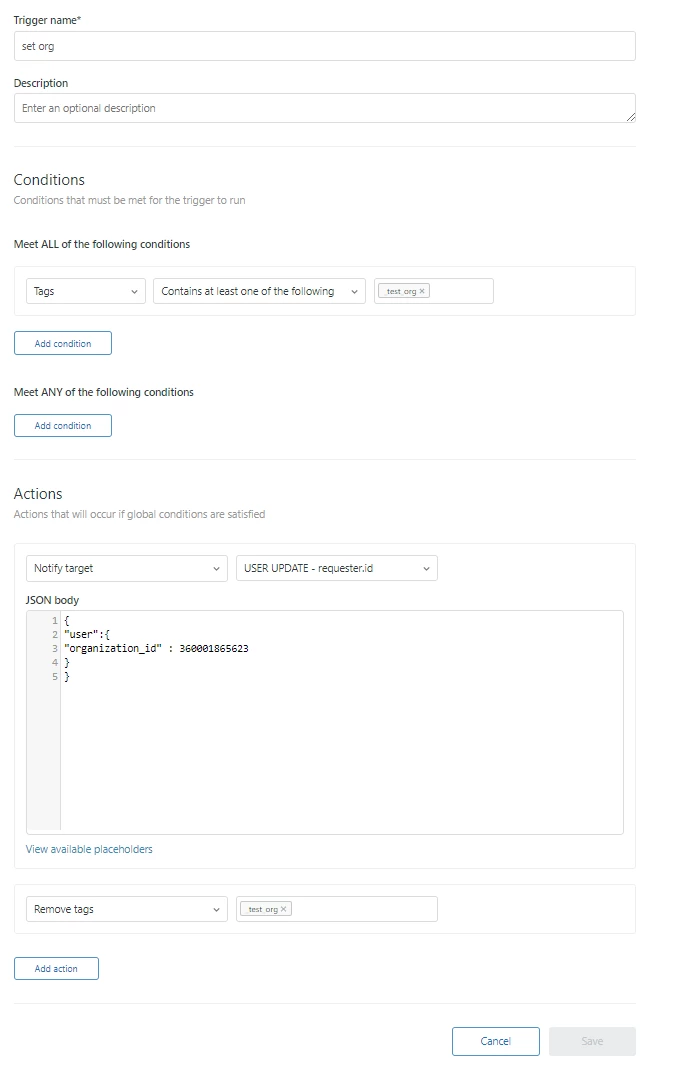
You can use an HTTP target to accomplish this provided you can set the condition properly to fire a trigger.  I assume that based on brand / form or other requester level attribute etc you can set a tag that can be used for the correct condition to fire the trigger. 

If you have an existing HTTP Target for .../api/v2/users/{{ticket.requester.id}}.json then you can simply call that, otherwise you will want to create a new one by going to Extensions / Add Target / HTTP target

Name: whatever you want to call it, i.e. "Update Requester"

Url: https://your-zendesk-domain.com/api/v2/users/{{ticket.requester.id}}.json

Method = Put

Content Type = JSON

Choose your authentication type for the API call and create

Next, find the organization id.  Simply go to People / Organizations and click the one you want - get the ID that is in the url, i.e. https://your-zendesk-domain.com/agent/organizations/123456789/tickets

Next, create a new trigger for updating the organization field - set the correct conditions, i.e. ticket created and tag must contain xyz etc etc.  Add the action to Notify Target - and select the appropriate target that you just created (i.e. Update Requester).  Use the below JSON body - just update the value to be the organization id you found in the above step in place of what I have listed below. 

{
"user":{
"organization_id" : 123456789
}
}

NOTE: You must be sure to have a condition that will only be met once.  As an example, one of the ALL conditions might be that Tags | Contains None of the Following | org_updated (as an example).  Then just add an action so that the trigger adds that tag after it executes the JSON. With the tag now added to that ticket the Trigger will not fire again.


  • August 23, 2018

James, thanks for the response.  This seems plausible with one exception: I don't see any action under Triggers where Organization can be set.  Are you seeing this on your end too?

Best regards,

Winston Price


  • August 24, 2018

Winston - You are correct - but that is where the HTTP Target comes into play.  As long as you can establish the correct conditions for the trigger to run on the ticket where you would like the organization to be set for that requester - then the HTTP Target and JSON code I pasted above will set the Organization.  In our instance of ZenDesk, The below trigger was something I tested successfully yesterday - the conditions are very simple for my test - just needs to contain a specific tag, so you would want to determine the right set of conditions in your use case.  But...once the condition is met - that JSON code will update the organization for that ticket requester. 


  • March 1, 2019

Hi Everyone, 

We would love to have Organization Field  an available target on a trigger as well. We have end users who belong to multiple organizations that are mainly email only users. I would like to set a trigger that, based on criteria in their description field, would route the ticket to the correct organization. 


Ie. If Comment Text contains One of the following words "NVCOM" Then->  perform action: set Organization to "Nevada Committee".

This is an issue because most of my clients are in government and like to have email documentation they can reference. They do not like using the website. So we have to manually change this every time they send in a ticket. 


Thank you. -Brian


Brett Bowser
  • Community Manager
  • March 1, 2019

Thanks for sharing your feedback and use-case Brian!

We'll be sure to pass this on to the appropriate team for consideration.

If our Product Managers have any additional questions they'll reach out :)

Cheers!


Peter11
  • March 12, 2019

Yes, I concur, this is badly needed.

Would really make manual work unnecessary in our case.


Situation: 

  • We have a customer1 who uses our application on ...
  • systems operated by a third party who also operates systems for other customers.

The employees of the third party are serving several of our customers.

They have their own company as the primary organization, as well as all of the customer's organizations as additional organizations. 

They send their tickets to customer1.support@ourdomain.com. So, we know perfectly which organization to attribute the ticket to. However, Zendesk prevents this by insisting without offering a bypass that the ticket has to be associated with the third party's organization. Hmppf.

Neither triggers, nor automations nor macros are able to help here. A real pity.

Thanks for listening!


  • March 25, 2019

Wow, we also really want this. We have a unique support number for different customers that each map to a unique Brand. We also have one Organization where all users for each customer belong to. There is currently no way to make sure all inbound call tickets are placed under the correct Organization, they are only associated with the Brand.

We really need the ability to set the Organization based on Brand. We can set Brand based on Organization via trigger, why not the other way around?


Nicole17
  • Employee
  • March 25, 2019

Thanks for the additional comments, Peter and Swaraj.