Ability to set Requester:Organization from Triggers | The place for Zendesk users to come together and share
Skip to main content
Accepted

Ability to set Requester:Organization from Triggers

Related products:Support
  • June 16, 2015
  • 52 replies
  • 61 views

Show first post

52 replies

  • April 3, 2019

This seems such a basic functionality, but is not available. Please add this functionality!


Peter11
  • May 28, 2019

I implemented the scheme outlined by James (a BIG Thank You, James) and it works flawlessly.

So, we have a solution.

Would I recommend this solution as a standard way of doing things?

For experienced sysadmins and developers, no problem at all. However, looking at Zendesk's usual clientele (and the way Zendesk is doing things at this time in Support), it just isn't a good fix - it is, in truth, an API hack that requires far more knowledge about Zendesk Support (the application) than can be expected from Zendesk's target audience.

Expanding on the thought, I perceive that there is some kind of imbalance in the currently supported trigger features: While I can query the value of organization, I cannot set it.


  • August 20, 2019

This is a feature we badly need also (set Organization based on received email address).  Our ticket reporting to customers is missing many tickets each month unless we manually go through, audit and update tickets each month which is incredibly time consuming.

The option of integration is not viable for us to do to all the third parties and systems involved in our ticketing.  We have been quoted in excess of $90k for one single integration and others have no APIs available.

We are a Managed Service provider in the Telco and IT space.

The scenarios we require being able to set the Organization based on the email address the request is being received at are as below.

1) Cloud Based Systems - We have logins to systems on behalf of our customers.  System access (Multiple systems in some cases) is provided by the customer to manage the platform on their behalf. The same few systems are managed on behalf of many customers, the only way we have to create these many accounts to the same system is to have a unique email address (therefore login) per customer.   We typically manage between 1 and 3 systems on behalf of our customers.

The email addresses such as customer1@ourdomain.com customer2@ourdomain.com

Any notifications that come from these systems are sent to the email address on the account. 

2) Third Party Providers - We have a number of third party providers that contact us on behalf of customers, sometimes multiple customers.  e.g. A customer may contract us to manage their business mobile phones and MDM Platform but have another provider for their IT (Active Directory, Email Server etc etc).  The IT provider will raise requests with us on behalf of multiple customers and the request is received from the IT providers domain.

The work around we have in place currently is that each system email address is a light agent on our account.  The user has well over 20 organizations against them. (I think there is a limit on this? so eventually we will need to figure our a new work around)

When these notifications/requests arrive in Zendesk our team need to manually select the customer on the ticket. This ensures the ticket is actioned correctly for the business rules of the specific customer.  This also in turn allows us to report correctly on the work we are doing for a specific customer.

As with all manual processes this leaves room for human error and it should be a relatively simple fix for Zendesk to implement this to save us (and others) a lot of manual work (200 + tickets per month being manually updated).


  • February 3, 2020

Thanks James, your solution for the HTTP target works perfectly.


  • February 4, 2020

I jumped the gun a little, using the HTTP trigger removed all the organisations from the user and updated the Organisation to only the last one set by the trigger.  Over 200 tickets updated to the incorrect Organisation because the tickets are being generated from a single email address for multiple customers.


The trigger would work if only one Organisation was required for the particular email address making the request but in our case we need to align just the ticket generated to the correct Organisation based on the email address it's received at, but I think I may be able to achieve this by using the below instead.

https://{subdomain}.zendesk.com/api/v2/tickets/{id}.json


  • February 4, 2020

+1


  • February 22, 2020

+1

Props to James. That was awesome. That was my introduction to Webhooks and the ability to use Zendesk API from within Zendesk to make up for what you can't already do in Zendesk. You just have to be weary of your conditions so your updates only apply when you want them to. But that was awesome.


  • February 9, 2021

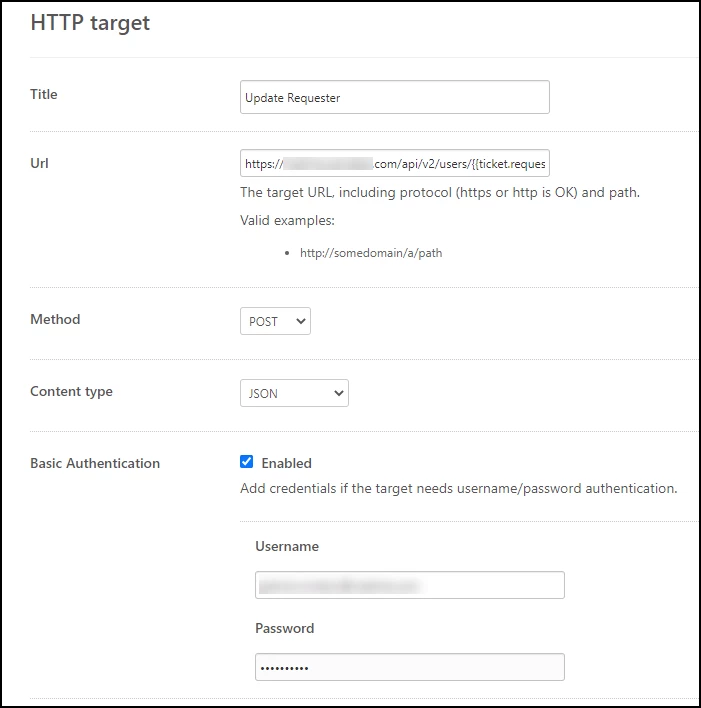
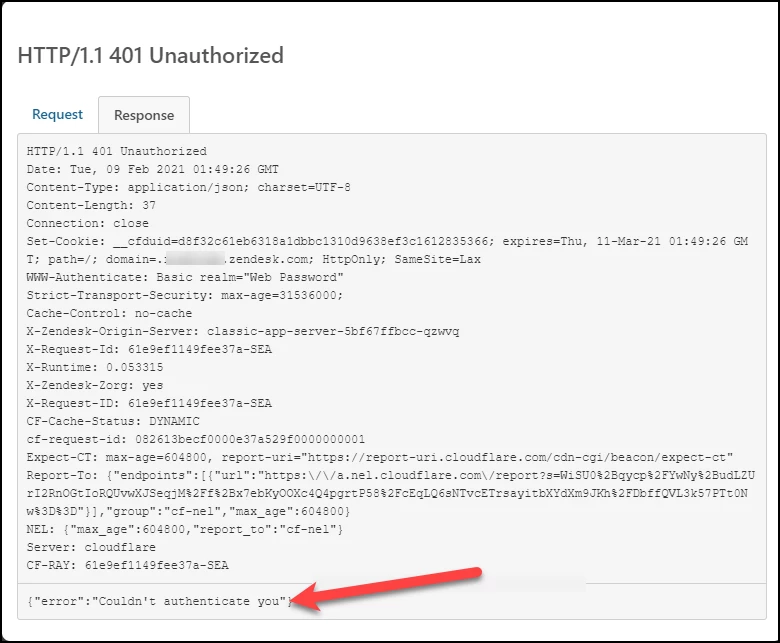
Hi can someone help me with the work-around James mentioned, I followed his instructions, but my authentication is not working properly. I am not sure what I am doing incorrect. What should I be using as Basic Authentication:

I used my username and password, but I get an error that says {"error":"Couldn't authenticate you"} 


Peter11
  • February 9, 2021

@Patrick Windsor II

You try to feed information back into your Zendesk domain, so this is a "internal" call.

I suggest that you use an API Token instead of basic auth. That makes things a bit more secure - you don't have to deposit your UID/PW in a public record (well, accessible for every admin in your account).

So, assuming that you are an admin, go to the cog (Admin), Channels, API, Settings, and click Add API token. Give your token a meaningful name, and, above all, copy and paste that API key into your password and key storage (mine is KeyPass 2) so you can retrieve it later on, as it cannot be retrieved ever after you click Save. That's part of the enhanced security I talked about above.

From the error message, it may well be that UID/PW access to the API has not been enabled - you can check that on the API Settings page as well, right at the top.

To use the token, go to your target definition - cog, Settings, Extensions, Targets) and edit your target: Add the string /token at the end of your user name, and paste the token into the password field.

Select Test target in the list box besides the Submit button, then Submit your update.

That's all.

Hope this helps.

Yours truly

Peter

P.S. Is there a specific reason why you selected, against James' advice, HTTP POST instead of HTTP PUT?
As is detailed in the API doc

https://developer.zendesk.com/rest_api/docs/support/tickets#update-ticket

You should use PUT, not POST.


Nina12
  • Employee
  • September 22, 2021

Hi all, thanks for sharing your feedback. I appreciate you highlighting this gap in the current product functionality. Whilst it's not something we're implementing at this moment in time, it's on our radar as a potential improvement as we're rethinking triggers and automations in the coming year. Thanks again for sharing - it's always helpful to understand what's top of mind for customers as we develop our roadmaps.


I'm curious if there has been any movement on this.  I am wanting to set custom organization membership based on Azure AD fields so that managers can be setup as Lite Agents and review tickets opened by their staff. 

For exampled we want end users in the marketing dept. to be auto assigned into the Corporate and Marketing Orgs.  This would allow VP's to see Corporate that includes several departments, but also allow limited granular views for the marketing manager.


Peter11
  • June 15, 2022

@michael152

<sarcasm>

This has been open only since seven (7) years.

Don't expect that kind of flash reaction from Zendesk.

As you see in the note above from September 2021, Zendesk has about another 2 or 3 months before they might consider to react to this.

</sarcasm>

Mind you, Zendesk discourages the use of triggers calling Webhooks, but in several areas, it's the only way to get some much needed functionality.

Let's hope that they think a bit out of the box, like offering some kind of simple configuration scripts, so some arguments may be gained from the ticket, requester etc. instead of just having to create one trigger per organization you want to set etc.

What I mean here is, some true if then else and/or case constructs so we can get things managed in one trigger instead of 1 per organization, for instance.

Yours truly

Peter


Another important feature which Zendesk won't implement.


  • June 28, 2022

How on earth has this not been implemented?!

We have organisation-specific services and need to offer organisation-specific support.

We use organisation-specific zendesk email addresses, and I need to set a trigger whereby:

Received at: ACME@us.zendesk.com

Set Organisation to ACME

And before someone says, setting potential domains in the organisation set-up doesn't capture all as it's common for user to email on personal rather than business email addresses.

This is such a basic requirement and it blows my mind that it doesn't exist.


  • October 19, 2022

I agree, I think this is a no brainer for Zendesk to implement. It should be doable and would meet our use case perfectly as well


  • Employee
  • November 4, 2022

Hi Everyone - 

New PM for Triggers & Automations here, catching up on the requests in the Community. It has been great to see all the feedback from you! 

I want to make sure I fully understand the use case as there is quite a bit of feedback on this thread. Is the main ask here for setting the Organization on the ticket? If so, have you tried creating a custom lookup relationship field on the ticket that points to Organization? From there you could use Received_at in the trigger condition and the custom lookup field on the ticket could be set using a trigger action. 


Traian
  • November 10, 2022

+1 we get tickets from slack, telegram, discord private groups/channels and need the ability to set the right Org in the trigger that matches the specific channel.


Sebastian13

This is needed. Especially since tickets from members without organization open without having an organization but as soon as a user has one or two organizations the choice drop down appears and there is no way to not assign the ticket to an orga. Also no trigger to unassign or assign it to a standard orga, which does not even appear in the organ choice dropdown once a user is part of an orga.


Damien11
  • October 9, 2023

It's absurd that it's still not possible to automatically add users in organisation using triggers.

Basic condition...

Let's say I want to add French customer in FR organisation based on their language.

This is currently not possible...

I have to create a http target or something else...


Sebastian13

A trigger that can have email addresses as condition could help us as well.

But the worst thing so far is that unexpectedly it does not even work out of the box to add users to an organization based on their email domain.

For example, for requests from a certain government organization, we know the domain name. But we don't know who will contact us. So we setup an organization that will add all end users creating a ticket with us and having this TLD to this organization.

However, we had to learn that this does only work for authenticated zendesk accounts. Which makes this functionality useless for us. Agencies do not use contact forms, they write an email. They can't be verified if the person writing to us just wrote an email. And we can't handle such a request special when it can't be recognized because it was not added to the organization.

That's a rather big flaw and counter intuitive. Customers should be able to decide on their own if they want to trust adding someone to an organization based on a TLD, even when unverified.


Forrest11
  • October 10, 2023

Just chiming in with others that it's baffling this isn't a feature at this point when this original post is 8 years old. With all the functionality surrounding triggers already existing I truly can't understand how the the dev team couldn't implement this in a matter of hours if not days, no matter how spaghetti the code might be behind the scenes. 


Peter11
  • October 10, 2023

Anyone wants to bet on how many more birthdays this request will receive in the comments?

10 would be nice, but I think that's just too quick to really hope for.

BTW: is the "official commenter" above still with Zendesk?
It seems impossible to @mention him.


Damien11
  • October 10, 2023

Hello, I have managed to create a webhook to automatically add a user in an organization but I can't find a way to automatically remove a user from an organization.

Has someone already managed to do it ?

Thanks


James57
  • January 8, 2025

Hi @damien11 ,

In general it should be possible to also automatically remove a user from an organization, but it does seem to be slightly more complicated.  May I ask what is the specific situation you are requiring for the removal?  Is it removing the requester from his sole organization, or is it that a user might have multiple memberships and need to just remove one of them?  I have created a tutorial for this on our Help Centre, which you can view at this link.  It is designed for removing a requester from his organization, but the template could be extended to other use cases.  Hope it can help!

Cheers ~


James57
  • January 27, 2025

We've recently added a new help centre article here explaining how to use a trigger and webhook workflow to be able to set the requester organization via trigger.   Hope it can help some folks, feedback is welcome.

Cheers ~