Community Feedback: Dashboard Builder | The place for Zendesk users to come together and share
Skip to main content
Feedback submitted

Community Feedback: Dashboard Builder

Related products:Analytics
  • March 13, 2025
  • 40 replies
  • 4 views

Walter11

Thank you for your continued engagement and feedback on our Dashboard Builder. As we work to enhance your experience, we’ve created this dedicated space for you to share your insights. 


How to Provide Feedback

Please use the template below to submit your feedback. This structure will help us categorize and address your concerns more efficiently.


Feedback Template

  1. Problem Category:
    •  New Dashboard Builder features
    •  Components missing in the Importer Tool
    •  Issues experienced while migrating a dashboard


  2. Problem Description: (Please provide a detailed description of the issue you’re experiencing or the feature you would like to see prioritized).


  3. Severity: (Please choose one of the following options)
    • Low: Minor inconvenience, no immediate impact on usage.
    • Medium: Some disruption in workflow but manageable.
    • High: Major disruption or complete inability to use key features.
    • Critical: Critical business function is impacted, immediate attention required.

Helpful Resources

To support you in transitioning smoothly to the new Dashboard and Report Builder, we’ve compiled the following resources:

We genuinely appreciate your contributions and look forward to resolving any concerns you have while enhancing your experience with our reporting tools.

Thank you for being a vital part of the Zendesk community!

Best Regards,
Walter 
40 replies

  • March 13, 2025

Problem Category:

 New Dashboard Builder features


Problem Description: 

We've tried to replicate our dashboards on the new Dashboard Builder, but we're coming up against one specific blocker that is preventing us from making the change - the inability to exclude reports from dashboard data restrictions. 


In our specific use case, we have a unique dashboard for every agent. At the moment, every agent has a dashboard which is filtered with hidden filters and bookmarks. This functionality has ostensibly been replaced with data restrictions. 


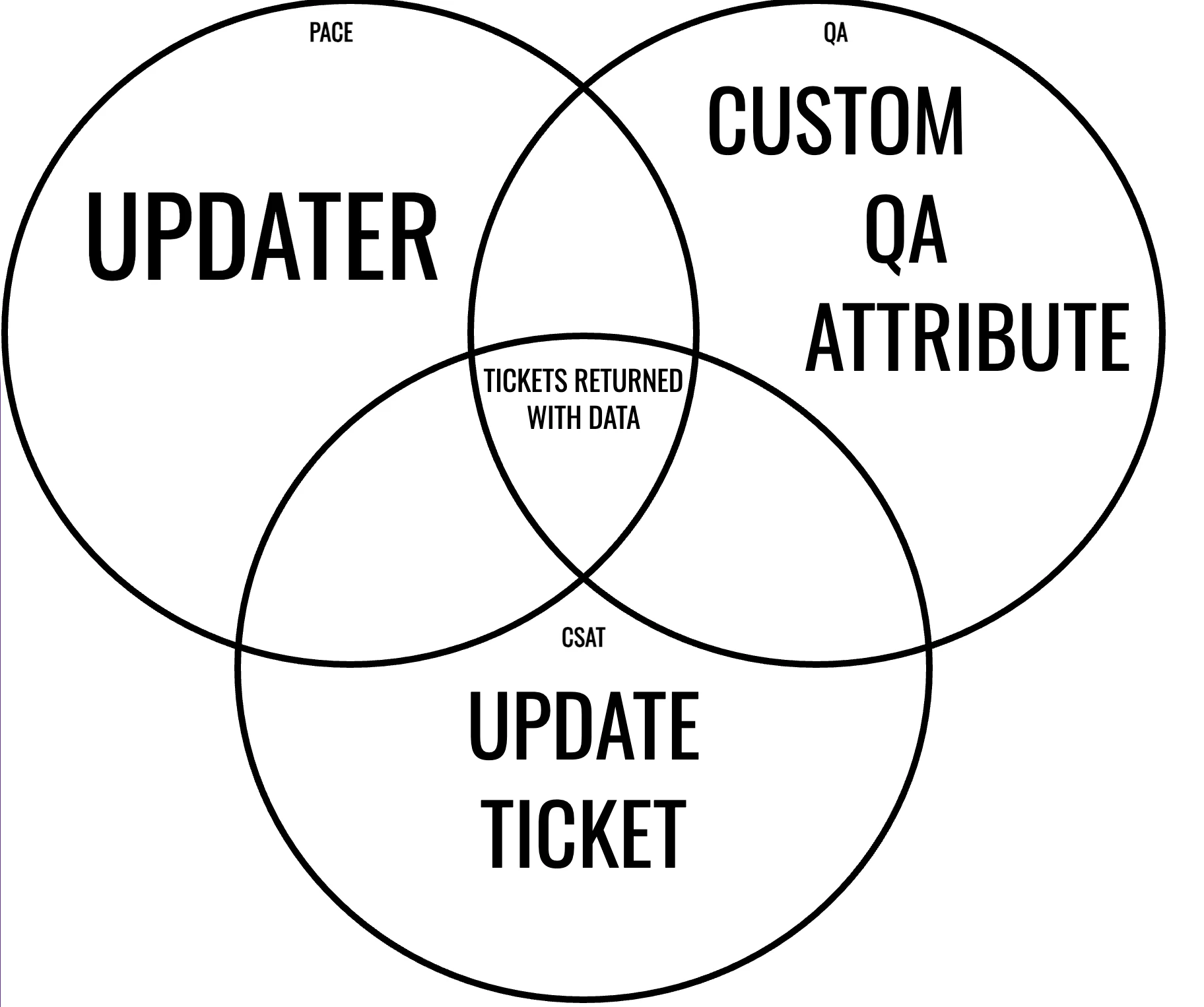
However, by mixing attributes on a dashboard, data restrictions are resulting in blank reports. Specifically, if we have a ‘Solved Tickets' report filtered by ‘Updater’ and a ‘CSAT’ report filtered by ‘Assignee’, the data restrictions will warp the data in both of these reports.


This seems like an enormous oversight and is a blocker for us when looking at migrating to the new dashboard builder. 


We either need to exclude data restrictions from individual reports or, at the very least, the ability to hide filters as in the current setup. 


Severity(Please choose one of the following options)

Critical: Critical business function is impacted, immediate attention required.


  • March 13, 2025

Category: New Dashboard Builder features
Feature: Dashboard Restrictions

- Legend Display (Severity = Low): When I have data filtered with a dashboard restriction, even if a chart updates to only show me the data for the value I have filtered for, the legend still shows all possible values from the underlying report, regardless of the filter. 
- Missing Datasets (Severity = High): Very few datasets are supported by dashboard restrictions requiring the building and maintenance of many many many many individual reports where we had previously been able to build multiple dashboards off one report. Key data sets for us personally: Knowledge Engagement, Talk, Group SLA
- Default Owner Toggle (Severity = Low): When I as a dashboard owner open a dashboard with restrictions, it defaults to the state of All Access, meaning I have to manually toggle on a filter still every time I open it, thus eliminating the convenience of pre-filtering. I would like to be able to select a default restriction.


Problem Category: Components missing in the Importer Tool

Problem Description:
Removal of the Top/Bottom functionality in the new dashboard builder significantly reduces interactive analysis.

For example, we have a custom ticket field for “Issue”. I want my dashboard to show, by default, the top 5 Issues within the selected period of time, to keep things compact, but allow the user to select the Top/Bottom N for more detailed analysis.

The fact that the report has Top/Bottom selectors is completely irrelevant, as that simply creates a static report of that size for the dashboard.  The only possible workaround with the new dashboard builder is to have a static top 5 report on the main dashboard tab then put the full issue report on its own tab to be manually analyzed.


Severity: High


Problem Category: New Dashboard Builder features


Problem Description: 

“Last 30 days” time filters on the new dashboard aren't actually “Last 30 days”. They're actually “from the day of the month last month to today”. For example, if I have a dashboard showing “Last 30 days” today, what it's actually showing is Feb 14, 2025-Mar 14, 2025.  That's 28 days, not 30. “Last 30 days” should be Feb 12, 2025-Mar 14, 2025.


This was discovered after a day of back and forth with Zendesk support trying to figure out why my custom dashboard, which is built as a subset of the stock “Zendesk Support” dashboard wasn't display the same results as the stock dashboard, using the exact same stock basic reports.


The legacy dashboard does yesterday back 30 days by default. The new dashboard does today back to the same day last month, regardless of how many days there are in the month.


We confirmed this behavior by manually setting matching date ranges in the “Zendesk Support” dashboard and my custom dashboard. For any manually-selected date range, the results matched up.

Maybe I'm weird, but I expect that an option labeled “Last 30 days" to actually do “Last 30 days”, regardless of how many days there are in the month.


Severity:  Medium


Jorge28
  • March 14, 2025
  1. Problem Category:
    •  New Dashboard Builder features


  2. Problem Description: The fact that, for instance, time filters cannot be hidden, affects the report design. For instance, let's assume we are sending reports in PDF format. There's NO NEED to display any filter there, however, the only solution we have now is to configure the time filter in any single report this dashboard has. This can be applied to any time or data filter.


  3. Severity:
    • Medium: Some disruption in workflow but manageable. It's manageable, yes, the reports generated with the new dashboard builder will provide the same information in the end, the design of the reports will look (much) worse.


  • March 17, 2025

I have only been using the new builder for a few days, and already there are so many things…

  1. Problem Category:
    •  New Dashboard Builder features


  2. Problem Description:  

    There are SO MANY features missing in the new dashboard builder. This is an incomplete list:

    - Cannot add images

    - Cannot add shapes (sometimes the only way I could format a report properly in Explore was to add my own grid lines.

    - Filters do not have a “show selected items option”. This is bonkers.

    - Cannot overlap elements on a dashboard. 

    - Can only align elements with preset grid squares. This leads to a lot of wasted space.

    - No longer have options in how filters are laid out (label above label to right, etc) This leads to a lot of wasted space

    - Cannot link filters across tabs. 

    - Cannot export a single report

    - No change metrics

    - No change attributes

    - Can't seem to remove the dataset name from reports – this is leading to A LOT of wasted space.


  3. Severity: (Please choose one of the following options)

    Basically, the whole builder is a huge step back for me. I get wanting to make something that is more intuitive for basic users, but you're making it impossible for Power users to build good dashboards.  

    HIGH: Of the issues I listed, change metrics, change attributes, filtering across tabs, not having the option to show selected items in a filter and the ability to add shapes and overlap elements are all high to Critical.

    Medium: The rest are medium.


  • March 18, 2025

Problem Category:

  • New Dashboard Builder features

Problem Description:

  1. Missing filter (severity medium): We use some of our dashboards to monitor ongoing operations.  A filter option for the "Last 24 hours" is missing. This is crucial for real-time monitoring and ensuring up-to-date data visibility.
     
  2. No images (severity low): There is no option to add images to dashboards, which limits customization and visual enhancements.
     
  3. Filters cannot be hidden (severity high): We have personal dashboards for each agent, and a global dashboard restriction is not a viable solution since it applies to all reports on a dashboard. It is currently not possible to exclude individual reports from this restriction, which makes certain use cases unachievable.

  • Newcomer
  • March 18, 2025

I like the look and feel of the new builder.  It is far more intuitive and smoother etc.  It's still really incomplete and the stream of new features being added doesn't seem like it's iterating fast enough to be complete by the date they have given us.


This is the same sentiment for the report builder.  


Shawna James
  • Community Manager
  • March 19, 2025
Thank you all for your continued feedback here! We sincerely appreciate you taking the time to share your insights. 

  • March 25, 2025

Is anything going to be done with this feedback? Conscious that time is ticking before the ‘old' dashboard editor is blocked and we simply can't migrate without some of these features. 

If you're not going to either delay the enforcement of the new dashboard builder or implement these fixes before July, we need to know so that we can mitigate against this. 


Tech15
  • April 3, 2025

Problem Category:

  •  New Dashboard Builder features

Problem Description: (Please provide a detailed description of the issue you’re experiencing or the feature you would like to see prioritized).

  • Removal of Tooltips. (Severity - MEDIUM) Tooltips played an important role in providing only the needed information in visualized reports. With this feature removed, tooltips will become cluttered as they would be without customizing them.
  • Other report settings. (Severity - HIGH) I'd be very thankful if someone would expand on this. It creates an impression that all legacy report settings will be removed. 
  • Change metric. (Severity - HIGH) This made filtering report data in the dashboard so much easier, everything could be predefined without creating additional reports. Good luck to your servers, which will be forced to hold several times more reports just because this feature will be removed.
    Let me give you an example: We have a logic for some reports to display values in different units, mostry for custom metrics, with change metric this was possible with a single report. In the new builder, every metric requires a new report and at the same time wastes our time in 2 places:
    1. Loading times - your server will become much slower because of the increased number of reports;
    2. Time spent in loading screens - duplicating a report is way slower than modifying the change metric filter.
  • Change attribute. (Severity - CRITICAL). Its absence from the GA is a blocker to us as the majority of our report's timeframe (day, week, month, quarter) is filtered with a change attribute. Currently, we cannot migrate our dashboards just to make three more copies of the same report.
  • Fonts. (Severity - LOW) Not used very often, but it helps to define more important parts from less important ones.
  • Top/Bottom. (Severity - MEDIUM) This will make all reports static without any real way to interactively filter only the relevant data.

The new builder has no useful features, it brings no real value in preparation for the full release at all. It removes all of the value that legacy builder is able to provide with its featureset.

Releasing such an empty builder shouldn't have been allowed in the first place. Each time I try to give another chance to both the “new” report and the dashboard builder, I just go back to the legacy one, as it is the only one where proper reports can be built. 

In my opinion, the new builder is miles away from going live or even into the public testing phase.


Robert17
  • April 4, 2025

Hi, I am posting some feedback after extensive use of the new Dashboard Builder. Coming from the perspective of an Explore power user, I am generally positive on the new experience, but I have concerns over missing feature parity between the legacy builder and the new builder, as well as some functional changes that are causing frustration. 


As a general comment, I think making Explore a better experience for new users is important, given the existing steep learning curve associated with the product. However, I feel like with many of the recent announcements about Explore as a whole, there is a net loss of functionality for power users who have been engaging with the platform for years (this includes the time limits on reports coming in / Dashboard Builder functionality). 

I know in my organisation we are looking at alternative platforms for reporting partly because of existing limits in Explore (both funtional and appearance related) and now with the more recent announcements, I see that happening sooner rather than later. Obviously this is disappointing because overall, I like Zendesk Explore, but also because Zendesk is expensive and Explore was advertised as a major and important component of the platform. 


Anyways, on to my essay. 


Problem Category:

New Dashboard Builder features


Problem Description: (Please provide a detailed description of the issue you’re experiencing or the feature you would like to see prioritized).

  • Filter capabilities
    • Select All / Exclude All / Exclude Selections are no longer available. This makes filtering a much more cumbersome experience than it previously was, as you need to select every option you want, as opposed to being able to select all or simply exclude a couple of options. 
    • Display Filter Options not being available slows me down when checking how I have a Dashboard setup. It also provides less visibility as to what has been selected for teams reviewing the Dashboard. 
    • Resizeable Filters - previously you could make filters smaller. On the new Dashboard Builder, filters can be increased in size, but not reduced. I have cases where I have 2 / 3 rows of fiters at the top of a Dashboard. This looks bad and makes the whole experience feel very cumbersome. 
      I would advocate for an entirely new system for adding / removing filters on a Dashboard, similar to the tabs setup (ex. toolbar on the right of a Dashboard that allows for the adding / removal of filters. This would mean no space at the top of the Dashboard is wasted on filtering. 
    • Hidden Filters - this is tied with my above comment on just changing the nature of how filters work on Dashboards. I like filtered views, but there are some filters I would prefer that people cannot change as they can disrupt the quality of data on a Dashboard (especially if you don't want to pre-filter something at a report level to keep it generic (because nobody wants 10000 reports that do the same thing with a slightly different filter…).
      With that in mind, I'd like to see a return of Hidden Filters - for fitlers I don't want people to use, I put them at the bottom of a tab with a note saying DO NOT EDIT - previously these were just hidden…
    • Date Filters are a better UI experience now, however I feel like there is a loss of control compared to what was preivously present. I would like to see the team revisit the structure of date filtering. 
    • Filter Name Changes - this in theory is fine, however I have found that sometimes I return to a Dashboard I built and changed the name of a Filter. There is no way to see what attribute the filter is actually using anymore - this can be confusing and the only method I have found that can help with this is to select a report and click on exclude filter, to remember what a filter was doing previously. 
       
  • Download individual reports - previously you could download an individual report from a Dashboard tab. Now the only option available is to download the entire tab. I see no reason why downloading an individual report shouldn't be available. 

    I saw on a related thread that the workaround would be for an Agent to edit the Dashboard > edit the Report > download from the Report Builder. In my opinion this is not a solution or a workaround for the following reasons:
    • Not all users are Full Agents with editing capabilities. 
    • Encouraging users to Edit a Dashboard is not the correct approach as this opens up the risk of making accidental changes to a Dashboard or Report. 
    • If you do choose to download via the Report Builder, the Filters on the Dashboard are not applied and in some cases the Filters may not even be setup on the Report. 
       
  • 30 Widget Limit - I am happy with a limit on the Dashboard if it improves performance (I have not seen dramatically improved performance, so I can't confirm this has really achieved that). 

    However, I have learned recently from experience that the limit includes text boxes! This limit should be for reports only, not filters / not text boxes, etc. 

    I have heard from Zendesk that data storytelling is important and as such to help make reports more easily understandable for our teams, I have been trying to add text boxes, however this is interfering with the limit of reports on the Dashboard so it feels self-defeating to include them in the limit. 

    It would be really helpful if there was a place to see on the Dashboard how many items you have left counting towards the limit to use. 
     
  • Select multiple widgets - the new drag / drop interface is easier to work with as opposed to the existing resizing individual components. However, when you want to insert a component in the middle of a Dashboard it would be nice if everything would just move down to accomadate this change. Alternatively, the ability to select multiple widgets and move them at once would be an excellent change in line with what was available on the previous Dashboard.

    Currently, I am forced to move multiple widgets individually just to accomadate a change in the middle or god forbid, near the top of the Dashboard. 
     
  • Report Customisation - at a base level, being able to disable the dataset shown on the report would be nice. I don't see a tremendous amount of value for most people to see this. 
    Maybe displaying it when editing a Dashboard would be nice, but for more users it is meaningless. 

    Other than that, hiding borders / rounded borders were nice to haves that it's disappointing to see missing now.  


Severity: (Please choose one of the following options)

  • Filter capabilities - HIGH
  • Download individual reports - MEDIUM 
  • 30 Widget limit - HIGH (just remove anything other reports counting towards the limit and this issue will be fixed)
  • Select multiple widgets - MEDIUM
  • Report customisation - LOW

  • April 4, 2025

I completely agree with Stephen! In attempting to create a simpler user experience, Zendesk removed so much functionality that it is impossible for experienced analysts to build attractive, robust dashboards.  The result is a tool that is so dumbed down that it's frustrating to use.


Previously Explore could be clunky and limited, but if you had enough experience there was almost always a workaround to accomplish what you wanted. For example, I would often layer elements over each other to get the insights and layout I needed. This is no longer possible. 


I also agree that removing the dataset name from visuals would be a an easy first step. Just by having that on every visual, it makes every dashboard seem cluttered. 


Laura38
  • April 11, 2025

Is there any update about hidden filter views?


Our current layout extensively uses the hidden bookmarks across multiple tabs, and losing this functionality or not having a workaround would be very problematic. We mainly use this to hide filters for “agent role”. We want to make sure the data shows only agent and admin numbers. We would not want viewers to have access to change this filter.


Thanks


  • April 17, 2025

Problem Category:

  •  New Dashboard Builder features

Problem Description:

"Cascade prompts" and an “exclude" option are missing from the filter settings. We often have a very long list of values (e.g., Updater name) and it is very cumbersome to go through a whole list of options in a filter to find the ones you need (e.g., the agents of a specific team). It would be much easier to filter for the team first and only display the agent names of that team in the updater name filter. It's even worse when you want to select all but one (e.g. exclude NULL). An “exclude” option is absolutely essential.


Severity: High


Tim43
  • April 29, 2025

Considering the costs of Zendesk I would have expected a leap in functionalities and usability in the new dashboard builder. But instead functionalities are taken away, it seems to me. 


Problem Category:

  •  New Dashboard Builder features

Problem Description: 

  • Report Naming in Dashboards. (Severity - low) Its no longer possible to align report names (e.g. center, left, right). Without this option it lacks “cleanliness” in the report name position. 
  • No pictures. (Severity - HIGH) The missing ability to add client logos to dashboards, makes it basically unusable for client reports. Who would deliver a dashboard (even if its just a screenshot) to a client without their (and our) logo on it? I guess nobody. 
  • Dataset and Report name visible in any report. (Severity - medium) The fact that the dataset and report name are visible in any report you add to the dashboard and cant be removed makes the dashboards ugly. Leadership already complained about this and i feel it would be an easy fix to add the functionality of removing this data. 


  • April 29, 2025

Problem Category:

  •  New Dashboard Builder features - (Missing date filter features)

Problem Description.

  • New dashboard builder date filters ignore fields where date is empty or null.
  • This is a major change to how date filters work, rendering missing data from reports where a filter is required given empty/null cannot be selected within the filter

Problem Detail:

  • Our particular use case has custom date fields which begin as empty/null, and throughout the lifecycle of the ticket will be updated to valid dates. 
  • We are required to filter on such date fields in our reports, from being able to see all records or those where date lands in a specific window.
  • Previously the ‘all history’ option included all dates AND null fields. Effectively rendering the filter as inactive.
  • The current implementation of the new dashboard builder has changed this behaviour, and as a result of having a date filter exist on a date field, anything that is null is ignored
  • There appears to be no workaround. Data is only visible when building dashboards without date filters on such fields. 
  • Potential options to resolve: 

    1) Restore an ‘all history’ option that included reporting of null values

    3) Allow users/viewers of the dashboard to toggle the filter as inactive, therefore temporarilty removing any filtering on dates, leading to tickets with dates and null entries to filter through


Severity:

  • High: Major disruption or complete inability to use key features.

Laura38
  • April 29, 2025
  1. Problem Category: HIDDEN FILTERS/BOOKMARKS-DASHBOARD LEVEL
    •  New Dashboard Builder features
    •  Issues experienced while migrating a dashboard


  2. Problem Description: (Please provide a detailed description of the issue you’re experiencing or the feature you would like to see prioritized).

    Our current layout extensively uses the hidden bookmarks across multiple tabs, and losing this functionality or not having a workaround would be very problematic. We mainly use this to hide filters for “agent role”. We want to make sure the data shows only agent and admin data. We would not want viewers to have access to change this filter.

  3. The Data Restrictions feature is not a solution for us since we are not looking to restrict data to specific users. We need to filter out specific users' data for all viewers. The only workaround provided by Zendesk support is to filter within the report level to make sure the agents won't see any end-user details. This will take a long time, taking into consideration that we have multiple dashboards to migrate(more than 30 Dashboards with more than 100 reports to update). This was a one-step process in the legacy dashboard. It would be helpful to have it back.


  4. Severity: (Please choose one of the following options)
    • High: Major disruption or complete inability to use key features.


  • April 29, 2025
  1. Problem Category: Components missing in the Importer Tool


  2. Problem Description: Change Attribute is still not available. We had been told it would be available by the end of April. It is now the end of April and it is not available. All of our dashboards make significant use of this, I cannot proceed with any imports of our existing dashboards without this feature being present as promised.


  3. Severity: Critical

  • April 29, 2025
  1. Problem Category: Components missing in the Importer Tool


  2. Problem Description: Change Attribute is still not available. It was promised by the end of April. It is the end of April now and it is not available. All of our dashboards use this, I cannot proceed with any imports until this is fixed.


  3. Severity: Critical

Jorge28
  • April 30, 2025

Problem Category: New Dashboard Builder features

Problem description: The fact that the width of the dashboard cannot be set anymore is leading to issues when customers want reports to be exported in PDF.  The table reports are affected the most. The font size has to be reduced to be able to fit all the table columns. In this example it can be observed, that the font size of the table, compared with the one of the report above is much smaller.

Severity: Medium/High (the customers that used the “legacy” dashboard builder understand this as a quality loss.


Robert17
  • May 2, 2025

Problem Category:

Dashboard Component Limits


Problem Description: 

Returning to this thread - I clearly made an oversight in my testing and have just realised that the following all count towards Dashboard components:

  • Reports
  • Text 
  • Filters (!!!!)
  • Change Attribute

I appreciate the limit is present to help with performance, but including non-report components in the 35 limit is a killer. 

  • I use some text boxes to separate data and provide notes to users. 
  • Filters are integral to building a half-decent Dashboard tab. I cannot believe these count towards the component limit. 
  • Change Attribute I have not used in it's new form, because whenever I try to use it, my browser freezes… 


Severity(Please choose one of the following options)

Critical: I can accept the limit at 35 for reports (if it actually contributes to improved performance), but I cannot accept that other components should impact this. 


Tech15
  • May 5, 2025

Update on the migration process and feedback.

The change attribute is a welcoming addition to the new builder, however, it still has much more to do to catch up with the legacy change attribute.

- First of all, it feels very slow and laggy, as soon as the change attribute options are opened, the whole browser is on the brink of crashing/freezing.

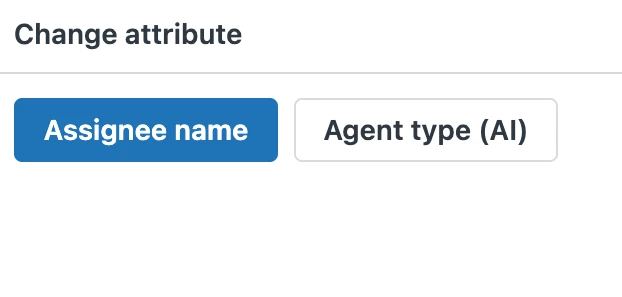
- Secondly, this feature at this moment is a downgrade to a legacy one, the reason being that there is no way to have a single attribute option like it is available in the legacy builder. We have some use cases where only one attribute has to be changed, unfortunately, this neat functionality is removed from a new change attribute. Both examples are visible in screenshots; the colored one is, of course, the legacy builder.

There is no need to display the default attribute. Having the default value visible creates even more parts to be explained to dashboard users.

Severity: MEDIUM HIGH

The change attribute settings performance Severity HIGH. It requires a lot of system resources, and as some have mentioned, crashes or freezes may happen.

The new builder is not only laggy/slow once change attribute settings are opened, but it is also very laggy when reports inside are being resized. I have never experienced such a laggy behaviour in the legacy builder. I only noticed this lagging to appear once there is already one fairly big report added to the dashboard. On one report side, it will behave fine, but as soon as the second, bigger report is added, resizing it will be laggy. Severity HIGH, advanced dashboards will be very hard to create on weaker systems because of this performance/optimization issue.


  • May 5, 2025
  1. Problem Category:
    •  New Dashboard Builder features


  2. Problem Description: Why was the ability to hide filters removed? Data restrictions isn't a fit for all use cases. For example, I have a custom attribute that is used as a filter to remove merged tickets from our reports. I understand this can be added to the various Data Restrictions we've created, but what about people who can view All data without restrictions, which often is senior leadership/execs. This means they're seeing incorrect data which causes unnecessary conversations and frustrations. The same goes for dashboards that don't have any data restrictions at all.


  3. Severity:
    • High: Major disruption or complete inability to use key features.

  • May 15, 2025

I agree with a previous poster that the change attribute is good addition, but it is extremely buggy. It can take 5+ minutes just to add a change attribute to a dashboard because clicking any setting related to change attribute causes the browser to freeze for a minute or more. Seriously? Why does ZD keep launching features that are half-baked?


Also, as an addition to my previous summary, the elimination of an “exclude” option in dashboard data filters is a major issue. If you're trying to filter a field with many values that change over time, exclude is the only viable option and yet it does not exist on the dashboard builder. 


Level = Critical. This is basic functionality and the new builder should not have been launched without it (and many other things). I still cannot believe ZD is forcing people to migrate to such an inferior and dysfunctional tool.