Community Feedback: Dashboard Builder | The place for Zendesk users to come together and share
Skip to main content
Feedback submitted

Community Feedback: Dashboard Builder

Related products:Analytics
  • March 13, 2025
  • 40 replies
  • 4 views

Show first post

40 replies

  • May 15, 2025
  1. Problem Category:
    •  New Dashboard Builder features


  2. Problem Description: Top/Bottom (highest/lowest) filter is not available in the new dashboards. This make reports like Assignee Activity and Assignee Update reports cumbersome and less interactive. I don't want to set the Top/Bottom filter on the report, because I don't want to make it a static report. I want whoever is viewing the dashboard to be able to control what is shown.


  3. Severity: 
    • High: Major disruption or complete inability to use key features.

  • May 23, 2025
  1. Problem Category:
    •  New Dashboard Builder features


  2. Problem Description: Unable to use the ‘Decompose’ feature from the published Dashboard. Only available when editing report.


  3. Severity: 
    • High: Major disruption or complete inability to use key features.

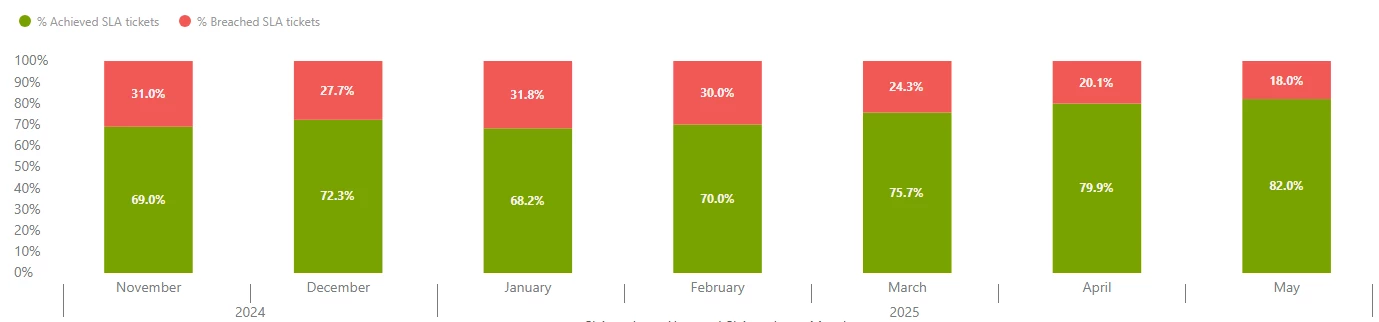
Below is a SLA graph which provides an excellent high level analysis of achieved vs breached.

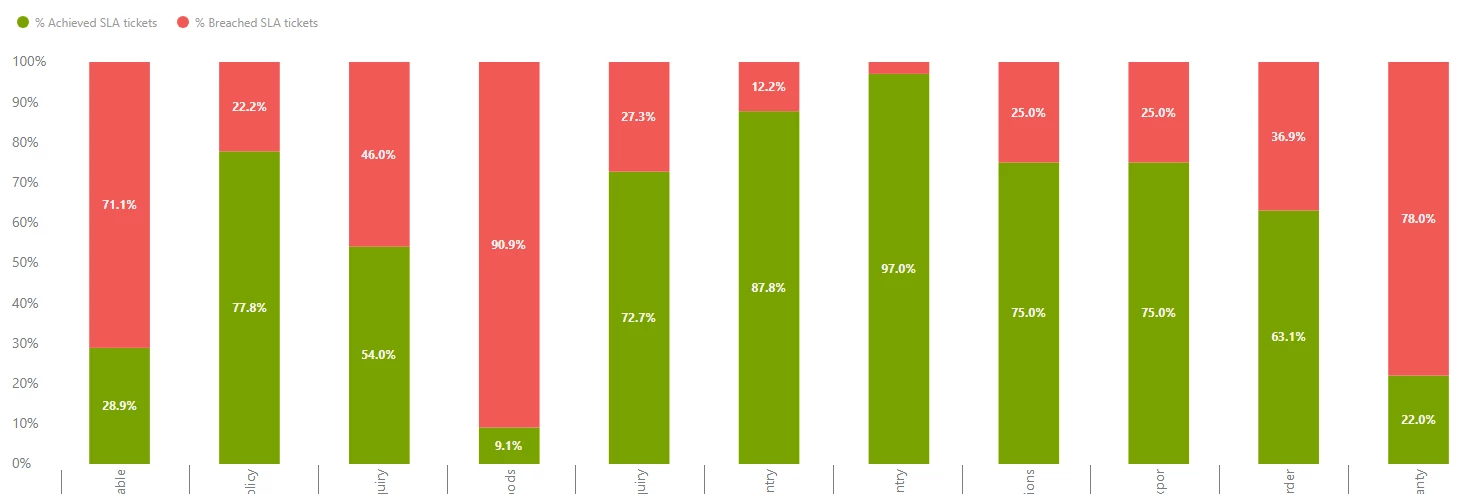
On the ‘Legacy’ dashboard, you were able to select on any given month and select ‘Decompose’, then select ‘Policy Name’ - which would provide you with the below view to analyse which specific SLA's were being Achieved vs Breached.


Isaac13
  • May 27, 2025
  1. Problem Category: New Dashboard Features
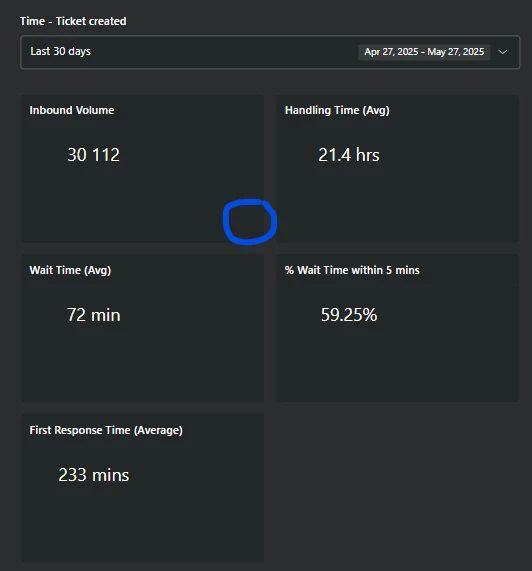
  2. Issue: There’s no option to enlarge specific elements (like graphs and tables) in the new dashboard, making it hard to view the details clearly.
  3. Problem Description: As shown in the attached images, there’s currently no option to enlarge the elements of the dashboard. Specifically, the graphs and tables lack a zoom or expand feature, making it difficult to see the statistics clearly. In the second image (blue circle), there’s no button or option to enlarge these elements.
  4. Severity: Low —Minor inconvenience with no immediate impact on usage.


Jorge28
  • May 28, 2025

Problem Category: Issues experienced while migrating a dashboard

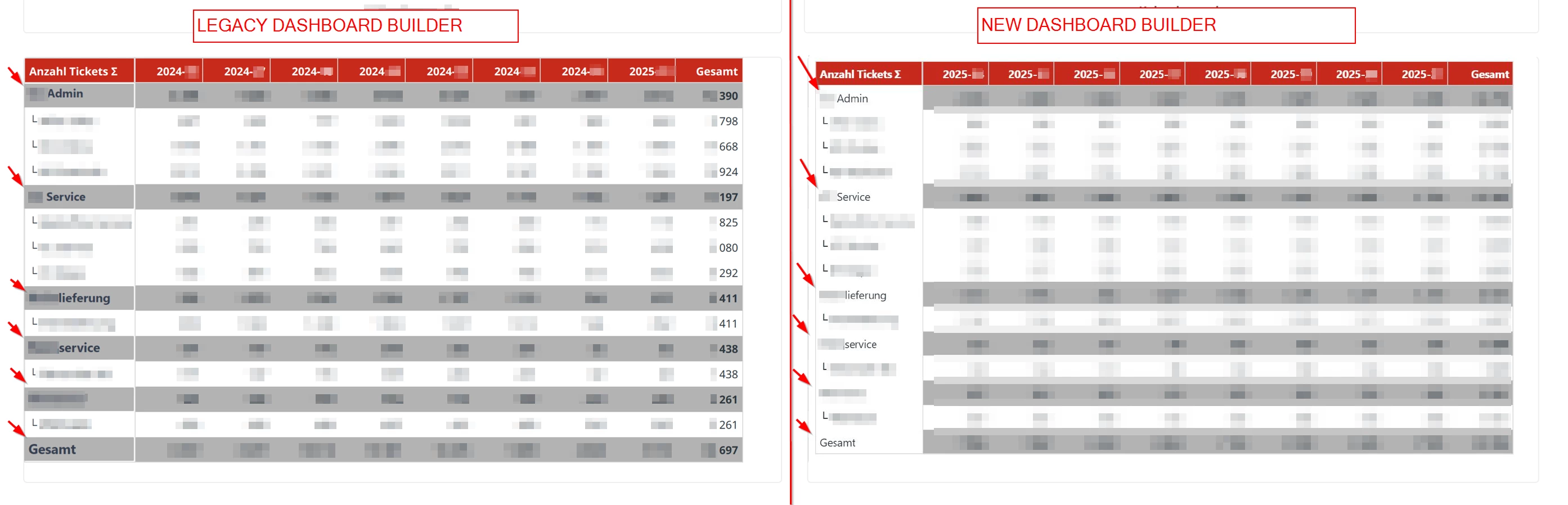
Problem Description: One of our customers has table reports with a special design. They wanted a kind of tree structure in the table, as well as a layout that clearly differentiates the divisions. This was possible in the classic dashboard builder, since components could be placed one above the other. However, this is no longer possible in the new dashboard builder. Please check the screenshot.

Severity: Medium


  • June 4, 2025
  1. Problem Category:
    •  New Dashboard Builder features


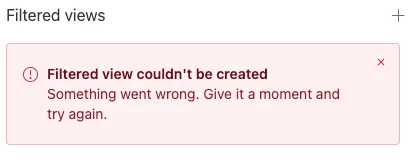
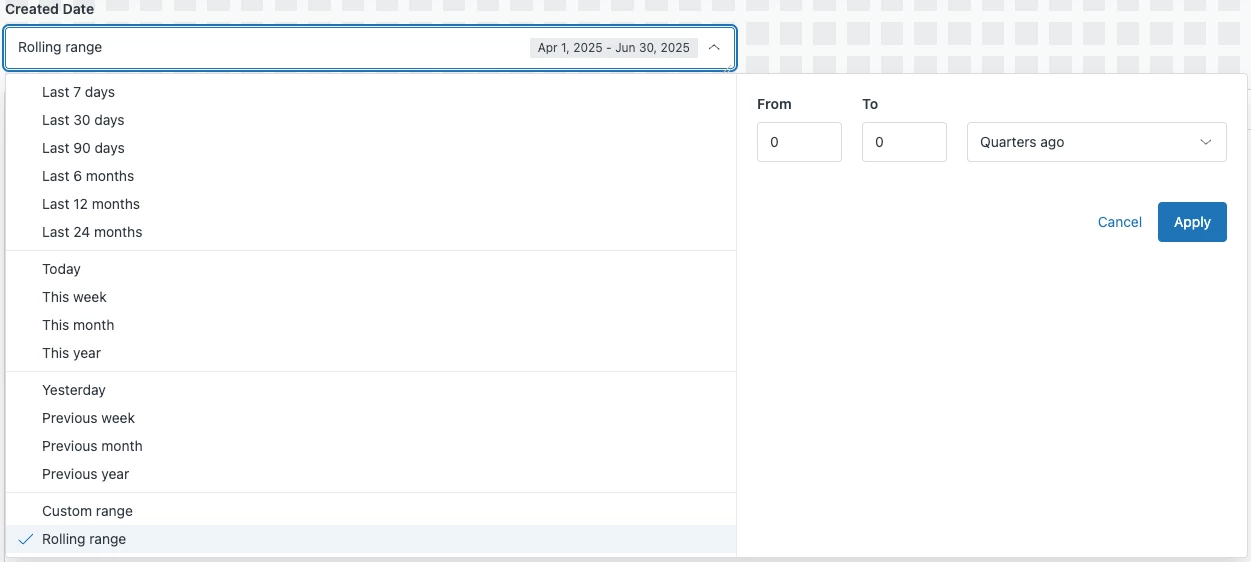
  2. Problem Description: When trying to create a Filtered View using a Rolling Range, I'm getting the following error. I've tried multiple times with different ranges, but none of them work. It'd be really helpful to have this fixed since the intent is to schedule the dashboard delivery to automate this tracking process.


  3. Severity: 
    • Medium: Some disruption in workflow but manageable.

  • Product Manager
  • June 6, 2025

Hi all, thank you for continuing to share your feedback.

We understand that you need more time to migrate your existing dashboards, and we need to address more of the issues that you have reported.  That's why we've updated the dates for the upcoming phases of the migration to the new dashboard builder:

  • February 25, 2026 (previously July 6, 2025): Legacy dashboards become view-only.
  • June 30, 2026 (previously November 4, 2025): Retirement of legacy dashboards.

  • July 2, 2025
  1. Problem Category:
    •  New Dashboard Builder features
  2. Problem Description: I have multiple tabs in a dashboard and want to apply the same date filter across each tab (as a default). When I schedule the distribution of the dashboard via email, the filtered views have to all align with the same date range as I selected for each tab. How am I supposed to schedule delivery if the Filtered Views do not apply to every single tab?


  3. Severity: (Please choose one of the following options)
    • Critical: Critical business function is impacted, immediate attention required.
    • Without the ability to send out reports to our customers, we are unable to go live.

  • July 8, 2025
  1. Problem Category:
    •  New Dashboard Builder features


  2. Problem Description: 

    I filtered for all but 4 groups in a migrated dashboard (the filter said “4 excluded”) and then created a filtered view and set it as the default. When reopening the dashboard the 4 excluded views are now the only ones selected and the filter says “4 selected”. The filter should stay as it is and not reverse the selection.


  3. Severity: 
    • High: Major disruption or complete inability to use key features.


Brett Bowser
  • Community Manager
  • July 23, 2025

Hey @jessica12

Thanks for taking the time to share this with us! This appears to be a bug and we currently have a problem ticket assigned to our developers related to what you're experiencing. I'm going to create a private ticket on your behalf and attach it to the PT so you'll receive updated when available. 

Thank you!


Elizabeth13
  1. Problem Category:
    •  Sharing / deep linking (to a specific dashboard tab, with specific filters applied)


  2. Problem Description:
    • When sharing a link to a dashboard, it will always open to the first tab of the dashboard rather than having a unique URL for each tab that can be shared to land directly on the tab meant to be looked at.
       
  3. Severity: 
    • Low: it's easy enough to work around, but would make it so much easier to share and/or bookmark (in the browser) certain dashboard tabs to get folks looking at the intended reports/data with just one click.

Hannah18
  • September 19, 2025
  1. Problem Category:
    • New Dashboard Builder features 


  2. Problem Description: (Please provide a detailed description of the issue you’re experiencing or the feature you would like to see prioritized).

    • Yesterday I deleted my dashboard and spent a number of hours rebuilding it. 

      I have just deleted the dashboard again :)

      Please add an extra layer of verification so I don't do it again!!


  3. Severity: (Please choose one of the following options)
    • High: Major disruption or complete inability to use key features.

Elaine14
  • Employee
  • October 24, 2025
Hi Hannah and Elizabeth,
 
Thank you both so much for taking the time to share such thoughtful feedback — this is hugely helpful as we continue refining the Dashboard Builder experience.
 
@Hannah – I completely understand how frustrating it can be to lose work like that, especially after spending hours rebuilding your dashboard. We’ve heard similar requests for an additional confirmation step or “undo” option before final deletion, and your experience reinforces how valuable that improvement would be. I’ve logged your feedback internally for our product team to review as we prioritize upcoming usability enhancements around dashboard management.
 
@Elizabeth – Great callout on the deep linking behavior. The current dashboard sharing structure indeed defaults to the first tab, but we agree that having unique shareable URLs for individual tabs would make navigation and collaboration much smoother. This is already being tracked as part of our roadmap discussions, and your feedback helps highlight the value of improving this flow.
 
We truly appreciate you both taking the time to outline these details — it makes a big difference in helping us identify what to focus on next. Please keep the suggestions coming as you continue working in the new builder!

  • February 6, 2026
  1. Problem Category:
    •  New Dashboard Builder - missing feature


  2. Problem Description: 

    Decompose feature is missing from the new Dashboard Builder, so we must use the old one. We would expect to see this in the new builder before the old dashboards builder is discontinued.


    It's been invaluable for communicating and sharing data/trends with stakeholders as it allows our dashboards to be more visual and dynamic.


  3. Severity: (Please choose one of the following options)
    • High: Major disruption or complete inability to use key features.


  • February 9, 2026

I have several items to report

Issue 1

  • Problem Category: Default filtered views only apply to All data
  • Problem Description: Default filtered view only applies to users with all data access. If I want to use Default filtered view for users in all the dashboard data restrictions, I can't do this. This means I have to create multiple dashboard reports and manage the filters on each report. 
    • Managing filters that are common across multiple reports is time-consuming and leads to possible misalignment
    • It also means there might be a need for duplicate reports so they can be filtered at the report level
  • Severity: Medium

Issue 2

  • Problem Category: Data restrictions max out at 5
  • Problem Description: 5 data restrictions is not enough (I don't want to create a dashboard per dataset. It won't work for the agents. They shouldn't have to look at multiple dashboards to put client reporting together.
  • Severity: High

Issue 3

  • Problem Category: Data restriction options max out at 20
  • Problem Description: only being able to apply 20 data restriction options is not enough (we have 65 active ticket forms, I have a use case that I need to set up a data restriction for 21 of the ticket forms, and possibly more in the future)
  • Severity: High

I cannot migrate legacy dashboards until Issues 2 and 3 are addressed.


  • February 9, 2026

Problem Category: Data restriction multi-select

Problem Description: When setting up a data restriction filter that applies to multiple options, I have to select each option individually. For example, if I have 5 ticket forms to apply to a data restriction, I have to select each form one at a time. It would save me time if I was able to select the 5 ticket forms all at one time and apply them to the data restriction filter in one action.

Severity: Low