disable pop up notifications showing ticket has been updated | The place for Zendesk users to come together and share
Skip to main content
Accepted

disable pop up notifications showing ticket has been updated

Related products:Support
  • June 15, 2022
  • 15 replies
  • 27 views

Reagan11

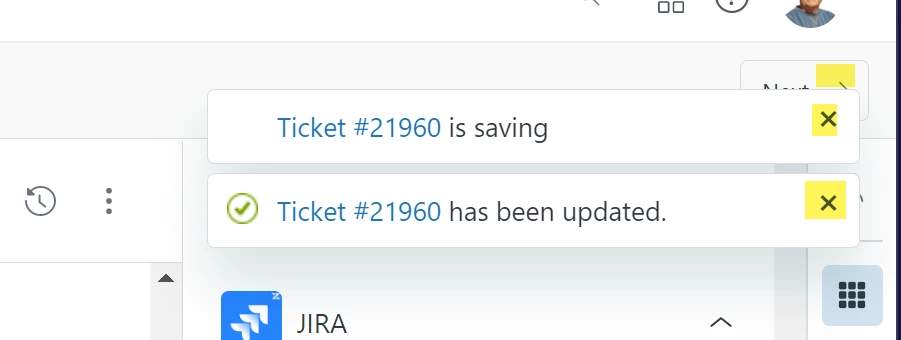
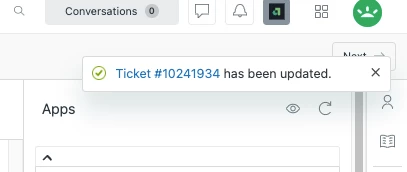
These type of pop up notifications happen every time the status of a ticket is updated and have to be cleared out manually. It is distracting for agents and causes excessive, unnecessary clicks. It would be great to have an option to disable these pop ups from occurring in the first place. Thank you! 

15 replies

Bethany11
  • June 15, 2022

This pop-up has definitely decreased my efficiency over time. I often make more than one update to a ticket, and having to wait for the pop-ups to expire or clicking to exit, takes time away from either refreshing my apps and/or moving to the next ticket as soon as possible. Additionally, I rarely use the pop-up to reference ticket updates or changes, so it's never used for it's intention anyway. 

If anything, it would be helpful to have the pop-ups appear in an area that will not block access/views to highly referenced areas of the screen. Thanks!


Kathleen12

These pop up notifications, and especially the notifications that require a manual "X" out of to close, are really a hinderance to my efficiency in tickets. When going through the queue as quickly as possible, and needing to stop between every ticket to address these pop ups, it's really unideal. Would love an option to select what notifications pop up there, or to simply disable these notifications if desired! 


Mike16
  • June 15, 2022

This is interesting, as my company's Zendesk instances don't have that behavior. For our pop-up ticket notifications, they are only present for about 3-5 seconds, and then go away on their own. However, I do see certain pop-ups (like errors and/or ticket deletion) that will stay until I manually remove them.

As an fyi, we are running under the "Professional Suite" (formerly Enterprise) plan, so not sure if that may have something to do with it or not.

~Konstantin


Chris129
  • June 18, 2022

This would be a huge improvement to my daily workflow. Bump!


Rudolph11
  • June 27, 2022

I would love to more control options added to pop-up notifications. Particularly useful would be controlling where the pop-up appears, controlling how long the pop-up stays visible, and the option of disabling pop-up notifications entirely.


Lloyd11
  • April 20, 2023

+1 this!

Would be great if we could either turn this into a personal setting for agent specific (Permission-required) or group specific where we could disable it for certain teams that are working on a large quantity of tickets and find this feature a nuisance. 

Are there any potential updates on this within the next roadmap for products?


Steve47
  • May 15, 2023

+1

Congratulations! ZD took a one-click operation and made it 3 clicks!!  :( 

I'd love to turn these off.  Thanks


  • January 25, 2024

you can click on "stay on ticket" option so the ticket doesnt close


Jose40
  • February 2, 2024

Would love to see this pop up show up somewhere else as this would help with efficiency. 


Samir12
  • Product Manager
  • March 25, 2024

Hello All,

Thank you for the engagement regarding pop-up notifications. I'm happy to share that enhancing the notification experience is on our roadmap, and this will include agent-level preferences that will give agents the ability to customize which events generate pop-ups. We don't have a confirmed release date yet, but I'll keep an eye on this post and will provide an update when we are closer to development. Thanks!


Arnaud11
  • April 11, 2024

+1 for completely disabling these notifications


Camille15

+1 for at least making them more customizable, or permissions given to those that do not need them to mark their prioritizations or schedules


Shah
  • May 27, 2024

How to create a trigger Alert pop-up notification message to agents when a ticket is created or updated displayed in the chat dashboard.


Arnaud11
  • December 18, 2024

Do you have any new information to block these pop-ups ?


Brigid
  • February 26, 2026

Hello! Checking in to see if there are any updates on blocking or moving these pop-up notifications. They appear directly over the “next in view” button and the button to end wrap-up time. So they can be a bit annoying and slow things down. I see they were mentioned to be on the road map back in 2024. Have any updates been made? Thanks in advance!