Draft mode in composer - We want your feedback :) | The place for Zendesk users to come together and share
Skip to main content
Feedback submitted

Draft mode in composer - We want your feedback :)

Related products:Support
  • May 16, 2023
  • 47 replies
  • 170 views

Show first post

47 replies

Lisa Kelly
  • Employee
  • July 27, 2023

DL
I just wanted to make sure that Kav knows that the text is not actually deleted when you switch channels. Not everyone knows that. For your larger issue that Draft mode is not the solution you were looking for, I'll leave that to the Product Management team. See Amisha's reply here


  • August 1, 2023

Another vote to retain the text when switching between internal note and public reply in the new agent workspace. 

And yet another vote to also allow other agents (light agents included) to view message drafts. This is super useful for reviewing the work of newer agents before the message is sent and--if a draft of a public reply was visible to all other agents--could then easily be sent without having to copy paste.

Thank you!


Sydney11
  • August 31, 2023

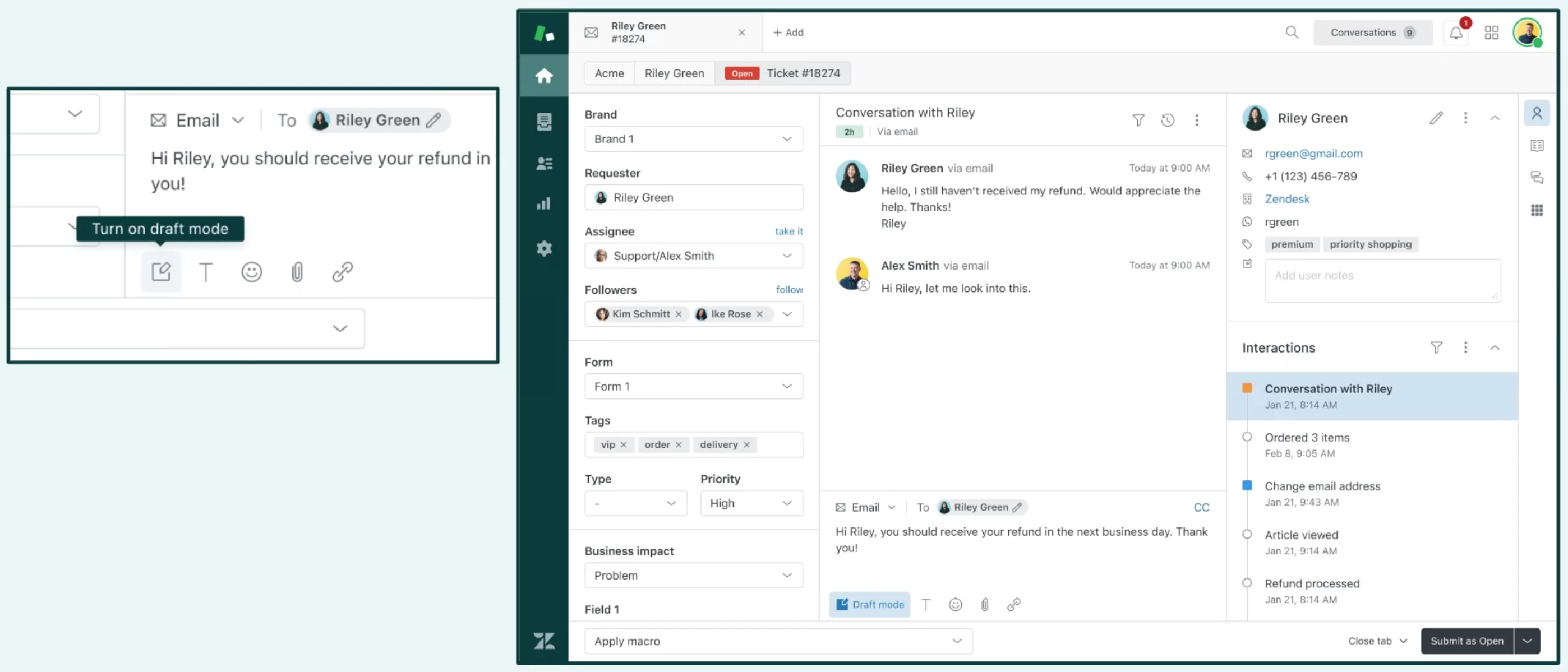
While I like the concept of draft mode, it does not work as we were hoping. 

Current behavior:

  • You select draft mode
  • You type your response
  • You hit submit
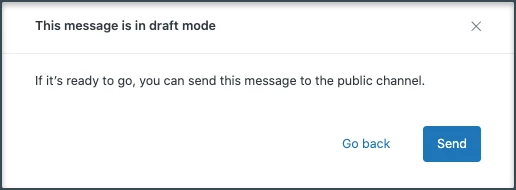
  • It prompts you with a big screen that greys out what you typed "are you sure you want to send"

Desired behavior:

  • When you are using draft mode and hit submit, it posts an internal note that is viewable for other members and can still be edited and then submitted when approved
  • It would be an added bonus if other folks could edit it too (if their role permitted - like a manager) and they can approve what is to be sent

The desired functionality for draft mode is to have it proofread by team members


  • September 1, 2023

I have to agree with the previous posts, that a real draft function where working together on replies would be very helpful. 

@adam55 mentioned the Cancel Ticket Submit app and I believe that that functionality combined with the possibility to collaborate on a response would be ideal. What is also missing in the app (and the draft function) from our point of view is the possibility to have a glance at how the ticket will look like for the customer that receives it. 

Either integrated in this function or seperately from it, I think this could improve the feeling of security especially for agents that are new to Zendesk and new to the concept of sending a response without seeing all elements of it (such as which previous messages are being sent with it, as it would be with a classic mail response). 


  • September 22, 2023

Too bad you guys broke markdown... the new internal note editor is horrible. We use complex macros to auto-populate internal notes with tons of markdown and now all that is broken. Jira does this too and they suck at it. One rule of thumb over all my years of using markdown, DO NOT RENDER IT ON THE FLY. It makes it extremely buggy and hard to edit while working on crafting a message. Bring back the preview function, PLEASE!!!


  • Newcomer
  • October 6, 2023

Hi Zendesk Team!

It would be really nice to have an ability to switch on/off draft mode as enabled by default for all agents in our Zendesk instance.  


Claudia18
  • October 13, 2023

Agree that drafts being visible to all agents would be helpful across tickets.

Is there a way to toggle draft mode in composer within the mobile app, or is there a timeline in which this feature may be rolled out?


  • October 16, 2023

It worked well the way it was. I echo the comment made by DL above. 

Now it requires a workaround of copy/pasting when you decide to switch form public to private or vice versa. By the time you realize you want to switch, it's too late to turn on draft mode. And draft mode creates extra steps when you try to save... 


Amon
  • Newcomer
  • October 17, 2023

I haven't noticed Draft Mode being made available to us.


@amisha11 Based on the conversations here, would it be exceptionally challenging on a UI-level to retain text when transitioning between an internal note and a public reply within the new agent workspace?


Paul19
  • November 10, 2023

Hey ZD Team,

I would like the ability to enable draft mode using a macro.

I have macros that add public comments to tickets with placeholders that the agent has to edit. The old workaround was to make the comment internal, and then the agent could make it a public comment when they have replaced the placeholders; now, this is unavailable as a workaround (unless they cut & paste). so I would like to have the option to run the macro but add the comment as a draft public comment. Then, the agent could turn the draft off once they have populated all the placeholders.

Thanks


  • January 24, 2024

I've just switched over to the Agent Workspace and, like many others before me, have been adapting to the new composer paradigm.

One specific pain point regarding Draft Mode is that, as far as I can tell, making use of the "persistent Draft Mode" feature requires a mouse click. This is an unwanted and inefficient imposition on efficient, consistent, and predictable workflow.

It seems like I can either:

  1. Manually re-enable Draft Mode at the start of working on every ticket, and then manually disable it before submitting the ticket—all three possible via keyboard shortcut; or
  2. Manually enable Draft Mode once, save/submit the ticket—both via keyboard shortcut—and then confirm the send through Draft Mode—and be forced to move to the mouse to click the "Save" button

In the old workspace, my ticket workflow was this:

  1. Load into a ticket, defaulted to Internal Note mode
  2. Compose response
  3. When ready to submit, use ctrl+alt+C to switch to Public Reply mode, then use ctrl+alt+S to submit and solve the ticket (or the shortcut for a different status)

The basic shape of this efficient and predictable process flow is broken by the design of the new Workspace. Not only am I forced to switch to Public Reply mode immediately—adding another step to be memorized for the process—but if I want to make use of Draft Mode to replace the Internal Note mode's previous "drafting/safety" function, then I'm forced to swap interaction modality from keyboard to mouse and aim for a small button target to submit every ticket.

I'm confused as to why the "This message is in Draft Mode, do you want to send it publicly?" modal does not either:

  1. By default place focus on the "Send" button; and/or
  2. Accept a simple keystroke to activate the "Send button"

In fact, based on extremely standard UI design principles, I would already expect 'enter/return' to activate the "Send" button, because it is clearly colored as the default UI element. However, regardless of whether I trigger the "Are you sure?" modal by clicking the "Submit" button in the Ticket UI or by using one of the keyboard shortcuts that submit a ticket, focus does not appear to land on the "Save" button—neither the 'enter/return' nor the 'space' keys trigger that button.

The button can be navigated to by pressing 'tab' twice and then 'space' to activate the button, but not only does this force the agent to take even more actions, it is easy to over- or under-shoot the number of inputs necessary, especially when an agent's time is spent handling dozens of tickets or more every day.

Either there should be an ability to default to Draft Mode when loading the Public Reply composer for a ticket—regardless of whether Draft Mode was manually turned off in the previous ticket—or if you're dead-set on forcing a modal dialog to confirm sending through Draft Mode, it needs to be navigable by simple keyboard interaction.

If you can get to the "Are you sure?" modal via keyboard shortcuts, you need to be able to also get through the modal with keyboard shortcuts.


  • February 21, 2024

I just turned on Agent Workspaces today, and came here to report a bug thinking that this obviously must not be intended behavior. Sadly found this thread and am surprised to see a 'Draft mode' be created rather than the must easier and more intuitive 'old way' that used to allow agents to toggle back and forth.

Yellow background is 'safe', white is 'not safe' when it comes to drafting replies and things of that nature. Draft mode is not a solution that we will use.

I am sure my team will continue to have to copy-paste our messages from internal notes to public replies, adding an extra step is what used to be a simple and fluid workflow.


  • February 22, 2024

The comment by Andrew Goetz clearly echos my experience. I really miss the ability to decide to shift from internal to customer facing without having to copy/paste the text into the same panel after toggling. 


  • February 23, 2024

Sadly I think the ship has sailed on these discussions - Zendesk weren't interested last year when lots of us reported various issues with the new Agent Workspace, and ultimately we've just had to get on with it and adjust to the new functionality.

If it's any consolation, you do get used to it...


Santi11
  • March 5, 2024

Please, allow to turn off Agent Workspaces, this is breaking our workflow. Why are you breaking things that worked correctly and why are you forcing this change ? 


Samantha23

Is there any update on when this loss of function will be re-enabled, or at least configurable by admins, to retain the text content when toggling from internal comment to public comment?  In my view, this is actually presenting as a bug as opposed to a security feature, for the reasons outlined below:  


Draft mode unfortunately does NOT address the major user experience issues associated with this change, and unfortunately our org has had to revert entirely from Agent Workspace, losing much of the efficiency features that we have, due to the fact that we use 100s/1000s of macros legacy to agent workspace that default the comment type to internal while the agent edits the content and customizes before publicly sending.  


This forces people to manually copy + paste, and also we have no ready way to determine which legacy macros automatically set comment to private.  
 

In addition, the feedback that we are getting is it increases the risk of sending an incomplete message to the requester.  None of this is addressed by having agents manually click DRAFT MODE.
 

To my understanding this change wasn't communicated as part of the agent workspace migration, that admins would have to figure out a way of determining within their 100s and 1000s of macros which ones default to private versus public and make the adjustment.  


We've had to roll back agent workspace entirely because of this, as we have no ready way of determining how many of our macros will need to be edited.  


  • Employee
  • April 18, 2024

Is there a way to turn draft mode ON as a standard for all users in Admin? New customer deploying and wants to add a protection layer before agents accidentally send an incomplete response. 


  • June 25, 2024

I don't understand how to turn on Draft Mode for my team, please put in step by step information on how to activate? Using Internal Note as you are drafting your email is safest you never know, but to not have it carry to Public Reply automatically is not efficient. 


Lisa Kelly
  • Employee
  • June 25, 2024

Hi Tracy
Agents have to activate it themselves individually. See Writing drafts of public replies in tickets for step-by-step instructions. Draft mode remains on until they decide to turn it off.


Christian34

Having this draft option available in the API would be AWESOME!


James57
  • October 4, 2024

Hi all,

We have recently launched an updated version of our Drafts app on the Zendesk Marketplace, which addresses several of the use cases shared here. Specifically, the app allows you to save drafts on a ticket which you or other users can later retrieve. In addition, we have included a copy button for easily transferring internal notes to public replies.

This app is free to use, so feel free to install it here and see if it can help.  We'd appreciate any feedback that you have as well!

Thank you ~


  • October 7, 2024

The Draft mode is great as it is too easy to accidentally send a message publicly when meaning to craete an internal note - would be better if admins could make the use of it mandatory for all agents