Ticket Field Tooltips in Agent Workspace | The place for Zendesk users to come together and share
Skip to main content
Delivered

Ticket Field Tooltips in Agent Workspace

Related products:Support
  • June 24, 2021
  • 25 replies
  • 391 views

Sheldon11

Feature Request:

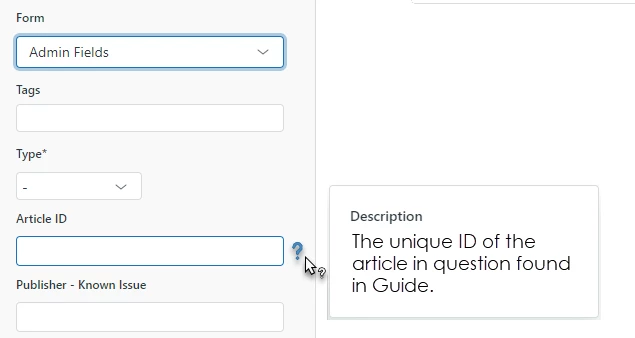
Implement hover tooltips on Ticket Fields in the Agent Workspace when viewing a ticket, leveraging the Ticket Field Description text. Similar to the hover option to see Macro Descriptions.

Here is what this could look like:
Use Case:

We often use shortened or simplified Ticket Field names for agents for various reasons but they can leave agents, especially new hires, struggling to understand the intent. Shortened internal field names also make for prettier reporting and save hassle renaming attributes in Explore.  

Reasoning:

Showing users the Ticket Field Description (that already exists in Support) or at least giving Admins a checkbox to use it as a tooltip would alleviate user confusion when completing forms and improve user effectiveness or accuracy documenting fields correctly. I'm sure there are many Zendesk admins that prefer shortened Ticket Field names while also struggling to convey enough detail to internal users/agents. Tooltips would solve these problems and improve the Agent Workspace. 

25 replies

Rudolph11
  • June 25, 2021

Fantastic idea. +1


  • June 28, 2021

This is an amazing idea!


Sydney12
  • June 28, 2021

Sheldon11
  • Author
  • June 28, 2021

Good find, Sydney. Didn't see that in my searches but I was pretty hard headed about the "tooltip" terminology. The feedback provided in that 2018 post seems to be more inline with how Zendesk handles End-user descriptions on web forms, which can cause a ton of "word vomit" if not used with caution. Tooltips keep the UI free of clutter when users don't need that extra field description displayed. Still, very similar feedback with the same end result of exposing Ticket Field Descriptions in tickets. 


Sam15
  • July 8, 2021

+1. Another helpful thing would be to have a third title field: One for admins (when building forms), one which is the "agent" title, and one which is the "end user" title. 


Gaurav Parbat
  • Director of Product Management
  • November 10, 2021

Hi Sheldon,

Thanks for sharing your input. We will take this feature request into consideration for our 2022 plan.

Thanks,
Gaurav Parbat


Anthony29
  • December 5, 2021

Absolutely great idea! I still don't know where those custom field agent descriptions are going without this!


Luma
  • May 9, 2022

+1 Any update? 


Heather13
Forum|alt.badge.img
  • Contributor
  • November 18, 2022

@gaurav12 hoping you might have an update on this? Tool tips is a hot topic!


Sarah25
  • March 10, 2023

+1 - we have customers requesting this feature! 


  • March 10, 2023

+1 Great idea! Would be very useful! 


Amisha11
  • Employee
  • April 12, 2023

Hey folks!

We appreciate your feedback on this topic and would love to hear more directly from you live. Please join us on Thursday, April 25th at 9 AM PDT for our PM Roundtable. It’ll be an open discussion on what is and isn’t working with the recent UI changes regarding Agent Workspace. So please bring those questions, concerns, or feedback!

The product team would also like feedback on enhancements they plan on making in Agent Workspace, so we can design the experience tailored to your CX needs.

The link to register can be found here, we’d love to see you all there. 

Cheers,

Amisha Sharma


  • September 25, 2023

This would also be helpful for us!


  • May 8, 2024

This functionality is extremely useful and important, and it should be implemented in the system.


Sydney11
  • March 21, 2025

+1 for this functionality - I added my comment earlier regarding a feedback post back from 2018 but it is no longer accessible. There was now another feedback post just recently posted: Feature Request: Display Standard Description of Custom Fields to Agents – Zendesk help


Scott12
  • Newcomer
  • April 16, 2025

+1 So many votes and support for this idea, yet no updates or progress for something that appears to be a pretty easy win. 

https://support.zendesk.com/hc/en-us/community/posts/9043316066842-Feature-Request-Display-Standard-Description-of-Custom-Fields-to-Agents


  • April 28, 2026

Any Update? 


This is now live. Agents will see tooltip descriptions when hovering over ticket fields in the workspace.


I have to be straight with you: this request is nearly 5 years old. 46 upvotes. Years of comments asking us to build it. That's not good enough.


I am the CEO of Zendesk and personally built this feature using AI-assisted coding tools. The building part? About an hour. The internal reviews, testing, and approvals to get it shipped took longer than the coding but our ambition is to keep the high standards in terms of product quality while decreasing the effort and time it takes to address customer feedback.


The point is: the cost of building small, high-impact features like this has collapsed. There's no excuse for letting clear customer needs sit in a backlog for years. We're going back through requests like this one and shipping them.


Thank you to everyone who kept asking. You were right to push us.


  — Tom


Brett Bowser
  • Community Manager
  • May 15, 2026
Updated idea statusAcceptedDelivered

@Brett Bowser - I don’t see this functionality in my instance. 

Do I have to enable this in the settings somewhere?


Brett Bowser
  • Community Manager
  • May 19, 2026

@Brett Bowser - I don’t see this functionality in my instance. 

Do I have to enable this in the settings somewhere?

Hey ​@Chris Fassano , thanks for sharing this and sorry for the confusion! I’m reaching out to our product team to find out more about the above feature and will post back here ASAP. 


Brett Bowser
  • Community Manager
  • May 21, 2026

Hey everyone!

Thanks for your patience while I looked into the release of the feature Tom mentioned above. We temporarily paused the rollout to ensure system stability during Zendesk Relate this week. The good news? Rollout resumes tomorrow, and it should be live in your accounts soon! 😀

As always, thank you for taking the time to share your feedback with us, and let us know if you have any other questions!


Brandon Tidd
Forum|alt.badge.img+1
  • User Group Leader
  • June 3, 2026

This is now live. Agents will see tooltip descriptions when hovering over ticket fields in the workspace.


I have to be straight with you: this request is nearly 5 years old. 46 upvotes. Years of comments asking us to build it. That's not good enough.


I am the CEO of Zendesk and personally built this feature using AI-assisted coding tools. The building part? About an hour. The internal reviews, testing, and approvals to get it shipped took longer than the coding but our ambition is to keep the high standards in terms of product quality while decreasing the effort and time it takes to address customer feedback.


The point is: the cost of building small, high-impact features like this has collapsed. There's no excuse for letting clear customer needs sit in a backlog for years. We're going back through requests like this one and shipping them.


Thank you to everyone who kept asking. You were right to push us.


  — Tom


If ​@Tom Eggemeier can do it, so can you. Love seeing community features greenlit!


Abe13
  • June 9, 2026

Very unhappy this was forced onto our account without an option to disable the function.  Our Admin team is now having to answer endless questions about the Jira IDs and Admin notes we were using to coordinate and track changes to fields in our system.  Nothing sensitive was revealed, but this is now bogging us down needlessly for a feature that we neither wanted or needed.


Hi everyone,
Following up with an update on the issues raised after the initial rollout.
Some of you reported that field descriptions not intended for agents were appearing in tooltips, so we made some improvements to the feature:

  • Tooltips display only the Agent-level description, the one specifically written for agents in your field configuration.
  • If no Agent-level description is set for a field, no tooltip appears.
  • The Customer-level description is never used for these tooltips.

This gives admins full control: tooltips only show what you've explicitly written for your agents to see. Any internal notes in other description fields won't surface.
If anyone is still seeing unexpected behavior, let us know.

Best,