View Active (non-Suspended) users only and by default | The place for Zendesk users to come together and share
Skip to main content
Feedback submitted

View Active (non-Suspended) users only and by default

Related products:Admin center
  • February 14, 2024
  • 4 replies
  • 17 views

Daniel43

Presently, there is a filter to show Suspended users only, by means of a checkbox. That means it is impossible to view non-Suspended users only.

In fact, I often want (and I expect many folks often want) to see only non-Suspended users (that is, to hide Suspended users), and I would prefer to set that as the default.


4 replies

Shawna James
  • Community Manager
  • February 14, 2024
Hello Daniel, 
 
Thank you for taking the time to provide us with your feedback. This has been logged for our PM team to review, and for future reference, here’s our product feedback template. This template has been designed by community members and PM's to help users provide the most accurate details for their feature request so that we can better understand your use case and needs. You do not need to update your post now but we would appreciate it in the future if you could utilize the template.
 
For others who may be interested in this feature request, please add your support by upvoting this post and/or adding your use case to the comments below. Thank you again!

Maddie11
  • August 21, 2024

@shawna11 

I want to co-sign this request and would like to take it a step further, I'd like to suggest that only non-suspended users are shown anywhere users are mentioned, unless suspended users are specifically and explicitly included or selected in filters.


Even when users are suspended, active users have the ability to select them in the Assignee dropdown on tickets, for example… Even though they are suspended. Seeing suspended users everywhere is incredibly messy, and is not helpful when we are trying to keep track of users.


We have to manually remove suspended users from groups in order to prevent them from showing in the Assignee dropdown. It's incredibly tedious and repetitive. 

Our use-case is very simple: we have many users on our account, and filtering through non-suspended users is currently impossible. From the Team members page, we can only select seeing only suspended users from the filters, but when that checkbox is left unchecked, we see both suspended and non-suspended users.


We cannot simply delete suspended users as we need to maintain historical data, but currently suspended users take up a substantial amount of valuable space and time on a daily basis.


Daniel43
  • Author
  • August 22, 2024

Maddie is 100% correct. Zendesk got the UX backwards in this case.


  • Newcomer
  • April 16, 2026

@Shawna James 

This request becomes even more important when looking at the current overall user-management experience in Zendesk.

First, the full Customer Lists filtering functionality is effectively limited to admins or to very specific custom-role permissions, which already makes this tool much less practical for day-to-day operational work. At the same time, the available filters and overall usability are still quite limited.

Second, Zendesk officially states that Customer Lists is a legacy add-on. Yet there is no clearly better modern replacement for the same use case.

Today, if you open Customer Lists > Suspended users, you can at least see the suspension Reason. However, the list of reasons is too limited, so in many real cases agents end up using Other reason. To see the actual Additional comment, you have to open Edit for each user one by one, which does not scale at all.

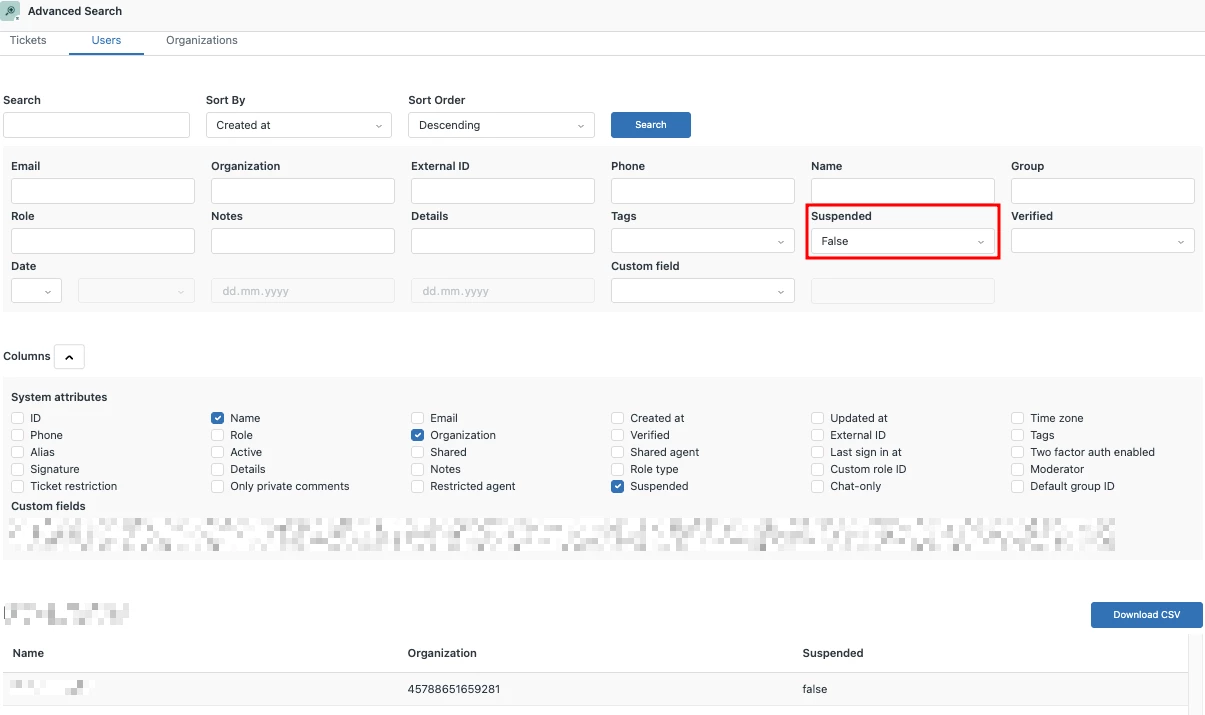
Yes, Zendesk suggests using Advanced search > Users with a filter Suspended True/False but that is not an equivalent replacement. In practice:

  • it is a more technical and less accessible workflow,
  • it shows Organization ID instead of the organization name,
  • and it does not expose suspension details such as Reason and Additional comment.

So at the moment we have an awkward gap: the legacy interface is weak, the alternative is incomplete.

Ideally, Zendesk should improve this either:

  1. in Customer Lists, by allowing a clear and default view of active (non-suspended) users only,
  2. If Advanced search > Users is the proposed alternative, it should be enhanced to display the organization name and suspension-specific details like Reason and Additional comment, otherwise it remains only a partial workaround.
  3. if Customer Lists is no longer a strategic area, in Organization > Users.

The Organization > Users page especially needs attention:

  • there is no filter to separate suspended and non-suspended users,
  • there is no clear visual label for suspended users in that list, even though Zendesk already shows a Suspended label in other places such as Customer Lists > All customers.

This is already closely related to these ideas as well:

  •  

  •  

In short: if Customer Lists is legacy, the alternative workflows should be improved accordingly, especially Advanced search > Users and Organization > Users, including support for suspension-related fields such as Reason and Additional Comment. If Customer Lists remains available, it should at least provide practical filtering and clear visibility for active versus suspended users.