

 Like those little Note and Warning boxes? Want them in your Help Desk articles? You can quickly turn any piece of text into one of those by inserting a little CSS into your Help Desk code.
This hijacks two of the WYSIWYG color swatches built into the article editing tool. The specific colors are pink120 and pink130, shown below.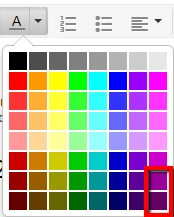
Just add these lines to your CSS, upload the :before images to the Assets section, and fill in the background url for the :before elements. Then when creating an article, highlight the text you want to turn into one of these and select the corresponding Info or Warning color, and viola! Once you publish the article, you will have those nice, shiny boxes. Feel free to tweak the colors to your liking or to match your brand, and comment to show us how you used it!
See a live example here: https://knowledge.chronotrack.com/hc/en-us/articles/204785404


span[class=wysiwyg-color-pink120] {
background: repeating-linear-gradient(
135deg,
#e2e2e2,
#e2e2e2 30px,
#d9d9d9 30px,
#d9d9d9 60px
);
color: #fa4000;
font-weight: bold;
padding-bottom: 12px;
padding-left: 10px;
padding-right: 20px;
padding-top: 8px;
border-radius: 20px;
border: dashed 2px #ff6600;
font-style: italic;
display: block;
text-decoration: none;
margin-top: 14px;
margin-bottom: 4px;
}
span[class=wysiwyg-color-pink120]:before {
content: url('');
width: 50px;
height: 40px;
display: inline-block;
float: left;
}
span[class=wysiwyg-color-pink130] {
background: repeating-linear-gradient(
135deg,
#e2e2e2,
#e2e2e2 30px,
#d9d9d9 30px,
#d9d9d9 60px
);
color: #cc0000;
font-weight: bold;
padding-bottom: 12px;
padding-left: 10px;
padding-right: 20px;
padding-top: 8px;
border-radius: 20px;
border: solid 2px red;
font-style: italic;
display: block;
text-decoration: none;
margin-top: 14px;
margin-bottom: 4px;
}
span[class=wysiwyg-color-pink130]:before {
content: url('');
width: 50px;
height: 40px;
display: inline-block;
float: left;
margin-bottom: 0px;
}
##### EDIT JULY 2018 #####
I've since opted for a simpler, cleaner, less-yucky design for these boxes for my Guide site, so I figured I'd share. The boxes now use "i" and "!" in the :before elements rather than the images, so it's also tidier.


CSS:
span[class=wysiwyg-color-pink120] {
background: #00a2ff;
color: #fff;
font-weight: bold;
padding-bottom: 12px;
padding-left: 10px;
padding-right: 20px;
padding-top: 8px;
border: solid 1px #e6e6e6;
display: block;
min-height: 70px;
text-decoration: none;
margin-top: 14px;
margin-bottom: 4px;
box-shadow: rgba(136, 136, 136, 0.439216) 0px 2px 3px;
}
span[class=wysiwyg-color-pink120]:before {
content: "i";
font-size: 60px;
width: 30px;
z-index: 2000;
display: inline-block;
float: left;
margin-top: -20px;
padding-left: 10px;
}
span[class=wysiwyg-color-pink120] a {
color: #333;
text-decoration: underline;
}
span[class=wysiwyg-color-pink130] {
background: #ff6600;
color: #fff;
font-weight: bold;
padding-bottom: 12px;
padding-left: 10px;
padding-right: 20px;
padding-top: 8px;
border: solid 1px #e6e6e6;
display: block;
min-height: 70px;
text-decoration: none;
margin-top: 14px;
margin-bottom: 4px;
box-shadow: rgba(136, 136, 136, 0.439216) 0px 2px 3px;
}
span[class=wysiwyg-color-pink130]:before {
content: "!";
font-size: 60px;
width: 30px;
z-index: 2000;
display: inline-block;
float: left;
margin-top: -20px;
padding-left: 10px;
}
span[class=wysiwyg-color-pink130] a {
color: #333;
text-decoration: underline;
}


