Adding tool tips on hover in knowledge base articles | The place for Zendesk users to come together and share
Skip to main content
October 10, 2018
Question

Adding tool tips on hover in knowledge base articles

  • October 10, 2018
  • 12 replies
  • 66 views

Is there a way to add a tool tip when a customer hovers over a particular word, phrase or image in a knowledge base article? 

Something like this...
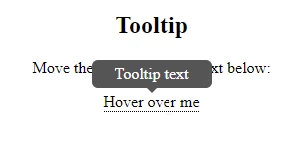
Thanks!

12 replies

Nicole17
Employee
October 18, 2018

Hey Jolshock -

I hear it can be done, but requires some custom coding. You can check out the Zendesk Garden for the elements - I found this for Tooltips.

June 11, 2020

Bumping this thread as I have need of this functionality. Any news? That article for tooltips has been deprecated.

Nicole17
Employee
June 11, 2020

Hi Sean - 

Here's the updated tooltips stuff:  https://garden.zendesk.com/react-components/tooltips/

July 24, 2020

@ Nicole Community Manager. your link

https://garden.zendesk.com/react-components/tooltips/


404 PAGE NOT FOUND

Nothing to see here

You won’t find anything growing on this page. Head back to the homepage to see more of Garden.
 
Nicole17
Employee
July 29, 2020

Hi Miriam -

Apologies, some things have moved around. Here's the correct link: https://zendeskgarden.github.io/react-components/tooltips/

July 16, 2021

Sorry but links are not working anymore.

do you have any other to explain this?

Right now my problem is that I can't use IF statement to select which link should have which tooltip.

thanks!

Br

/Carlos

July 16, 2021

Carlos and everyone, 

We had to do this through simple HTML but it's easy enough to do. Here's how:

<span class='tooltip'><span class='tooltip-content'>tooltip_content_here</span>keyword_for_tool_tip</span>

Example: <span class="tooltip"><span class="tooltip-content">Sets the size of the font, in pixels, for the text overlaying the video.</span>48px</span>

July 16, 2021

Hello Sean!

I have tested your code but this makes to appear a tooltip on each box of the Home_page a tooltip, I mean on each category, meanwhile I want to to add only for Category 1 the tooltip1, and 2 with 2...

I did this before with some help but now can't remember how to use the "if" to show only on one box Category.

Thanks!

July 16, 2021

Ah, you're trying to do this within a table, I think? If so your table will have <div> elements and you'll need to nest the tooltip code properly within the table, if that makes sense?

July 16, 2021

Yes Sean! I'm trying to add a tooltip in the Zendesk like this one:

I did in the easy way, because just add it in the html code on the live code webpage.

But the code of Home_page.hbs is like this:


So as {{#if}} statement does not allow me to compare two values like:

{{#if href == '/hc/en-us/categories/360001117812-Cow-Traffic'}}

<span class="tooltip">Tooltip_text</span>


to make it happen, so I do not know how to compare this two values to point when the user pass over the name or box I want to add the tooltip.

Thanks!
