BLANK FIELD in Article text editor for Zendesk Guide | The place for Zendesk users to come together and share
Skip to main content
Question

BLANK FIELD in Article text editor for Zendesk Guide

  • November 1, 2022
  • 7 replies
  • 0 views

Chris53

Hello,

At some point between October 21 and now, various published articles in my company's database are showing as blank when I open them up in the Guide editor. They are normal when accessing their published URLs, but within the text editor they are blank. 

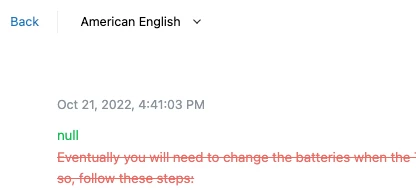
When I look at the revision history, it shows that the last change was that the body text was removed and replaced by NULL in green letters. 

Can anybody explain this? 

7 replies

  • November 1, 2022

I am seeing the same behavior for certain Helpdesk pages in our knowledge base.


Emily14
  • November 1, 2022

My team is also seeing this on sporadic articles, I haven't yet figured out a pattern to the articles impacted. The published versions have content but the editor is suddenly blank. 

One difference from the original post though, I am not seeing the revision history change. The last change just shows as 'published.' 


Grace18
  • November 1, 2022

We're also seeing similar behavior. Our revision history isn't showing any changes to the article body.


Chris53
  • Author
  • November 1, 2022

1. Revision history shows red crossed-out text (which I did not do) with NULL above it

2. The next revision 3 seconds later in the revision history, completely blank except for NULL


Chris53
  • Author
  • November 1, 2022

Thanks all for replying. Zendesk support said they are getting more reports similar to ours and are looking into it.


  • Employee
  • November 2, 2022
Hi Chris,

It looks like you already confirmed that the issue was resolved on the ticket you raised with us. Thank you!

Grace18
  • November 2, 2022

This seems to be resolved for us as well!