Can the {{if}} expression in the help center supports comparison? | The place for Zendesk users to come together and share
Skip to main content
March 9, 2016
Question

Can the {{if}} expression in the help center supports comparison?

  • March 9, 2016
  • 15 replies
  • 50 views

The following if clause checks if the variable "name" exist.
{{#each categories}}
{{#if name}}name exists.{{/if}}
{{/each}}

Is there any way that i could use the expression as follows to see if the value is equal to some text

{{#if name equals "John"}} Hello John.{{/if}}

[OR]

{{#if name = "John"}} Hello John.{{/if}}


Also is there a page where i can get information about which object is available for which page and details about the expression language in the help center custom design.


This topic has been closed for replies.

15 replies

March 9, 2016

{{#if}} helper does not supports conditions like equal, not equal, etc.

What you can do is use the {{#is}} helper within the {{#each}} to, for example, prevent a category from showing up in the categories list.

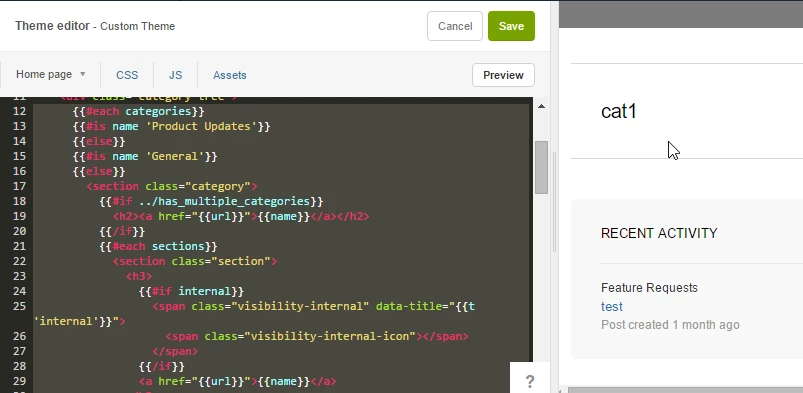
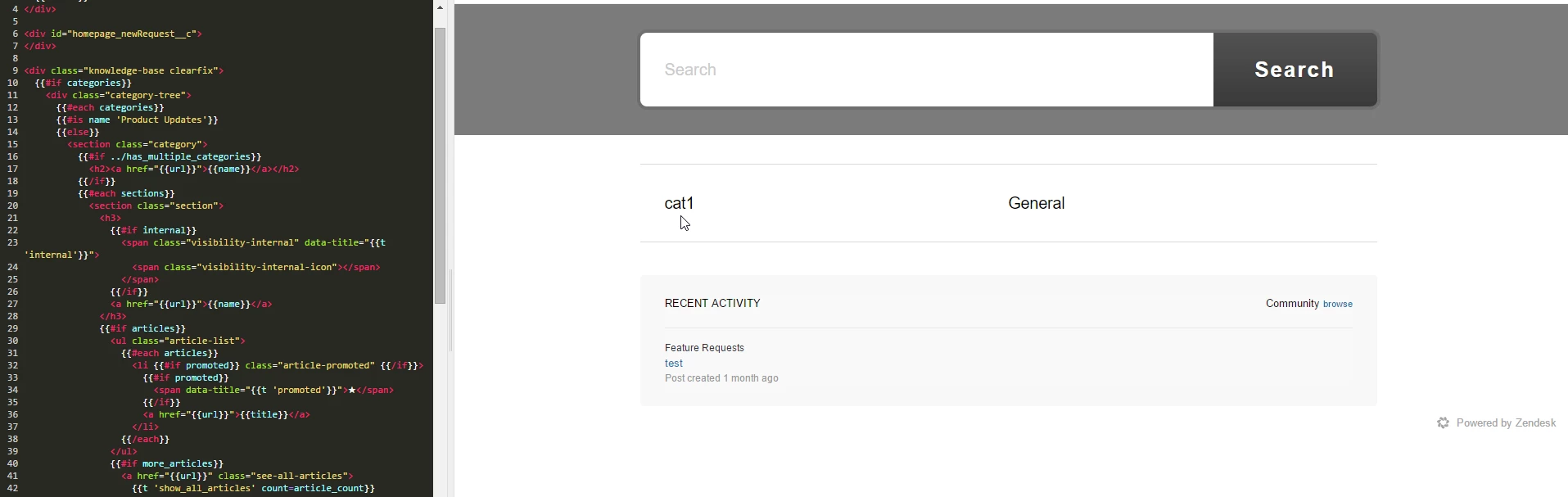
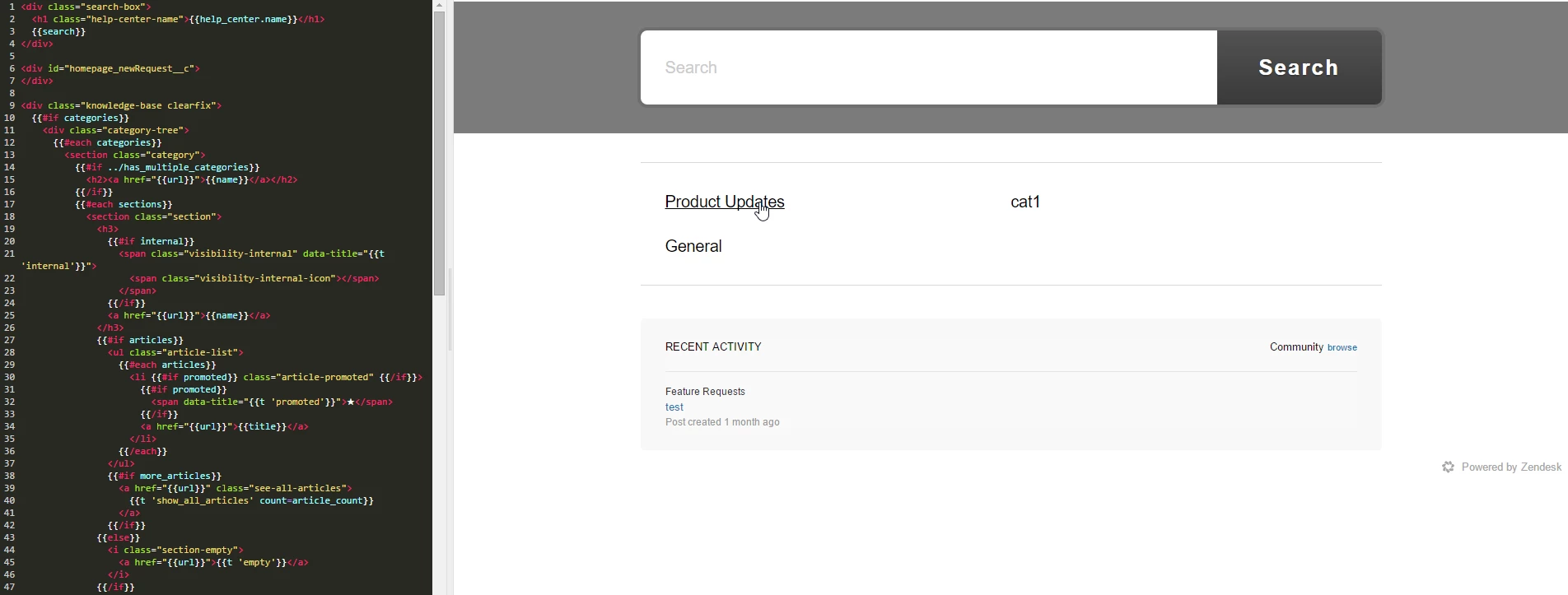
Here is an example on how to eliminate "Product Updates" from the categories list:
Note I have added the following after the {{#each categories}} - the "is" condition is empty, therefore nothing is rendered for the Product Updates category:

{{#is name 'Product Updates'}}
{{else}}


Hiding 'Product Updates':

Original:

This syntax is called Handlebars, and is also referenced in Zendesk help center:
https://developer.zendesk.com/apps/docs/help-center-templates/introduction#expressions


March 9, 2016

How do you remove 2 categories?


{{#each categories}}
{{#is name 'FAQ' || 'Development'}}     // I want 2 names here 

{{else}}

{{/is}}

{{/each}}

March 10, 2016

There are no logical operators in Handlebars.js...

Just add another nested {{#is}} - maybe others have a better idea?

{{#each categories}}
  {{#is name 'Product Updates'}}
  {{else}}
    {{#is name 'General'}}
    {{else}}
      <section class="category">

           ....

      </section>
    {{/is}}
  {{/is}}
{{/each}}


ModeratorWes
March 11, 2016

@Tal - No better ideas here, thats normally what I have to do.

July 27, 2016

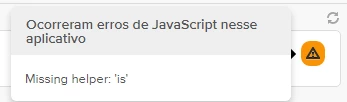
Does this work with app framework v1 or will this only work with v2? I am trying to use the {{#is}} block helper in a v1 app and it does not look like it is included in the installed block helpers, but you can't install additional helpers for a v1 app.

Employee
July 28, 2016

Hi Jo! Sounds like a unique use-case. I've opened up a ticket for further investigation on this -- you should receive an email shortly.

Jehan
November 1, 2016

@Andrew, it's a normal case in any programming language to have if, else if and else statement.

I found it very frustrating that there isn't very help material in Zendesk documentation for doing something like this. I have a scenario where I want to change the style of Section page. If section Id is 123, apply css class 123, else if section id is 456 apply css class 456, else apply css class 789. 

I couldn't figure out a way of doing this. 

Employee
November 11, 2016

Hi Jehan- 

If, else statements are possible in our templating language. This is discussed here: https://developer.zendesk.com/apps/docs/help-center-templates/introduction#conditional-helpers

A conditional is a block that's rendered based on whether a specified condition is true or false. You can use built-in Handlebars helpers to set up if and unless constructs. You can also use the custom conditional helper is to create equality conditions.

A condition is usually a Help Center property such as article.internal, which has a boolean value of true or falseSome properties don't have boolean values. 

In regards to the CSS, you can add classes or ID and that target them to style one section different then another. For example: 

In the HTML you could add the following: 


<li id="category_id_"><a href=""></a></li>

And the following to the CSS: 

/* Community Category */
#category_id_200297817 {
background-image: url("//p6.zdassets.com/hc/theme_assets/691859/200070077/beach.jpg");
background-size: 100%;
}

More on this idea is discussed in this article; I recommend reading over the comments as well. 

June 13, 2017

HC is good easier, but to did zendesk apps not work {{#IS}} 🙁 ... how to make use {{#IF}} search value?

Code:

{{#each ticket}}
  {{#is tags 'contrato_ativo'}}
    <img src="{{assetURL 'ativo........
{{else}}
<img src="{{assetURL 'default......
  {{/is}}
{{/each}}
Employee
June 19, 2017

Hi Sandro!

Sorry for the confusion here! The Help Center templating language, Curlybars, is a different product feature then the templating offered in our Zendesk Apps Framework V1. The is helper is something we custom developed for use within the Help Center templates and is not a default feature of Handlebars.js which is what the Apps Framework uses for templating. 


You can learn more about Handlebars.js in these resources: 

From reviewing the first two resources above, it appears they offer an if and unless helpers that would get you close to the functionality of the custom is helper in Curlybars.