Customize Heading Text | The place for Zendesk users to come together and share
Skip to main content
Solved

Customize Heading Text

  • February 23, 2018
  • 2 replies
  • 0 views

I have three headings in our Help Center that I would like to change. Two of them are on the article pages:

Related articles
Recent articles

I just want to change the case so both words are capitalized:

Related Articles
Recent Articles

Also on the search results page I want to change

Knowledge base

to

Knowledgebase

I cannot for the life of me figure out how to do it, can anyone help me out?
Best answer by o2dis

Hello @Sherri Anderson,

If you are using Zendesk Copenhagen Theme. See below steps - 

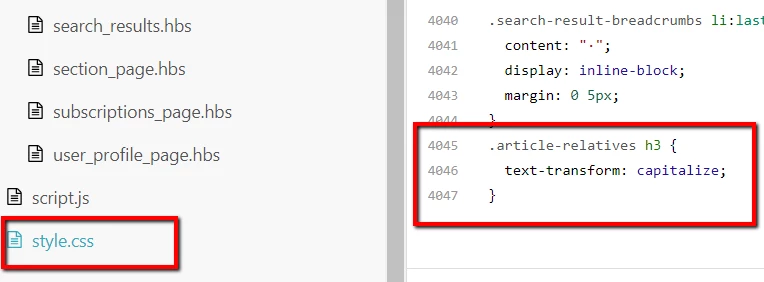
Go to the "style.css" editor tab and paste the below code on the bottom.

.article-relatives h3 { 
text-transform: capitalize;
}

For Search Result page see below steps

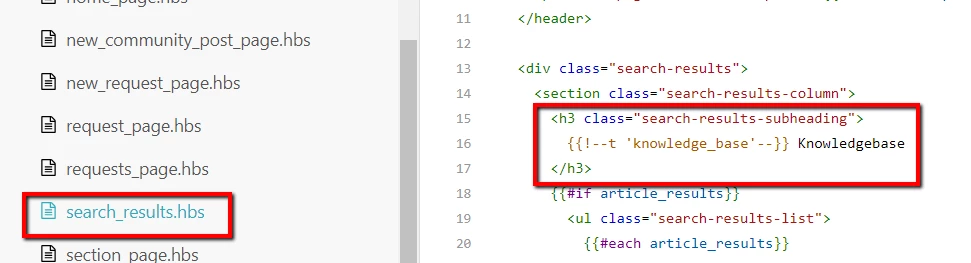
Go to the "search_results.hbs" editor file > Go to the line no. 16 > Comment the code and add your own text.

If you are using multi-language support in your Help Center you can also use the Dynamic Content.

Please let us know if face any issue.

Thanks

Customer Support Theme Team

This topic has been closed for replies.

2 replies

o2dis
  • Answer
  • February 23, 2018

Hello @Sherri Anderson,

If you are using Zendesk Copenhagen Theme. See below steps - 

Go to the "style.css" editor tab and paste the below code on the bottom.

.article-relatives h3 { 
text-transform: capitalize;
}

For Search Result page see below steps

Go to the "search_results.hbs" editor file > Go to the line no. 16 > Comment the code and add your own text.

If you are using multi-language support in your Help Center you can also use the Dynamic Content.

Please let us know if face any issue.

Thanks

Customer Support Theme Team


  • Author
  • February 23, 2018

Well .... that was a little too easy. *blush

Thank you so much for your help! Worked perfectly!