
Customizing Category page | The place for Zendesk users to come together and share
Skip to main content
July 12, 2021
Question

Customizing Category page

  • July 12, 2021
  • 58 replies
  • 189 views

Hello,

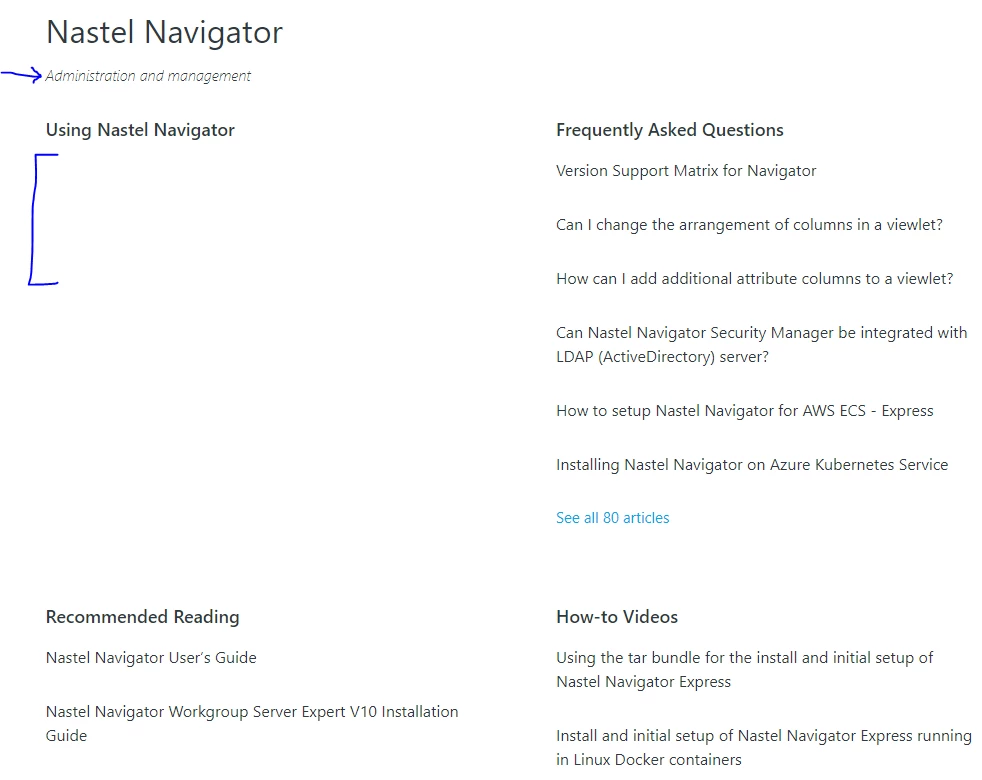
I apologize if these questions have been asked already, I was unable to find answers.  I had the following questions about customizing the Category page (see attached image for reference).

  1. Is there a way to remove the Category description?  In the attached image this is "Administration and managment"
  2. How can I display the subsections?  In the attached image, you will see the "Using Nastel Navigator" section is empty.
  3. How can I display the articles as a bulleted list with less space between articles?  So for example, under "Frequently Asked Questions," how can I have bullet displayed next to each article and how can I make the spacing between each article less?

Thank you in advance for any help offered : )

-Victoria


58 replies

July 14, 2021

Hi Pulkit,

I appreciate it : )
For the arrows, something like one of the following:


Or, if that is not possible, then like this:

Thanks,
Victoria

Pulkit12
Newcomer
July 14, 2021

Okay, I will come up with the solution :)

Pulkit12
Newcomer
July 14, 2021

Hi Victoria Campagna

Please add the below code at the bottom of your style.css file

.section-tree .section-list .section-list-item a {
justify-content: unset;
}

.section-tree .section-list .section-list-item a:after {
content: '>';
font-size: 20px;
margin-left: 5px;
}

Let me know if it solves your issue

Thanks

Pulkit

July 14, 2021

Hi Pulkit,

That's exactly what I wanted, thank you!  I might have lied when I said I only had one more question :*(

If it's possible, can you help me with 2 more changes? 

The first one is to make the space below the header slightly bigger. 

The second one is to move the bullets over so that they line up with the headers.  In the image below, see the bullets below "Frequently Asked Questions" as an example.  Under "Recommended Reading" and "How-to Videos" is how they appear now.

Thank you again,
Victoria

Pulkit12
Newcomer
July 14, 2021

Hi Victoria,
Happy to hear that it solves your issue :)
I will provide you the solution for your questions 😊

Thanks
Pulkit

Pulkit12
Newcomer
July 14, 2021

Hi Victoria Campagna

Please, add the following CSS at the bottom of your style.css

Solution for your 1st question

.category-content .page-header h1 {
margin-bottom: 25px;
}

Solution for your 2nd question

.section-tree .article-list {
list-style: disc;
list-style-position: inside;
}

Let me know it solves your issue 

Thanks 

Pulkit

July 14, 2021

Hi Pulkit,

Woohoo!  My Category page now looks perfect :)  You have been so incredibly helpful.  Thank you, thank you, thank you!

-Victoria

Pulkit12
Newcomer
July 14, 2021

Hi Victoria Campagna

It's my pleasure to help you :)

Ping me anytime if you need any futher help

Thanks 

Pulkit

December 19, 2022

@pulkit12 Hi, how can I use bullet points for articles in my section page please?


Pulkit12
Newcomer
December 19, 2022

Hi Oliver Mottram

Please, add the below CSS at the bottom of your style.css file 

.section-content .article-list {
list-style-type: disc;
list-style-position: inside;
}

Let me know if it solves your issue 


Thanks 

Pulkit 

Team Diziana