Easily Make Your Zendesk Help Center Dropdown Fields Searchable | The place for Zendesk users to come together and share
Skip to main content
Sushant
Contributor
July 24, 2024

Easily Make Your Zendesk Help Center Dropdown Fields Searchable

  • July 24, 2024
  • 17 replies
  • 267 views

Hello Zendesk Community!
 

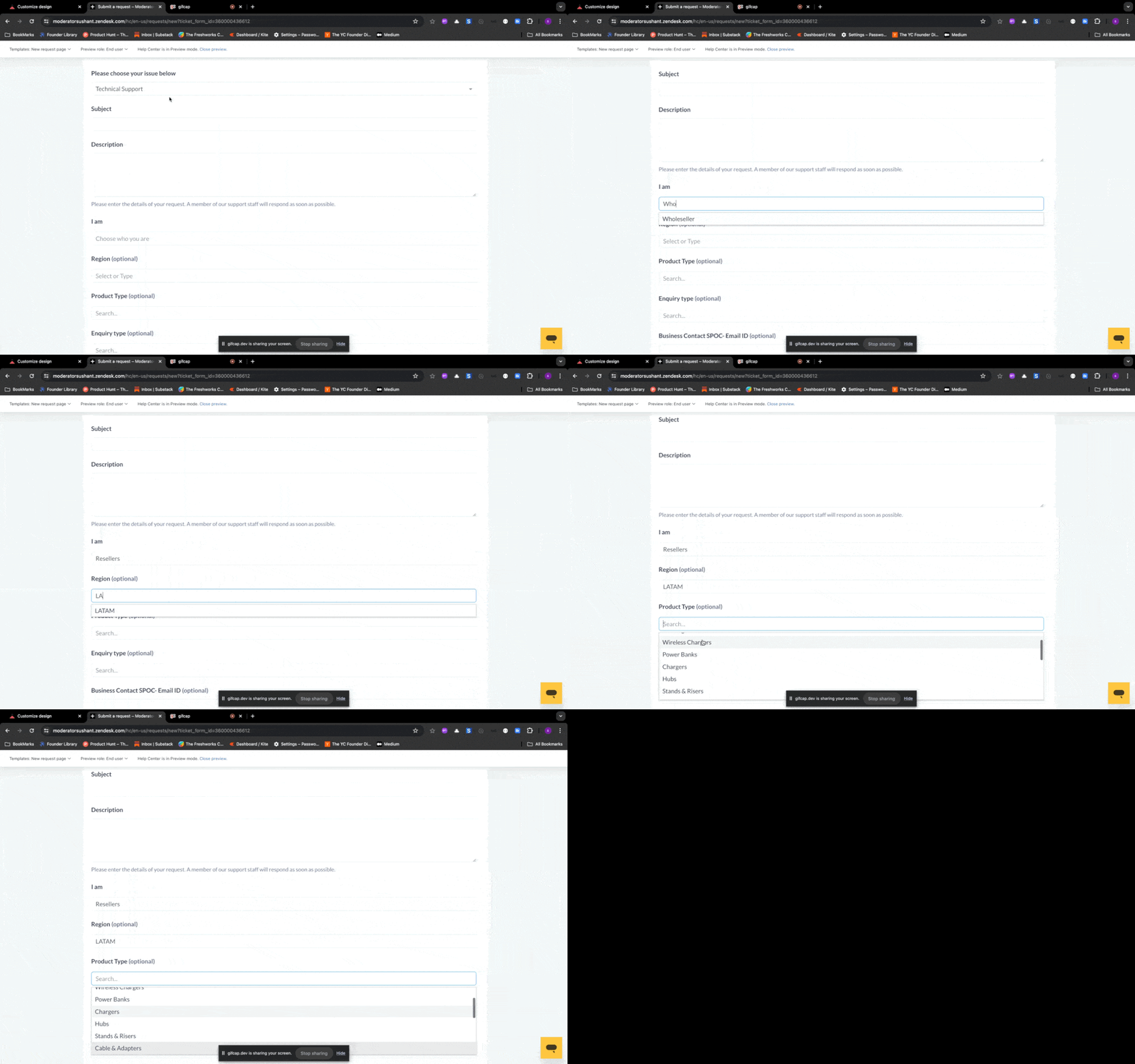
I'm excited to share a solution I've developed for a long-standing issue many of us have faced: making dropdown fields searchable in the Zendesk Help Center. 
This lightweight, efficient utility provides a seamless searching experience for dropdowns and offers additional customization options and better UI.

Request Thread here:


Here's how you can add this to your help center
 

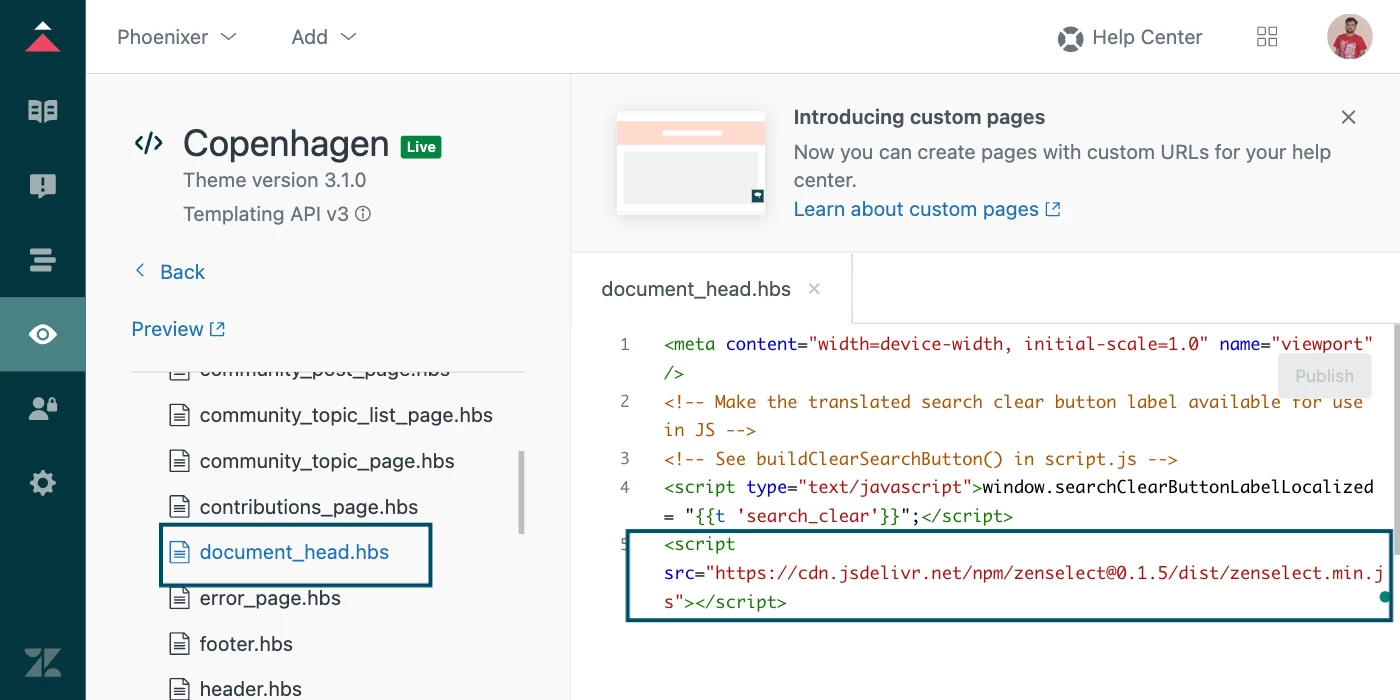
1. Add the CDN to your Help Center Open your document_head.hbs file and add the following line.

<script src="https://cdn.jsdelivr.net/npm/zenselect@0.1.5/dist/zenselect.min.js"></script>


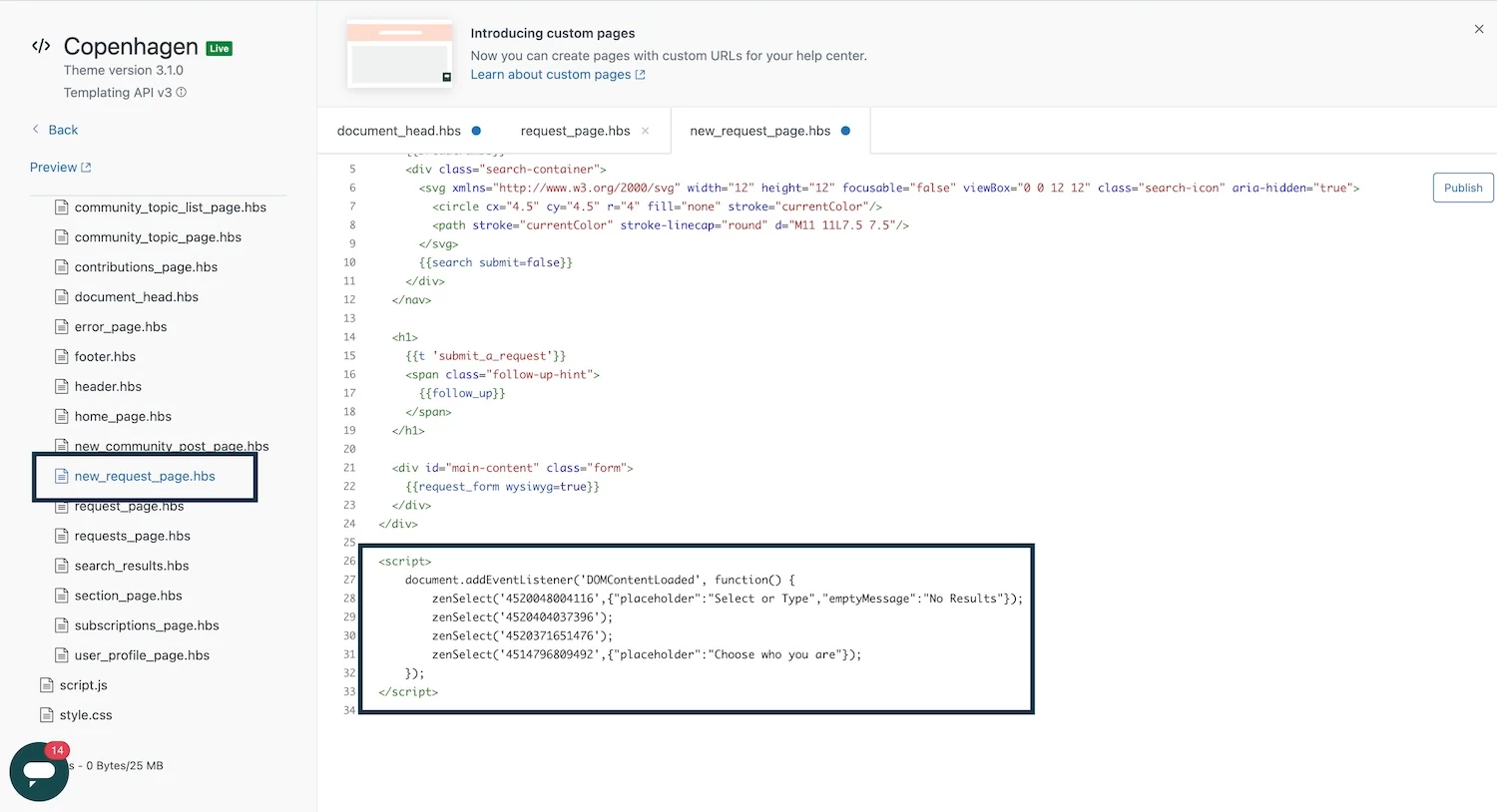
2. Add the script to your new_request_page.hbs file:
 

<script>
    document.addEventListener('DOMContentLoaded', function() {
        zenSelect('4520048004116',{"placeholder":"Select or Type","emptyMessage":"No Results"});
        zenSelect('field_id');
        zenSelect('4514796809492',{"placeholder":"Choose who you are"});
    });
</script>
  • Replace '4520048004116', 'field_id', and '4520371651476' with your actual dropdown field IDs.


That's it! Your dropdown fields should now be searchable. ✌️ 

(In fact, Utility takes care of all complex manipulations)


Additional Customization: 


This solution also allows for easy customization:

1. Custom Placeholder for dropdown
 

zenSelect('4520048004116', {"placeholder":"Select or Type"});

2. Custom No Results Message:

zenSelect('4520048004116', {"emptyMessage":"No Results"});

You can combine both options as shown in the initial script.


This solution replaces the old-style dropdown with a more user-friendly, searchable version. It's lightweight, efficient, and easy to add to your help center.

I hope this helps solve a problem many of us have been facing for years. If you find this useful, please consider supporting my work by buying me a coffee ☕ | https://www.buymeacoffee.com/phoenixer


Feel free to ask any questions or share your feedback in the comments below!

Note: Zendesk has already planned to implement this feature, though the rollout date is uncertain. In the meantime, delight your end-users with a seamless selection experience.

Nested dropdowns are not supported at this moment. However, based on feedback and demand, this feature will be included in a future version.
 

17 replies

July 2, 2025

@integriq  this seems to have stopped working (i think Zendesk updated their theme).

Jenmark
Employee
July 16, 2025
Hi Viktor,
 
Can you please clarify or point out the specific area or venue of the solution provided here, you're referring to wherein it seemed to stopped working? Also, kindly share with me the Theme & Templating API version you're using when you noticed the behavior you reported here.
 
Moreover, just want to reiterate what Sushant Awalekar [India] mentioned above that Zendesk has already planned to implement this feature, though the rollout date is uncertain. So ideally the solution shared here may not be fully supported at this moment. However, based on feedback and demand, this feature will be included in a future version.
July 21, 2025

@jenmark we used some older version of the copenhagen theme and we updated to the latest (i think its 4.5) . So this solution stopped working. Now i can search by the first letter (if i have a dropdown and press M , it will take me to the choices starting with M) but not able to type full name (As this solution was doing). 

Jenmark
Employee
July 22, 2025
Hello Viktor,
 
Thanks for sharing the step by step actions for reproduction of the behavior you reported and we're really sorry to know that the workaround solution provided here is no longer working as it used to. So since the said workaround solution isn't an official Zendesk provided, I'm afraid it wasn't guaranteed that it would work 100%.
 
Additionally, just reiterating that Zendesk has already planned to implement this feature, though the rollout date is uncertain. Moreover, I saw this comment from one of our Product Managers in this Community Post, wherein our Developers plan to roll out templating APi v4  and the accompanying update to the Copenhagen theme, which is part of the roadmap development towards providing dropdown search out-of-the-box very soon.
 
However, due to competing priorities of product improvements & enhancements, I'm afraid we can't provide any timeline yet nor any information more than this for now. Hence we suggest you follow this Community Post and you may also share your insights & use-case as comment so it may be used by our Developers for the said  product improvement/enhancement.
August 18, 2025

Hi @1263213534169


Is there going to be an updated script for Themes. v4.5


Sushant
SushantAuthor
Contributor
August 21, 2025

Hi @jack15  @viktor13 

Yes —New version of zenselect is currently in beta 🎉 

This release includes support for v4.5 and will be published as an npm package in mid October.
 

👉 If you’d like to try out the beta version, let me know and I’ll share access.
 

Honestly, I was a bit surprised to see that Zendesk still hasn’t made dropdown fields searchable natively. For a while, I even put this development on hold thinking Zendesk would eventually bring it out-of-the-box — but I guess the time isn’t right just yet. No worries though, that’s exactly why this project(ZenSelect) exists 🙂

The new version comes with

  • ✅ Automatic detection of select/dropdown fields
  • ✅ Searchable dropdowns without extra setup
  • ✅ Improvements in performance and flexibility and other controls
  • 🚀 More enhancements are also on the way!


    Here’s a little sneak peek of how it looks in beta 👇


September 2, 2025

Hi @integriq 


Of course - Will happily take a look and try it out.