
How do I display sub-sections as blocks - just as sections are displayed in the homepage? | The place for Zendesk users to come together and share
Skip to main content
Sep 4, 2021 11:02 PM UTC
Question

How do I display sub-sections as blocks - just as sections are displayed in the homepage?

Hello everyone, 

I'm trying to display my subsections as blocks, just as the sections are displayed on the Help Center homepage (see image below). I'm using the default Copenhaguen Theme and haven't made any modifications to it.
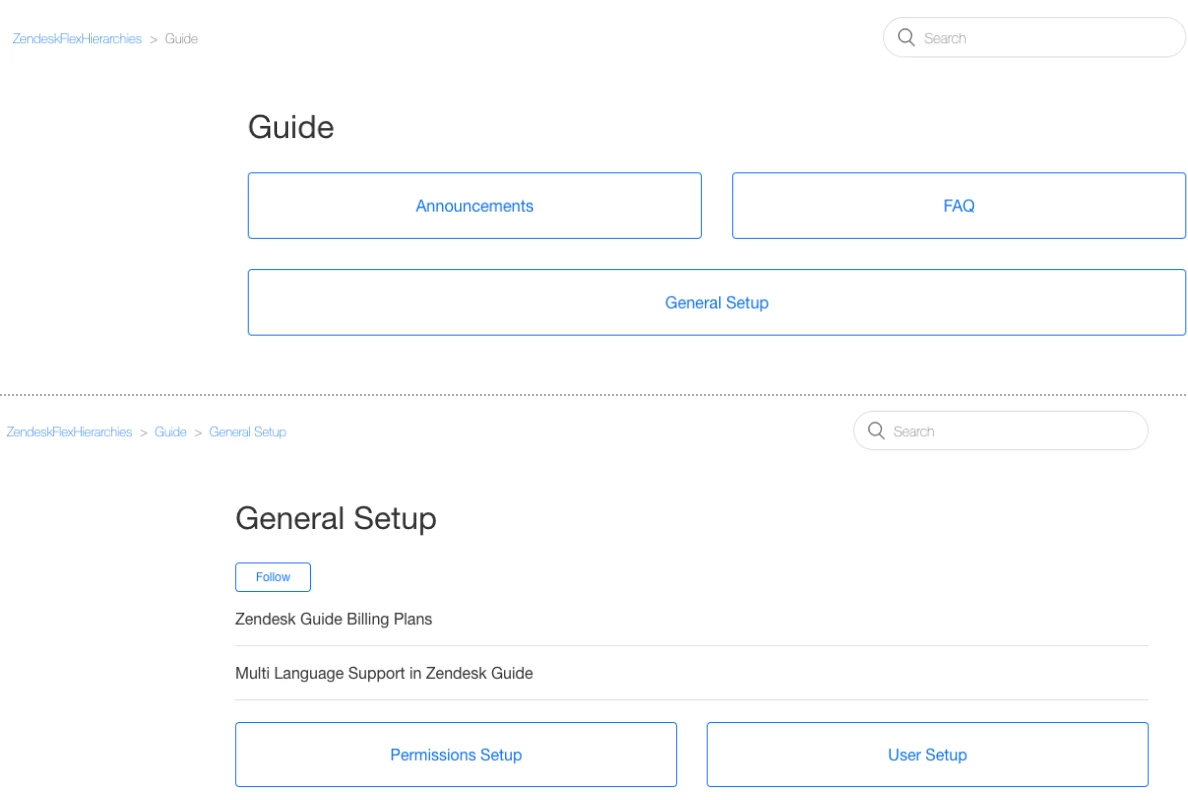
I'd appreciate anyone's help. Thanks in advance!

17 replies

Greg K
Employee
Sep 7, 2021 6:23 PM UTC

Hi Matias! The images that you shared are from this article and from what I can tell, the gist for subsections will do exactly what you're looking for. Just in case I'm misunderstanding, could you let me know what that code example is missing?

Translate
Ifra
Community Expert
Sep 8, 2021 5:39 AM UTC

Hi @Matias Ricci Brochiero,

The given code snippet is for the subsections for the homepage, you can add the code anywhere on the home_page.hbs file. I'm using Copenhagen Theme.

 <ul class="blocks-list">
{{#each categories}}
{{#each sections}}
{{#if sections}}
{{#each sections}}
<li class="blocks-item">
<a href="{{url}}" class="blocks-item-link">
<span class="blocks-item-title">{{name}}</span>
</a>
</li>
{{/each}}
{{/if}}
{{/each}}
{{/each}}
</ul>


Screenshot for the same:


Output is:


Thanks

Team

Translate
Thank You :)
Matias12Author
Sep 8, 2021 2:37 PM UTC

Hi Ifra & Greg - I appreciate your responses.

@Greg - Community Manager, I've tried those, but when I add them to my code nothing happens. Everything seems to be the same.

@Ifra Saqlain, maybe I wasn't clear enough. I want sections & subsections to be displayed as blocks not only on my homepage (sections there are already blocks by default) but also in the subsequent section pages. 

Thanks again for your time. Looking forward to your help,

Matt

Translate
Ifra
Community Expert
Sep 8, 2021 5:19 PM UTC

@Matias Ricci Brochiero,

Have a look at the code:


1). Homepage suctions & subsections code.

 <ul class="blocks-list">
{{#each categories}}
{{#each sections}}
<li class="blocks-item">
<a href='{{url}}' class="blocks-item-link">
<span class="blocks-item-title">
{{name}}
</span>
<span class="blocks-item-description">{{excerpt description}}</span>
</a>
</li>

{{#if sections}}
{{#each sections}}
<li class="blocks-item">
<a href="{{url}}" class="blocks-item-link">
<span class="blocks-item-title">{{name}}</span>
</a>
</li>
{{/each}}
{{/if}}
{{/each}}
{{/each}}
</ul>


Screenshot for the same:


Output would be: Sections & subsections are showing as a block on homepage.


2). Code snippet for section page.

   <ul class="blocks-list">
{{#if section.sections}}
{{#each section.sections}}
<li class="blocks-item">
<a href="{{url}}" class="blocks-item-link">
<span class="blocks-item-title">{{name}}</span>
</a>
</li>
{{/each}}
{{/if}}
</ul>


Screenshot for the same:


Output would be :


When you add the subsection code on your HBS files, pay attention on the class-name.

<ul class="blocks-list">:                      blocks-list

<li class="blocks-item">:                        blocks-item

<a href="{{url}}" class="blocks-item-link">:                         blocks-item-link

<span class="blocks-item-title">{{name}}</span>:                   blocks-item-title


These are default classes which create the blocks for the section, subsection if you use sequently as I did above with <ul>, <li>, <a> & <span> tags.

You can use subsection code on category, section and homepage with the those classes to create the blocks on any template.


You only need to follow this structure with the same/default classes  to get the subsection as a block.

For the section page
----------------------

<ul class="blocks-list">
{{#if section.sections}}
{{#each section.sections}}
<li class="blocks-item">
<a href="{{url}}" class="blocks-item-link">
<span class="blocks-item-title">{{name}}</span>
</a>
</li>
{{/each}}
{{/if}}
</ul>


For the category page
-----------------------
<ul class="blocks-list">
{{#if sections}}
{{#each sections}}
<li class="blocks-item">
<a href="{{url}}" class="blocks-item-link">
<span class="blocks-item-title">{{name}}</span>
</a>
</li>
{{/each}}
{{/if}}
</ul>


If any confusion do let me know :)

Thanks

Team


Translate
Thank You :)
Greg K
Employee
Sep 9, 2021 9:28 PM UTC

In addition to the incredibly helpful post by @Ifra Saqlain (thank you!), I also wanted to mention that if you haven't made any modifications to your help center at all, the only reason that your sections would be showing on the home page is if you only had one category. Once you have more than one category that contains visible articles to the user, the categories will show on the home page instead. 

Translate
Matias12Author
Sep 13, 2021 1:08 PM UTC

Thank you both for your help! I appreciate it.

Translate
Peter37
Oct 29, 2021 11:55 AM UTC

Hi,

Thanks for the code @ifra

After adding this code into category_page.hbs, I can see sections as blocks, but they are also visible as links below the blocks.

How to exclude links below, and only have blocks displayed?

For the category page
-----------------------
<ul class="blocks-list">
{{#if sections}}
{{#each sections}}
<li class="blocks-item">
<a href="{{url}}" class="blocks-item-link">
<span class="blocks-item-title">{{name}}</span>
</a>
</li>
{{/each}}
{{/if}}
</ul>
Translate
Peter37
Oct 29, 2021 1:24 PM UTC

To make it clear, I just want sections shown in blocks when a category is opened. I don't need articles shown.

Translate
Ifra
Community Expert
Oct 30, 2021 4:51 AM UTC

The code I provided above is only for the sections as blocks. 


I think I should have explained a little more about it. 

Remove all code of sections and article and paste the provided code inside the wrapper as shown in the screenshot and then see the result.


Result:


If any issue then share the screenshot here.

Thanks :)


Translate
Thank You :)
Oct 24, 2023 9:50 PM UTC

@ifra

Newbie here so firstly thank-you for all posts as i have come a long way already with your help.

I have 9 Categories  (Products in my case)

Each Category has 5 Sections which are all the same [FAQ, Product Info, Troubleshooting etc]

If i use the Code above get block for all of the sections (as intended i know!)

As one of my Categories has 2 variants I have had to create 2 new Sections. Then within Each of these Sections i place the same 5 Sections as mentioned above.

Below is a graphical representation of what i see currently using the Copenhagen theme

Example if of a Category Product of T Shirts.

There are 2 variations Long and Short Sleeved


I am looking to apply the Blocks and ultimate aim to place image in them as i managed to do for the Categories on the home page.

To achieve this


The above code applies to {{#each sections}}

I only want to apply to specific Sections of my choosing (assume using the section ID)

The Copenhagen Theme is working well for the rest so dont want wish to remove complete code lines which would destroy the current section view when no variations (Sub Sections if you will)

I hope i explained myself well enough (unfortunately can not send you link to HD as not public or share screenshots)

Fingers crossed you (or anyone else) can assist.

Rgds James


Translate