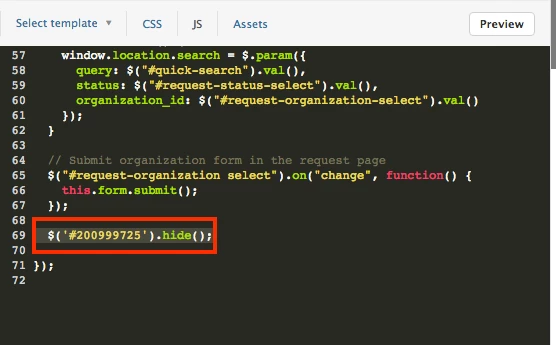
You can also use the {{#isnt}} placeholder. I prefer to not use JQuery unless absolutely needed. The code would look like this and will hide the category.
Hey Yotan - I see that Wes answered your question over in the Hiding a Category thread, so be sure to check that out. Welcome to the Zendesk Community!
@Benjamin - In order to remove the articles from the search then JQuery will not do the trick. You will need to restrict the sections to "Agents & Managers" only if you do this for each section then the Category, Sections, and articles will not show to regular end users. Only Agents & Managers will be able to see that Category on the homepage and everything under it.
You can only restrict "User Segments" at the Section Level.
User segments are really the only way that you can restrict access to content (and therefore what shows up in search results) in Help Center. Can you tell me more about why you want those articles to not be searchable?
Is it possible to hide all categories and sections without it effecting what would otherwise be found search results? If so, may I inquire as to how? In this context the hidden category and sections would be on the home and all other pages. Thank you.
I imagine that it's possible using JavaScript, but we'll need to get some of our coding gurus into the mix to give some details on what the code would look like. Can you tell me more about your use case for this?
I responded to an email with the following but do not see my reply on this thread. If this post is duplicative please accept my apologies and kindly delete one of them.
I’ve since started another thread that addresses my question. However, in answer to your question:
Here is a simplified way to consider my inquiry. Suppose you have three articles, A1, A2 and A3 all belonging to the same category and section. Suppose you have two users, U1 and U2. U1 is entitled to see A1, A2 and A3. U2 is only entitled to see A3. Under Zendesk current supported functionality, I would need two otherwise identical sections; S1 and S2. This because only sections can contain a “user segment”. Therefore, S1 needs to contain A1 and A2, and S2 would need to contain A3. Granted, I could duplicate A3 and also place it in S1, but this should be avoided for what should be obvious reasons. However, if we eliminate the *user facing name* “S1” and S2” from the equation and instead just return whatever appropriate article is inside the section, we avoid having to duplicate A3 and avoid U1 from seeing duplicative sections S1 and S2.
Unfortunately, I later come to understand that user segments are treated as an AND condition. I was hopeful that the user segment could be an OR condition, or better yet, at the discretion of the author of a particular section.
With regard to responding via email, the email notifications for Community activity come from a no-reply email, so unfortunately responding to those won't update the Community thread.
As far as organizing your content, with the current content organization functionality, restricting by Section is the only option. I'd recommend grouping your content up according to who is supposed to be able to see it, and then use corresponding user tags to create the appropriate user segments for each one.
Your welcome. We can consider the matter closed at this point, however, I would like to add the following.
I'm rather certain that I've replied to emails from Zendesk that are thread related and the reply has automatically been posted on the board.
Your suggestion of content organization is precisely what I'm doing. Trouble is, the user segments are treated as a a Boolean AND condition. Therefore, I need to replicate articles, which I'd prefer to avoid.
I'm wondering someone can help me with the following. I have a category hidden (id 111111111), but I'd like to hide another category, eg. (id 2222222). Thanks!
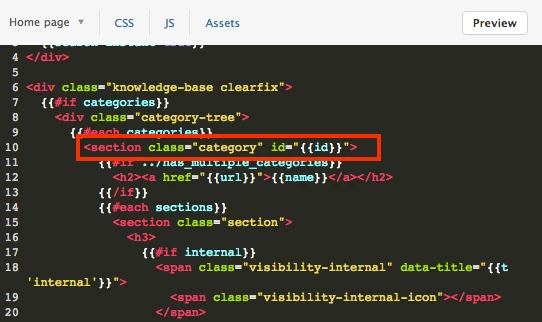
I would take a look at the helpers available to code your content. In a default Help Center, the Categories are displayed similar to the following (found in the Home Page template documentation):
If you want different behavior for a specific Category, then you can use and is or isnt helper to specify how you'd like that content to display (or not display) instead.
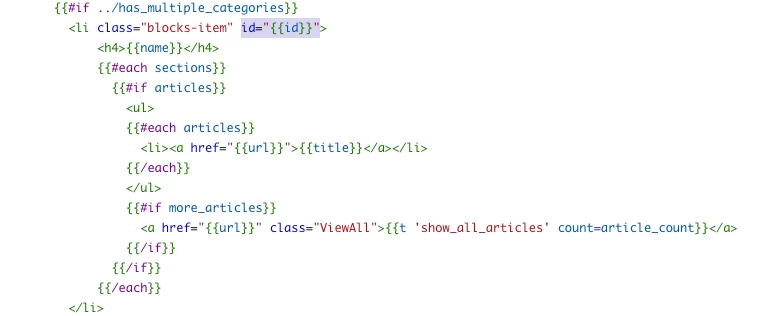
I passed an id attribute id="{{id}}" to obtain an specific ID for each Category Title. The token works great, but when I target the ID using CSS nothing happens. Could someone please help me to figure out what I am doing wrong?