Prefill and hide Subject & Description fields of specific form on New Request Template | The place for Zendesk users to come together and share
Skip to main content
Ifra
Community Expert
October 20, 2022

Prefill and hide Subject & Description fields of specific form on New Request Template

  • October 20, 2022
  • 69 replies
  • 610 views

Hello Everyone,

Credit

Zendesk Product(s): Zendesk Guide

Code Requirement: JavaScript

Template: New Request page

Scenario: Prefill the subject and description fields (if fields are required) and then hide both fields or only one field (depends on requirement).


Quetion: 

How to hide subject and description on new request template for the specific form?


Answer:

You want to hide the fields only for one form then check the form ID using the window location code with the IF condition using the JavaScript.

Source:
  
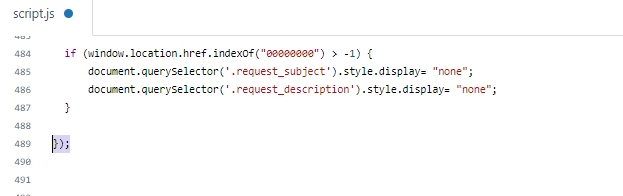
if (window.location.href.indexOf("00000000") > -1) {
      document.querySelector('.request_subject').style.display= "none";
      document.querySelector('.request_description').style.display= "none";
}


Note: Remove 00000000 and add your form-id.


Output:


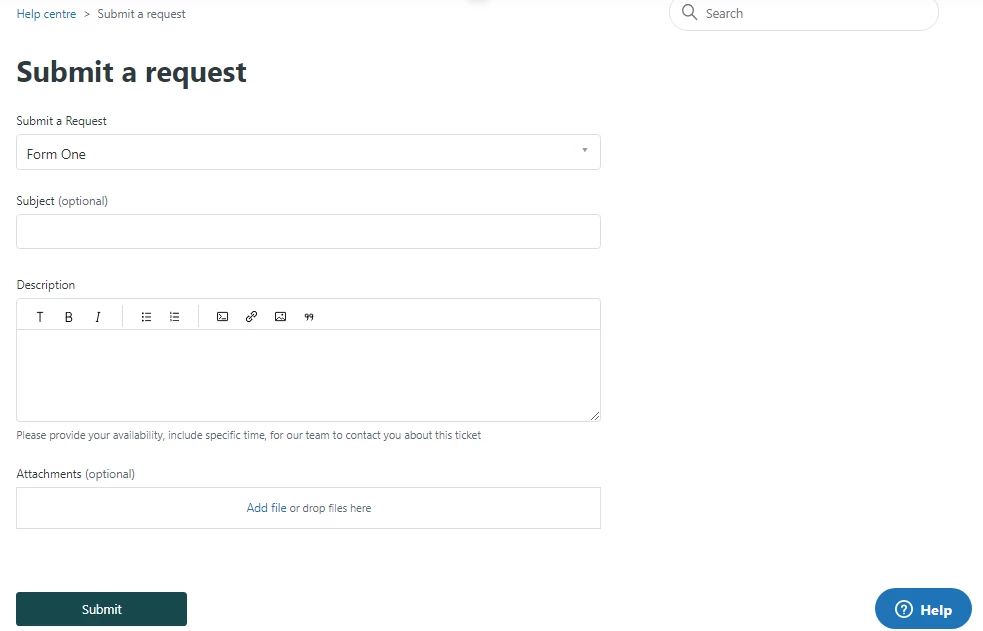
Form One - With subject and description field.


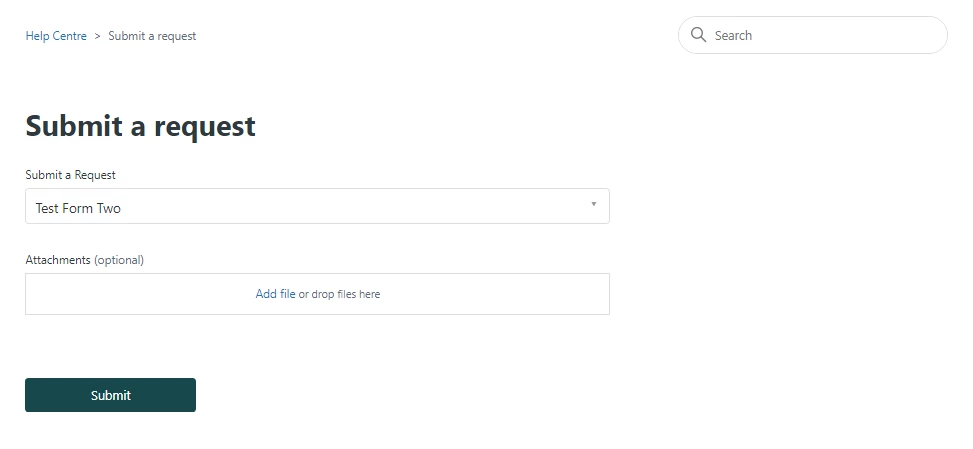
Form Two - Subject and description fields are hidden because I added the form ID of this form in the script code.


Where to add the code?

You can see how I added the code to the script.js file inside the function.

Screenshot:
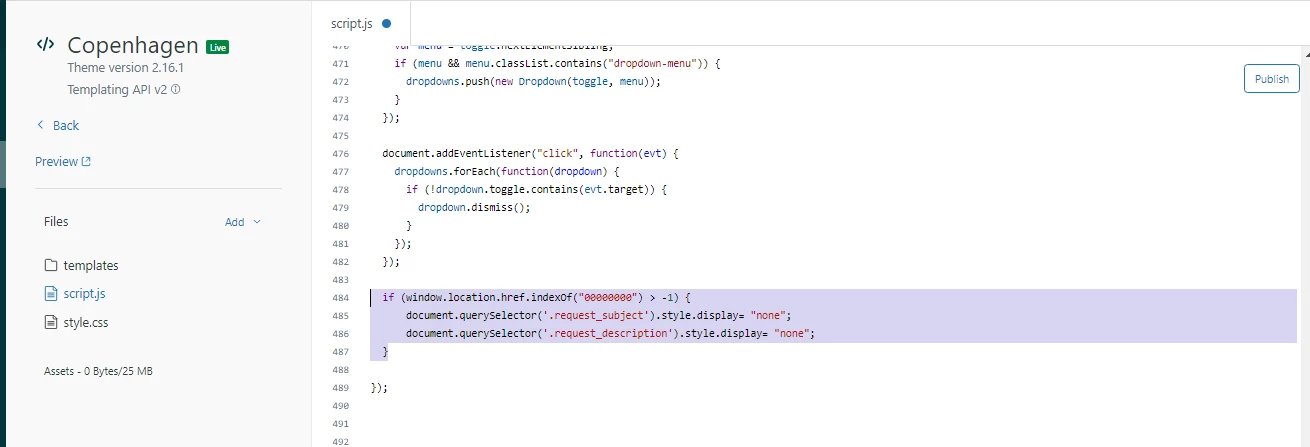
 

i). Go to Help Center > Guide Admin > Customize Design > Edit code.

ii). Find the script.js file.

iii). Add the shared code to hide subject and description field on new request template.

iv). Make sure code should be inside the DOMContentLoaded


Open Tag:


Close Tag:


Quetion:

How to get prefilled subject and description fields of a ticket of a specific form on new request template?


Answer:

If both fields are required then you can't submit a ticket without filling these. 

To get prefilled fields of specific form, use the given code.

Source:

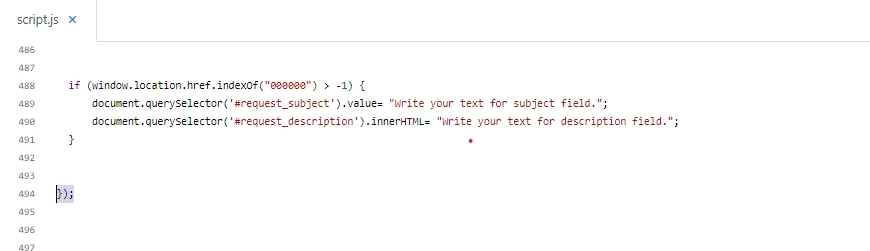
 if (window.location.href.indexOf("00000000") > -1) {
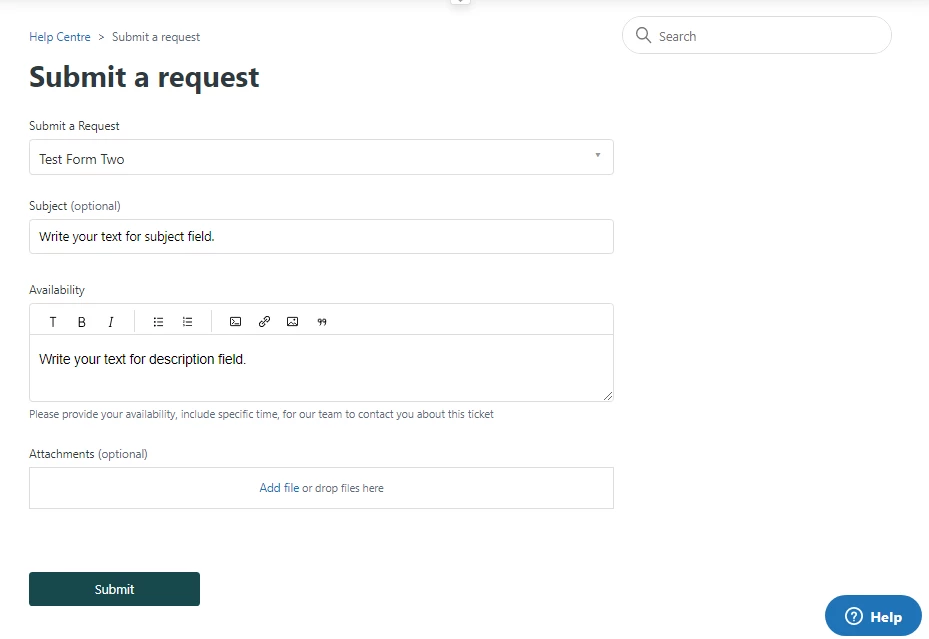
      document.querySelector('#request_subject').value= "Write your text for subject field.";
      document.querySelector('#request_description').innerHTML= "Write your text for description field.";
  }


Note: Remove 00000000 and add your form-id.


Output:


Where to add the code?
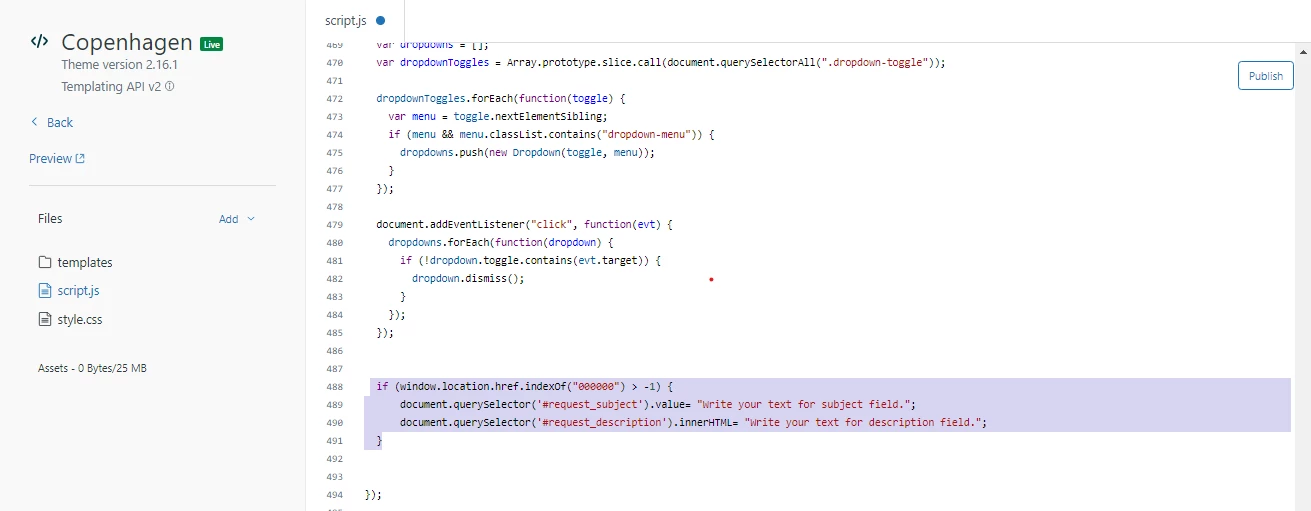
 

i). Go to Help Center > Guide Admin > Customize Design > Edit code.

ii). Find the script.js file.

iii). Add the shared code to hide subject and description field on new request template.

iv). Make sure code should be inside the DOMContentLoaded


Open Tag:


Close Tag:


Important: If your fields are required (if you have set) and you hide both then request form will not be submit. Use the below code to prefill and then hide the fields.

Source:

  if (window.location.href.indexOf("00000000") > -1) {
// Autofill subject field    
  document.querySelector('#request_subject').value= "Write your text for subject field.";  

// Autofill description field    
   document.querySelector('#request_description').innerHTML= "Write your text for description field.";
      
// Hide subject field     
  document.querySelector('.request_subject').style.display= "none";
     
// Hide description field 
 document.querySelector('.request_description').style.display= "none";
  }


NOTE: If this line of code doesn't work for anyone:-

  document.querySelector('#request_description').innerHTML= "Write your text for description field.";

they can use this line instead of the above line of code.

  document.querySelector('.request_description > textarea').value = 'Write your text for description field.';


Thanks :)


69 replies

Ifra
IfraAuthor
Community Expert
March 20, 2023

Hey Nicole, copy and paste the given code and see the output:

$("#request_subject").val("New request");
$("#request_custom_fields_12929052282519").keyup(function(event) {
  var stt = $(this).val();
  $("#request_subject").val(stt + " New Request");
});


Output:


let me know if it works for you.

Thank You
March 20, 2023

@ifra Just tried the code. When I use this, it unhides the Subject field. I did try to add the line of code to hide it, but even with that in it didn't hide. 

I added : $('.form-field.string.required.request_subject').hide();

I tried it at a couple spots (above the new code, below the new code) and nothing worked. 

Ifra
IfraAuthor
Community Expert
March 20, 2023

Nicole I just tried again:

URL


It is working, subject field already hidden in the form, I pasted that code and that is working.


Thank You
March 20, 2023

Hi Ifra, 

I just messed with the code a little bit and got it to work! Thank you for being such a rockstar! I'm going to list what worked for me below in case anyone else stumbles on this. If you can unlink our HC that would be great. I wish I could upvote your posts more than once, lol!!


//hide subject and autofill subject on submission for form
if ($("#request_issue_type_select").val() == "FormID") {
  $("#request_subject").val("New request");
  $("#request_custom_fields_fieldID").keyup(function(event) {
  var stt = $(this).val();
  $("#request_subject").val(stt + " New Request");
});
    $('.form-field.string.required.request_subject').hide(); // Hide subject 
};


March 22, 2023

Hi @ifra Can you possibly unlink our HC two comments up? Thank you so much, and as always, I appreciate your help so very much!!

Ifra
IfraAuthor
Community Expert
March 22, 2023

Thanks Nicole!


Thank You
March 22, 2023

Hi @ifra, its the link in your comment on this page. TY!


Ifra
IfraAuthor
Community Expert
March 22, 2023

Done!

Thank You
Rae12
April 26, 2023

Hi @ifra I'm trying to adapt this code to completely hide forms from the new_request list. 

This is what I've got so far, but it's not working

if (window.location.href.indexOf("new_request") > -1) {
    document.querySelector('.ticket_form_id=4719898103693').style.display= "none";
    document.querySelector('.ticket_form_id=360000334451').style.display= "none";
}

I'm using a Zenplates theme, and there isn't a DOMContentLoaded line at the top of the script.js template page. 

Ifra
IfraAuthor
Community Expert
April 26, 2023

No problem Alyssa !

completely hide forms from the new_request list

Means, you are hiding forms from dropdown list?

If Yes, use the below code: add the given code to your script.js file at the bottom area.

document.addEventListener("DOMContentLoaded", function() {

 document.querySelector('.nesty-panel').addEventListener('DOMNodeInserted', function(event) {
  
 event.target.querySelector('li[id="0000000"]').remove();
    
 event.target.querySelector('li[id="1111111"]').remove();


  });
});


0000000 and 1111111 is my form ID which I wanna hide from dropdown list on new request page.


Replace these ids with your IDs and you can hide mode forms just adding this single line of code:

 event.target.querySelector('li[id="222222"]').remove();


Credit: @Sam

https://support.zendesk.com/hc/en-us/community/posts/4409515399066-How-to-disable-the-ticket-form-dropdown-


Thank You