Redirect a link from the Community Topics page | The place for Zendesk users to come together and share
Skip to main content
Robert31
Jul 12, 2022 12:36 AM UTC
Question

Redirect a link from the Community Topics page

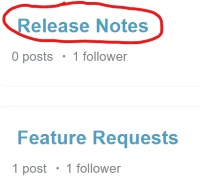
On the Topics page, is it possible to change the link behind a particular topic, in this case, 'Release Notes', to go somewhere other than to the page that displays the topic?

5 replies

Ifra
Community Expert
Jul 12, 2022 4:42 AM UTC

Hi fkrugerx, 

Follow the below points:-

i). Go to the 'community_topic.hbs' page

ii). Add the template name via copy-paste the below code at the top area..

<script>
var tempName = 'community-topic-page';
</script>


Screenshot:-


iii). Now, go to thescript.js file and paste the code at the bottom area.

if(tempName == 'community-topic-page') {
var _x = $("a.striped-list-title:contains(Release Notes)").attr("href", "TYPE YOUR EXTERNAL URL");
}


Screenshot:-


Add your URL here:-


If any issue do let me know :)


Thanks

Team

Translate
Thank You :)
Apr 26, 2023 10:20 AM UTC

Hi @robert31 and @ifra I'm trying to do the same thing with one of our community sections but unfortunately the redirect doesn't work. I've used the exact same code as above but replaced the contains value to look for "Announcements" as that's our section title.

The external URL has been updated to be the section within Guide for our new announcements too and nothing seems to happen unfortunately. @robert31 Were you able to get the code working as intended?

Translate
Ifra
Community Expert
Apr 26, 2023 6:08 PM UTC

@Scott Wallace, can you share the URL of that page where you want to do the changes regarding external URL?, then I will share the exact solution for your query.

If not, then share the screenshot of that section and page name as well.

Translate
Thank You :)
Apr 27, 2023 10:05 AM UTC

@ifra The community page is here and it should redirect to this section in Guide.

The code looks as follows:-

Translate
Ifra
Community Expert
Apr 28, 2023 8:08 AM UTC

Scott Wallace, use the given code

$("a.button.button-large:contains(What's New?)").attr("href", "https://connect.act-on.com/hc/en-us/categories/13386837131927-What-s-New");


Translate
Thank You :)