As part of our ongoing goal to improve our help center articles for AI AND human consumption, we’ve been attempting to do some format standardization.
Zendesk has some features that can help towards this, but there was a significant gap that I found, which led me to using Claude Skills to assist.
What Zendesk CAN do:
- you can create help center article “templates” to guide the creation of new articles.
- you now have more flexibility to select a specific font color. It used to be a limited selection, and our brand color was not included! But I see that recently, that has changed and we could put in our exact brand color #784FFF if we wanted.
What Zendesk CAN’T do:
- You can’t apply a template to existing articles.
- You can’t add borders to a screenshot. My previous workaround was to create a 1x1 table to act as a border but it was not pretty!
- You can’t ask Zendesk to remember your general formatting rules and ask it to apply them across many articles.
How I have used Claude:
I worked with Claude to create what they call a “Skill” for formatting our articles.
First, I copied the html of existing articles using this button at the top of the article:
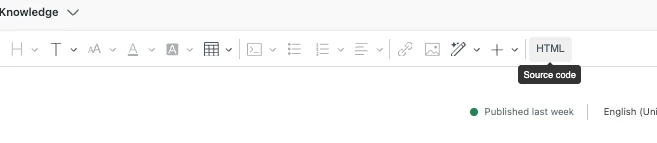
I shared the html from a handful of our articles with Claude so it had a basic understanding of the type of format we were currently using. Then I iterated with Claude on it to discover what kind of suggestions it had for improvement, what things I wanted to keep, etc.
In order to continue iterating on it, I would copy the html from another article and ask it to apply the new formatting rules. It would sometimes result in us finding gaps in our “rules” and we would add to them.
I’ve also shared a full list of ALL our articles so that it can identify potential opportunities for linking from one article to another, opportunities to standardize further when two articles might be referencing the same feature, etc.
Now, I’m going through all of our articles one by one, copying the html from the article, pasting it into Claude, asking it to run my “help center formatting” skill, and it’ll spit out the new html, which I can paste into Zendesk.
I have also used it to create the html for new articles, sharing screenshots from our product and basic info about that feature/report and asking it to draft a new article. It knows the structure for three different variations of article (how-to, report reference, and conceptual).
If it would help for you to see specifics, here’s a link to a document with the text from the Skills.md so you can see the general system prompt that Claude has when it begins to run the skill, as well as the standards.md that contain the *specific* instructions for my articles. To be clear: I did NOT write these documents. I iterated with Claude on what I wanted and IT wrote these documents in the best way to help itself understand the specs when it would begin to run the Skill.
Enjoy! Hope this helps! If you want to try something similar, just ask Claude to “help me build a skill to _______” and Claude knows how to get you started. :)
I’m happy to answer any questions as well.