A nav bar app that gives your support team a single place to understand how macros are being used and to browse all Chat shortcuts. It lives in the left-side navigation bar so agents and admins can access it at any time, independent of any open ticket.
The app has two tabs:
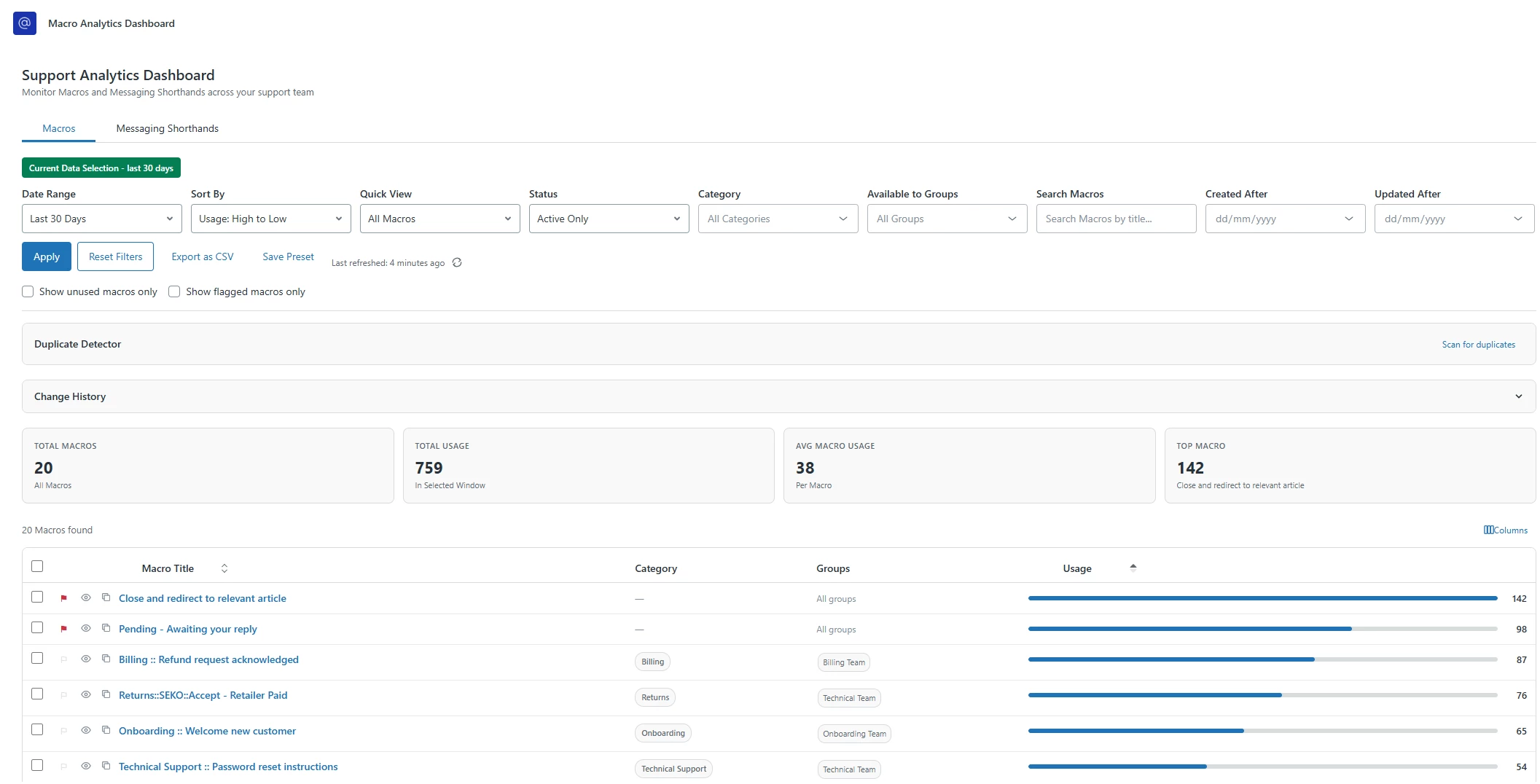
- Macros
- usage analytics, filtering, bulk actions, and housekeeping tools
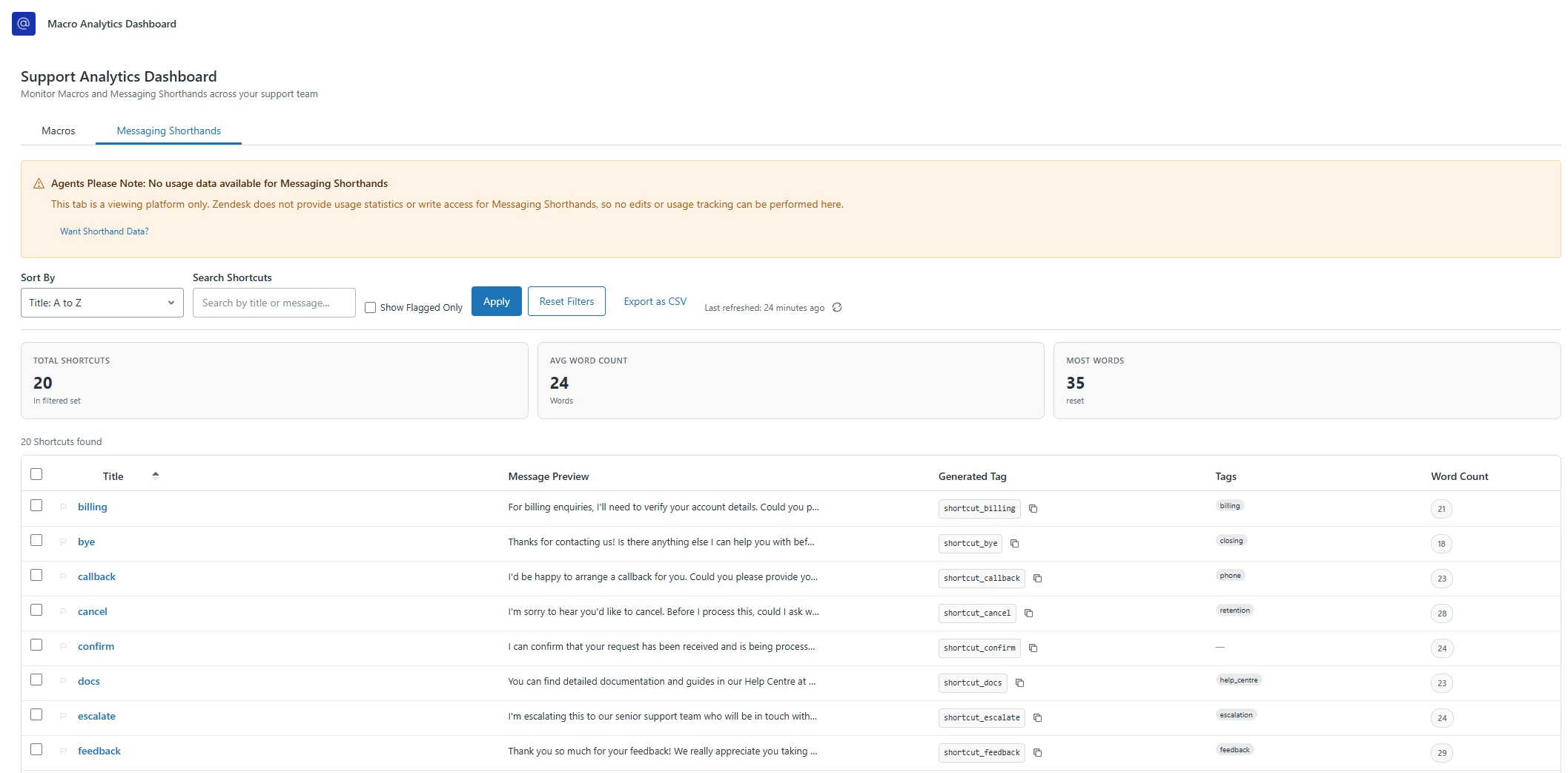
- Chat Shortcuts
- a read-only browser for all Zendesk Chat shortcuts with search, tagging, and export
Why this is useful
Zendesk doesn't have a built-in view that shows you macro usage data alongside filtering, duplicate detection, and bulk management in one place. If you manage a large macro library, it can be hard to know which macros are stale, which ones overlap, or which groups are using what. This app surfaces all of that in a single dashboard.
For Chat shortcuts, the native Zendesk Chat interface doesn't let you search, sort by word count, export to CSV, or generate tag slugs for tracking purposes. This tab fills that gap.
What the Macros tab does
- Fetches all macros via
GET /api/v2/macroswith usage sideloads - Displays a stats bar showing total macros, total usage, average usage, and the top macro
- Lets you filter by date range, category, group, status, and free-text search, with a Created After and Updated After date filter
- Supports saved filter presets stored in localStorage so you can jump back to common views
- Shows a stale data indicator with a manual refresh button
- Renders a sortable table with configurable column visibility (title, category, groups, usage, and more)
- Macro titles link directly to Zendesk Admin Center
- Each row has an eye icon that opens a read-only preview modal of the macro's actions
- Each row has a clone button that creates a copy of the macro via
POST /api/v2/macros - Duplicate Detector panel uses Jaccard word-level similarity (threshold 0.6) and identical action string matching to surface potentially redundant macros
- Change History Log panel tracks bulk actions and edits in localStorage (capped at 200 entries)
- Bulk actions: activate, deactivate, delete, add tag, export selected, or open selected macros in new tabs
- Export as CSV for the full filtered result set
What the Chat Shortcuts tab does
- Fetches all shortcuts via
GET /api/v2/chat/shortcutsand normalises the object-keyed API response to an array - Displays a stats bar with total shortcuts, average word count, and the longest shortcut
- Search by title or message content with live search term highlighting
- Sort by title A-Z/Z-A or word count high-to-low/low-to-high
- Sortable table with title, expandable message preview, Tags (Garden Tag pills), Generated Tag, and word count columns
- Generated Tag column derives a
shortcut_prefixed slug from the title and includes a copy-to-clipboard button with 1.5-second checkmark feedback - Flag/unflag individual shortcuts with persistence to localStorage so bookmarks survive page refreshes
- Per-row checkboxes and select-all for bulk selection, with bulk Open in Admin Center and Export Selected actions
- Export as CSV including all columns
- Graceful error handling: if Zendesk Chat is not enabled, a warning Alert explains why the tab can't load data, with a "Want Shorthand Data?" button that opens a modal explaining how shorthand usage tracking could be set up manually using the Generated Tag column
APIs used
| API | Purpose |
|---|---|
GET /api/v2/macros | Fetch all macros with usage sideloads |
GET /api/v2/macros/categories | Populate category filter |
GET /api/v2/groups | Populate group filter |
GET /api/v2/ticket_fields | Macro action context |
GET /api/v2/ticket_forms | Macro action context |
PUT /api/v2/macros/update_many | Bulk activate/deactivate/tag |
DELETE /api/v2/macros/destroy_many | Bulk delete |
PUT /api/v2/macros/{id} | Single macro update |
POST /api/v2/macros | Clone a macro |
GET /api/v2/chat/shortcuts | Fetch all Chat shortcuts |
zafClient.get('currentAccount.subdomain') | Build Admin Center deep links |
Tech stack
- React 18
- Zendesk Garden v9 (Tabs, Table, Combobox, Input, Button, Modal, Alert, Tag, Tooltip, Spinner, Checkbox)
- Zendesk App Framework (ZAF)
- styled-components
- localStorage for presets, column visibility, change history, dismissed duplicates, and flagged shortcuts
Key design decisions
Custom dropdown component. All single-select filters use a fully-controlled CustomSelect component rather than a native HTML select. This gives consistent styling across the filter panel: grey border that turns blue on hover/focus, a chevron icon, and a left blue accent bar with light blue background on the selected item.
Duplicate detection without a backend. The Duplicate Detector runs entirely client-side using Jaccard similarity on macro title words. No external service needed.
Chat API normalisation. The Chat shortcuts API returns an object keyed by shortcut name rather than an array. The fetchShortcuts utility in apiUtils.js handles this normalisation transparently so the rest of the app works with a plain array.
Generated Tag slug. The Generated Tag column in the Shortcuts tab derives a shortcut_ prefixed slug (lowercase, special characters replaced with underscores) from the shortcut title. This is designed to be used as a Zendesk tag on tickets to track which shortcuts are driving resolutions, even though the Chat API doesn't provide native usage data.
How to install
This app is built with the Zendesk App Builder. Once published, it appears as an icon in the left-side nav bar of the agent interface. No external credentials or OAuth setup is required - it uses only Zendesk's own APIs via ZAF.
Built with Zendesk App Builder. Feedback and questions welcome in the comments.