
Restricting Satisfaction Surveys by Date | The place for Zendesk users to come together and share
Skip to main content
ZZ59
Oct 3, 2017 7:12 AM UTC

Restricting Satisfaction Surveys by Date

Introduction

Customers with many tickets can become overwhelmed with satisfaction surveys. This frustrates the customer and can lead to invalid satisfaction metrics. This guide will show how to suppress a customer's notifications after a recent survey.

The inspiration and code comes from Moderator Joel Hellman. The typos are all mine.

Method

 To capture the last survey date, create:

  • A user field to hold the notification date value
  • An Webhook to populate the user field with a date 

To suppress notifications:

  • Create a new automation offering satisfaction without a notification
  • Change the standard automation to record the satisfaction notification date
  • Order your automations to ensure the new automation fires before the standard automation

Custom date field

Go to Admin>Manage>User Fields and create a new date field, 'Last Satisfaction Date'.
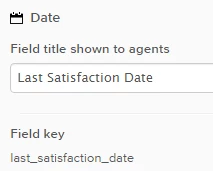
Ensure you have a field key value, 'last_satisfaction_date'. The Webhook will use this.

Webhook

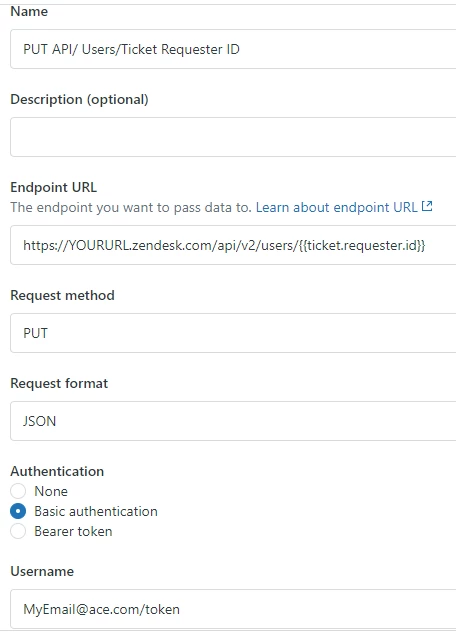
Go to the Admin Centre>Apps and Integrations>Webhooks.

Use the Action menu to create a new Webhook

Title: PUT API/ Users/Ticket Requester ID

URL: https://YOURURL.zendesk.com/api/v2/users/{{ticket.requester.id})

Method: PUT

Content type: JSON

Ensure you replace YOURURL with your own Zendesk.

For authorisation, tick the Basic authentication box. Enter an administrator's email address and password or create an API token.

The screen may look like this:
 

Create a new customer satisfaction automation

Go to Admin>Business Rules>Automations. Find your automation that sends satisfaction notifications. The default is 'Request customer satisfaction rating (System Automation)'. Clone this automation.

Rename the cloned automation to 'Customer satisfaction rating (Notification recently sent)'. Here is an example of the conditions.
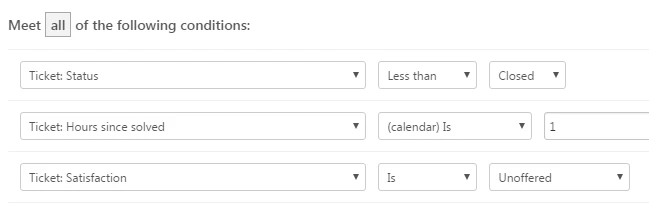
Here the automation will fire if the ticket is not closed, has been solved for an hour and the satisfaction rating is not offered.

Add a further condition to check when satisfaction was last offered by email.

The trigger will now only fire if the satisfaction notification was sent in the last week.

In the Action section, remove the notification action. An action is still need to offer satisfaction to allow the customer to rate the ticket in the Help Centre.

For reporting, you can add a further action adding a tag to the ticket. You can then use Insights to track the impact of suppressing notifications.

Change the standard automation

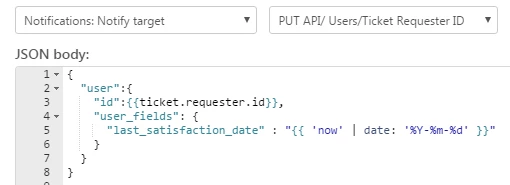
Go to Admin>Business Rules>Automations and edit the standard satisfaction automation. Add a new action to notify target and select the 'PUT API/User/Ticket Requester ID' created earlier.

In the JSON body, paste the code:

{
"user":{
"id":{{ticket.requester.id}},
"user_fields": {
"last_satisfaction_date" : "{{ 'now' | date: '%Y-%m-%d' }}"
}
}
}


The action should look like this:
Order your automations

Ensure this new automation appears before the standard automation. Select 'Reorder page' from the more actions menu. Drag the new automation above the system automation.
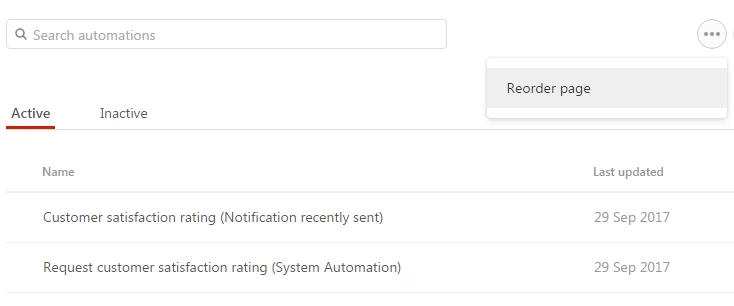
Customers with a recent notification can rate their tickets in the Help Centre.

Customers without a recent notification will receive a new satisfaction survey notification. The user account custom date holds the last notification date.

47 replies

ZZ59
ZZ59Author
Feb 15, 2018 7:47 AM UTC

Sheldon

Glad you have not given up on CSAT. Can you paste a screenshot of the JSON part of your trigger? It may just take some fresh eyes to spot the problem.

Translate
Mar 28, 2018 10:32 AM UTC

Hi everyone,

Could it be that the automatisation "notification recently sent" doesn't works when you have 3 surveys for the same customer on the same day?

I have an example where the survey question was sent for 3 ticket to the same customer on the same day.

As you can see in the screenshots, the "last satisfaction date" was on 26 March 2018.

I have 3 ticket examples where the automatisation for survey was fired on that date (26/03/2018)

One.

Two.

Three.

Normally my automatisations are correct:

=> ask for survey


Notifaction recently sent:


Overview:

Can someone help me? Thanks!

Thomas

Translate
ZZ59
ZZ59Author
Mar 28, 2018 1:29 PM UTC

Thomas

Can you please check if there has been any API failures on the earlier tickets. If the API failed, then for earlier tickets, the user custom field may not have held the expected date.

Go to Admin>Channels>API and check the Target Failures tab.

Translate
Mar 28, 2018 4:11 PM UTC

Indeed, there where some problems.

Translate
Aug 7, 2018 2:21 PM UTC

Hi - I am wondering if anyone can help with JSON for a future date.  Specifically, I am less concerned about when the last satisfaction was sent and more interested in when the next satisfaction might be sent. I was hoping that the JSON referenced above could be  'now' + 30 days but I am unsure how to alter the JSON body correctly.  Any ideas?  Thanks!

Translate
ZZ59
ZZ59Author
Aug 16, 2018 7:23 AM UTC

James

You need to use a bit of crazy maths to add days to the date. So, as everyone knows, there are 86,400 seconds in a day. So to add one day, you will use:

"last_satisfaction_date" : "{{ 'now' | date: '%s' | plus:86400 | date: '%Y-%m-%d' }}"

And to add 30 days you need 30 x 86400 =2,592,000

"last_satisfaction_date" : "{{ 'now' | date: '%s' | plus:2592000| date: '%Y-%m-%d' }}"

If you are testing this, you may need to refresh your browser (CTR F5) to see the updated value in the custom field.

Translate
Aug 16, 2018 3:30 PM UTC

Graeme - Thank you!!!  Worked like a charm.  I really appreciate the help.

Translate
Emilie15
Aug 20, 2018 2:49 PM UTC

Hello Graeme,

Thanks for the example, it really fits our need.

However, I have the same error Sheldon got (but I can't find an answer on how to fix it).

I send this JSON:

{
"user":{
"user_fields": {
"last_satisfaction_date" : "{{ 'now' | date: '%Y-%m-%d' }}",
"test_trigger" : "ok"
}
}
}

and I have this result:

{
"error": "RecordInvalid",
"description": "Record validation errors",
"details": {
"custom_field_values.base": [
{
"description": "Base Last Satisfaction Date is invalid (expected a date; try YYYY-MM-DD)"
}
]
}
}

The update is correctly done for the field "test_trigger" which is a text field.

If I hard-code the date, the "last_modification_date" field is correctly updated.

Any idea about what I miss here?

Thanks a lot!

Translate
ZZ59
ZZ59Author
Aug 20, 2018 3:14 PM UTC

Emilie

I am not sure how you custom fields are updating without the specifying the user in your JSON.

I would expect to still see the line with:

"id":{{ticket.requester.id}},

Translate
Emilie15
Aug 20, 2018 3:41 PM UTC

Graeme,

I call the URL https://myzendesk.zendesk.com/api/v2/users/userID.json.

It updates the given end-user. It perfectly works like this for the update of the field "test_trigger".

Thanks.

Translate