
Zendesk iOS Messaging SDK not retaining history | The place for Zendesk users to come together and share
Skip to main content
July 20, 2021
Question

Zendesk iOS Messaging SDK not retaining history

  • July 20, 2021
  • 14 replies
  • 66 views

Hey Team,

I am currently integrating the iOS Messaging Zendesk SDK by initialising the SDK with the channel key and launching the ZDKMessaging.instance.messagingViewController on successful initialisation.

I am running into an issue there - The zendesk chat opens up with previous message history and flows ONLY on the first launch of the zendesk viewcontroller instance.

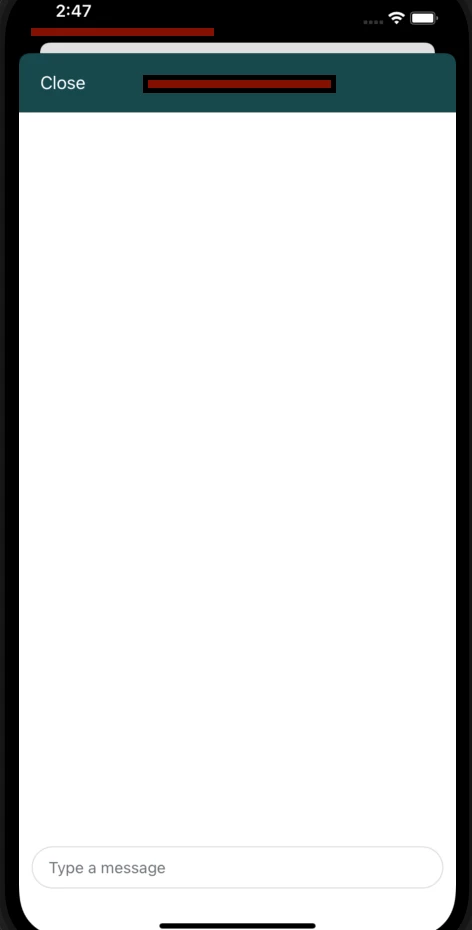
If I close the zendesk chat, and re-open it, I see the zendesk chat view controller with a no previous messages. I can type the message in the input field at the bottom, however, once I hit send, the message isn't seen in the chat window.


Here is the attached screenshot of how the blank zendesk chat view controller is seen on the second instance.
14 replies

Eric27
July 20, 2021

Hey Amogh,

Sorry you're running into issues! Can you provide the code of your ViewController and any corresponding delegates so we can take a look?

Have a wonderful day!

Eric Nelson | Manager - Developer Advocacy

AmoghAuthor
July 21, 2021

Hey Eric,

Thank you for the reply.

Here is the code :


AppDelegate.m

- (BOOL)application:(UIApplication *)application didFinishLaunchingWithOptions:(NSDictionary *)launchOptions

{

       NSString *zendeskChannelKey = @"___REDACTED____";

       [ZDKMessaging initializeWithChannelKey:zendeskChannelKey completionHandler:^(ZDKMessaging * _Nullable messaging, NSError * _Nullable error) {
    NSLog(@"init complete");
  }];

}


And this is in one of the methods in ViewController.m

dispatch_async(dispatch_get_main_queue(), ^{

      UIViewController *viewController = [ZDKMessaging.instance messagingViewController];

      viewController.navigationItem.leftBarButtonItem = [[UIBarButtonItem alloc] initWithTitle: @"Close"

       style: UIBarButtonItemStylePlain

      target: self

      action: @selector(dismiss)];

      UIViewController *rooterController = [UIApplication sharedApplication].keyWindow.rootViewController;

      nav = [[UINavigationController alloc] initWithRootViewController:viewController];

      urlPressed = callback;

      UIBarButtonItem *backItem = [UIBarButtonItem alloc];

      [backItem setTitle:@"Back"];

      [[nav navigationItem] setBackBarButtonItem:backItem];

      ZDKMessaging.delegate = self;

      [rooterController presentViewController:nav animated:YES completion:^{

        RCTLog(@"in blocks");}];
    });
- (void) dismiss {

  [nav dismissViewControllerAnimated:YES completion:nil];

}
AmoghAuthor
July 23, 2021

Hey @Eric Nelson, any further update on this? This is kind of a bummer, and blocking a release for us.

Eric27
July 23, 2021

Hey Amogh,

Sorry for the delay. I'm not spotting any glaring issues in these files. It sounds to me like the you're losing the state on close, then the sdk isn't seeing the events in the messagingViewController after reopened. Mind if I move this into a ticket and you send me your app so that I can dig into this fully? If that's not possible a sample app with just the Zendesk specific bits in it would be useful. 

Thanks,
Eric

AmoghAuthor
July 23, 2021

Hey Eric,

Sure, please create a ticket for this.

Here is the google drive link to a sample app project which essentially has only the Zendesk initialisation and showing the zendesk messaging controller - link

Let me know your findings.

Thank you,

Amogh

Eric27
July 23, 2021

Thanks Amogh! I'll pull this into a ticket and reach out to you shortly.

Have a wonderful day!

Eric Nelson | Manager - Developer Advocacy

Jessica72
January 20, 2022

Hi @eric27 and @amogh

I know this is an older post, but was wondering if you found the solution after.

Tiberiu11
February 11, 2022

I had the same issue in the past, in my case the issue was that I've used the wrong channel key

Mick O'Donnell
Product Manager
February 23, 2022

Hi all,

Looks like there may be different implementation issues at play here, but just to clarify that the new Zendesk SDK for messaging is fully persistent, so it full preserve the entire conversation history indefinitely for that app install. If you authenticate the user, this will be across multiple devices. If you are not experiencing this, you can open a support ticket on support.zendesk.com. We currently don't have any reported issues impacting this aspect of the SDK.

March 13, 2022

I am having the exact same problem reported here. Do we have a resolution for this yet?