I don't have a correct answer for you yet but I would like to discuss with you on this point.
As per my knowledge, First Reply Time has measured automatically in SLA (The time between the first customer comment and the first public comment from an agent, displayed in minutes. First reply time will not be measured on tickets created by an agent.)
As per definition, there is an involvement of an agent so it won't be worthy if you would create an automation to get down First Reply Time for a ticket that doesn't assign yet.
Question: Are you creating SLA with Calendar hours or Business hours? Hoping you are working with Business hours as it has a major role in SLA. How to Setting a schedule for Zendesk Support.
Basically, I want to generate an automatic first reply when clients send a ticket during the weekend.
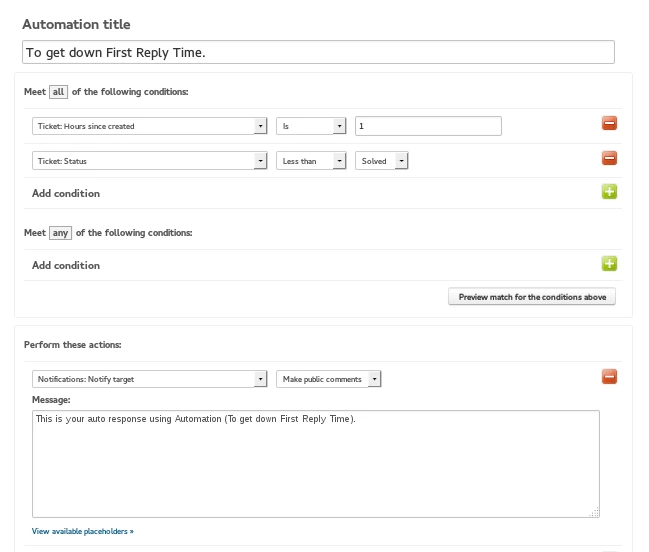
On above note: You can create an Automation with conditions like Ticket: Hours, since created, is 16 hours.
Assumption: Assuming that your company works 8 hours (9-5) from Monday to Friday. Now suppose a query has been raised on Friday just after 5 PM. Now as per our created Automation, your requester would get an email notification on next Saturday around 9 AM.
There are few points which you need to keep in mind.
First Reply Time would works if Assignee makes a public comment on that ticket.
We could not add public/private comments by Triggers and Automation BUT I have search and found a solution for this. Here is another way to add a comment?
And confirmed it will take care of your First Reply Time.
Please read linked solution as there are some side effects like Public comment would be created by a fix agent but ideally, it should be created by the assignee.
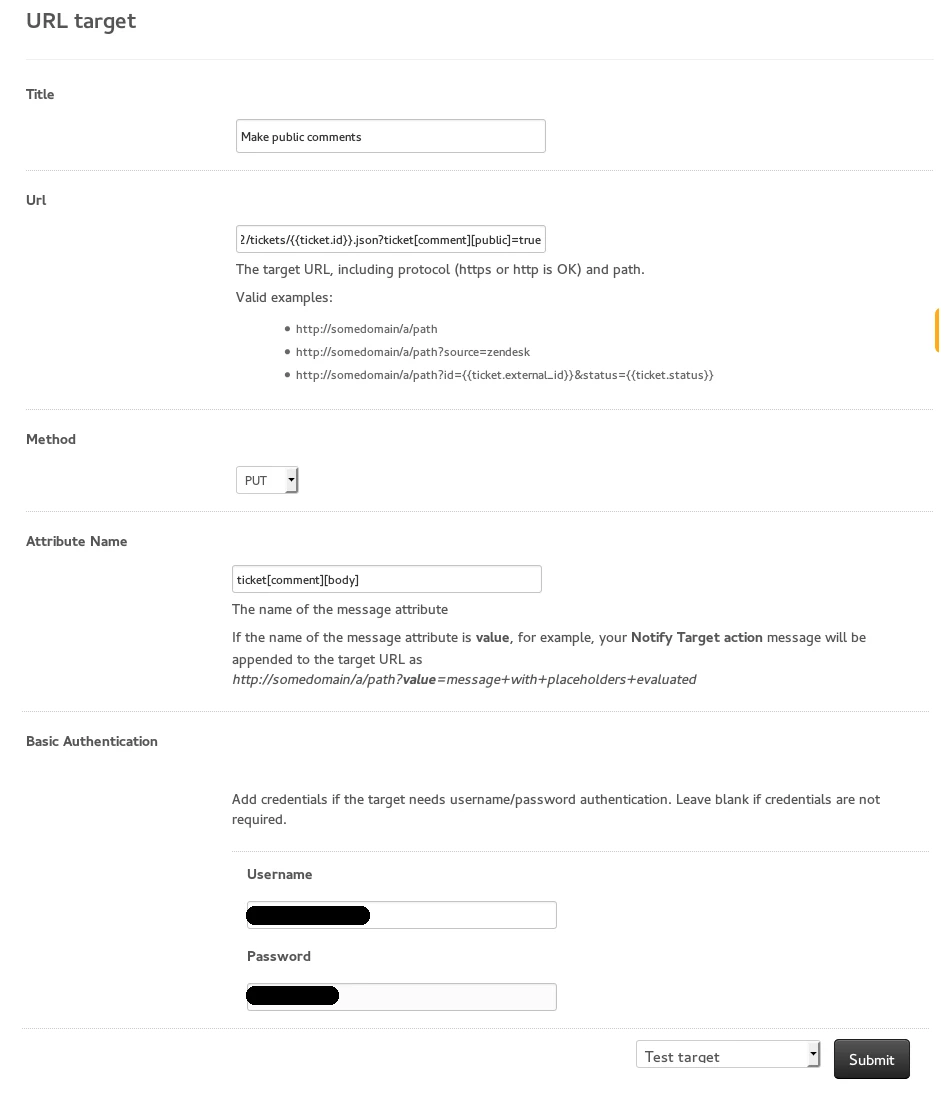
I have a create a URL Target (Admin >> Setting >> Extension) to create public comment and use that Extension in the Automation (Admin >> Business Rules >> Automations).
This looks great, however I wanted to just check how it all works.
I have created an automation to send a further qualification email to the ticket requestor when a ticket is created, however that email is not shown as a public comment on the ticket. I 'think' that the solution you put above would solve this for me, but I am a little unsure how to achieve this.
Would you be able to provide a step by step so that my automation adds the email as a public comment to the ticket?
Yeah I am interested in getting this process working for me, but all of the links say I do not have access. I've setup a trigger to email client when they create a ticket after hours, but would like for it to do a public reply on the ticket as well.
Would love to follow the links to the instructions/details, but says I do not have access.
That tip was archived as it is not a recommended workflow and was causing a lot of issues for users. It has the potential to create a race condition and automation loops, so we took it down and do not encourage users to update a target using a trigger.