Hi Team,
How to create a child ticket without any third-party application and how do we link child ticket to parent ticket.

Hi,
If you have Professional, Enterprise, or Enterprise Plus you can do this with Side Conversation Child tickets.
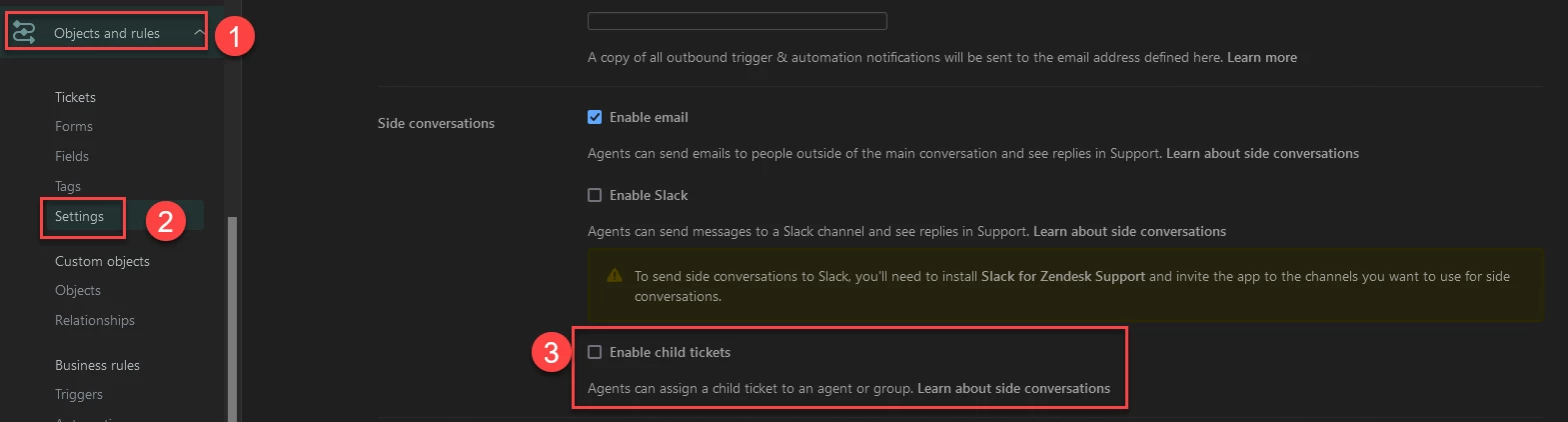
You can turn this on by going to the Admin Center>Objects and Rules>Settings>Side Conversation>Enable Child Tickets.
Here is a post about Side Conversation Child Tickets.
https://support.zendesk.com/hc/en-us/articles/4408836521498
Best Regards,
Kyle
@kyle43 how did you set up a dark theme?
Hi @eduardo12,
Yes, I installed a browser plugin for Zendesk that has a Dark Mode Theme
https://growthdot.com/?utm_source=darkmode&utm_medium=referral&utm_campaign=browser.
There is one for Chrome and Firefox.
@kyle43
Thanks a lot my friend, I've posted a topic about redirecting chats, do you think you know the answer?
Here is the link: https://support.zendesk.com/hc/en-us/community/posts/4474386630810-How-to-redirect-live-chats-of-different-brands-
Already have an account? Login
No account yet? Create an account
Enter your E-mail address. We'll send you an e-mail with instructions to reset your password.
Sorry, we're still checking this file's contents to make sure it's safe to download. Please try again in a few minutes.
Sorry, our virus scanner detected that this file isn't safe to download.