
Customizing Category page | The place for Zendesk users to come together and share
Skip to main content
July 12, 2021
Question

Customizing Category page

  • July 12, 2021
  • 58 replies
  • 186 views

Hello,

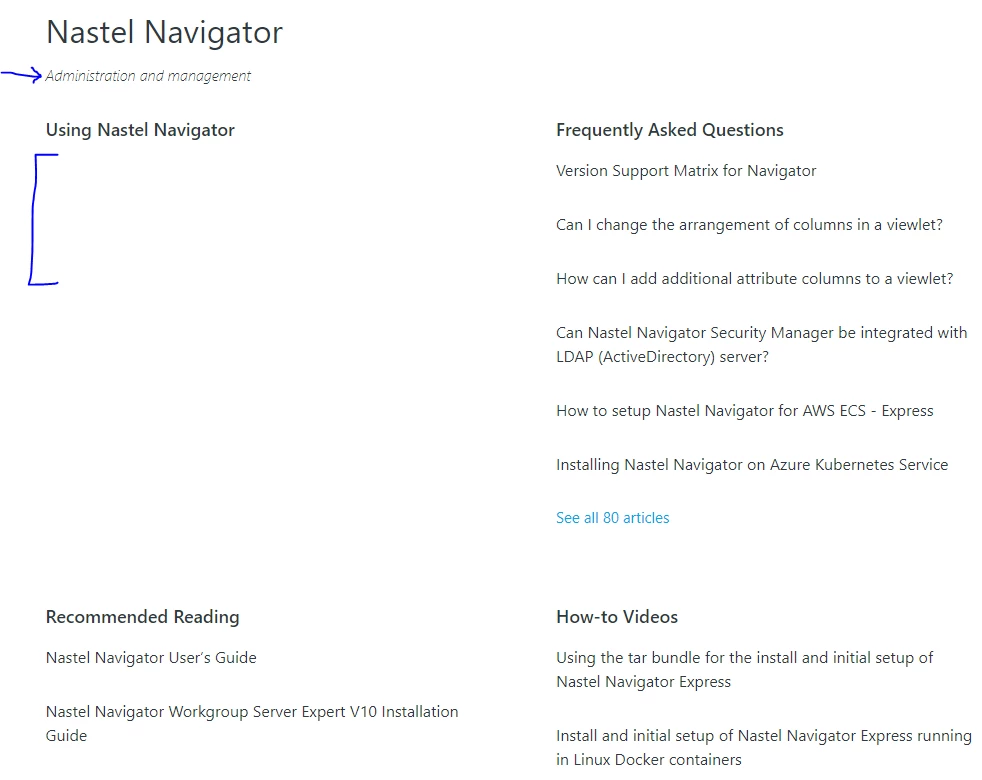
I apologize if these questions have been asked already, I was unable to find answers.  I had the following questions about customizing the Category page (see attached image for reference).

  1. Is there a way to remove the Category description?  In the attached image this is "Administration and managment"
  2. How can I display the subsections?  In the attached image, you will see the "Using Nastel Navigator" section is empty.
  3. How can I display the articles as a bulleted list with less space between articles?  So for example, under "Frequently Asked Questions," how can I have bullet displayed next to each article and how can I make the spacing between each article less?

Thank you in advance for any help offered : )

-Victoria


58 replies

Pulkit12
Newcomer
July 13, 2021

Hi Victoria Campagna

Here are the answers to your question 

1. To remove the category description add the below CSS at the bottom of your style.css

.page-header-description {
  display:none;
}

2. You have to create the subsections under the target category, or can you please let me know which theme you are using because for support subsection you have to update the code if your theme does not have a subsection code

3. To add a bullet list on the articles list and modify the gap between the articles add the following CSS at the bottom of your style.css file

.section-tree .article-list {
list-style: disc;
}

.section-tree .article-list .article-list-item {
padding-bottom:0px;
padding-top:10px;
}

Let me know if it solves your issue

Thanks 

Pulkit

Team Diziana

July 13, 2021

Hi Pulkit,

Thank you for your help!  I implemented 1 and 3 above and the category page looks so much better :) 

For #2, I do have subsections under the target category.  I am using the Copenhagen theme.  Do you know what I would have to update to show the subsections?

Thanks again,
Victoria

Pulkit12
Newcomer
July 13, 2021

Hi Victoria Campagna

Happy to hear that it works for you :)

For #2 Can you please share the category template Code so that I can look at that your template has Code that helps the Subsection to display

Thanks 

Pulkit

July 13, 2021

Hi Pulkit,

Sure, please see below:

<div class="container-divider"></div>
<div class="container">
<nav class="sub-nav">
{{breadcrumbs}}
<div class="search-container">
<svg xmlns="http://www.w3.org/2000/svg" width="12" height="12" focusable="false" viewBox="0 0 12 12" class="search-icon">
<circle cx="4.5" cy="4.5" r="4" fill="none" stroke="currentColor"/>
<path stroke="currentColor" stroke-linecap="round" d="M11 11L7.5 7.5"/>
</svg>
{{search scoped=settings.scoped_kb_search submit=false}}
</div>
</nav>

<div class="category-container">
<div class="category-content">
<header class="page-header">
<h1>{{category.name}}</h1>
{{#if category.description}}
<p class="page-header-description">{{category.description}}</p>
{{/if}}
</header>

<div id="main-content" class="section-tree">
{{#each sections}}
<section class="section">
<h2 class="section-tree-title">
<a href="{{url}}">{{name}}</a>
</h2>
{{#if articles}}
<ul class="article-list">
{{#each articles}}
<li class="article-list-item{{#if promoted}} article-promoted{{/if}}">
{{#if promoted}}
<svg xmlns="http://www.w3.org/2000/svg" width="12" height="12" focusable="false" viewBox="0 0 12 12" class="icon-star" title="{{t 'promoted'}}">
<path fill="currentColor" d="M2.88 11.73c-.19 0-.39-.06-.55-.18a.938.938 0 01-.37-1.01l.8-3L.35 5.57a.938.938 0 01-.3-1.03c.12-.37.45-.63.85-.65L4 3.73 5.12.83c.14-.37.49-.61.88-.61s.74.24.88.6L8 3.73l3.11.17a.946.946 0 01.55 1.68L9.24 7.53l.8 3a.95.95 0 01-1.43 1.04L6 9.88l-2.61 1.69c-.16.1-.34.16-.51.16z"/>
</svg>
{{/if}}
<a href="{{url}}" class="article-list-link">{{title}}</a>
{{#if internal}}
<svg xmlns="http://www.w3.org/2000/svg" width="16" height="16" focusable="false" viewBox="0 0 16 16" class="icon-lock" title="{{t 'internal'}}">
<rect width="12" height="9" x="2" y="7" fill="currentColor" rx="1" ry="1"/>
<path fill="none" stroke="currentColor" d="M4.5 7.5V4a3.5 3.5 0 017 0v3.5"/>
</svg>
{{/if}}
</li>
{{/each}}
</ul>
{{#if more_articles}}
<a href="{{url}}" class="see-all-articles">
{{t 'show_all_articles' count=article_count}}
</a>
{{/if}}
{{/if}}
</section>
{{else}}
<i class="category-empty">
<a href="{{category.url}}">{{t 'empty'}}</a>
</i>
{{/each}}
</div>
</div>
</div>
</div>

Pulkit12
Newcomer
July 13, 2021

Thanks I will look at that 

Pulkit12
Newcomer
July 13, 2021

Hi Victoria Campagna

Please update the below code with your existing one

<div class="container-divider"></div>
<div class="container">
<nav class="sub-nav">
{{breadcrumbs}}
<div class="search-container">
<svg xmlns="http://www.w3.org/2000/svg" width="12" height="12" focusable="false" viewBox="0 0 12 12" class="search-icon">
<circle cx="4.5" cy="4.5" r="4" fill="none" stroke="currentColor"/>
<path stroke="currentColor" stroke-linecap="round" d="M11 11L7.5 7.5"/>
</svg>
{{search scoped=settings.scoped_kb_search submit=false}}
</div>
</nav>

<div class="category-container">
<div class="category-content">
<header class="page-header">
<h1>{{category.name}}</h1>
{{#if category.description}}
<p class="page-header-description">{{category.description}}</p>
{{/if}}
</header>

<div id="main-content" class="section-tree">
{{#each sections}}
<section class="section">
<h2 class="section-tree-title">
<a href="{{url}}">{{name}}</a>
</h2>
{{#if sections}}
<ul class="section-list">
{{#each sections}}
<li class="section-list-item"><a href="{{url}}">{{name}}</a></li>
{{/each}}
</ul>
{{/if}}
{{#if articles}}
<ul class="article-list">
{{#each articles}}
<li class="article-list-item{{#if promoted}} article-promoted{{/if}}">
{{#if promoted}}
<svg xmlns="http://www.w3.org/2000/svg" width="12" height="12" focusable="false" viewBox="0 0 12 12" class="icon-star" title="{{t 'promoted'}}">
<path fill="currentColor" d="M2.88 11.73c-.19 0-.39-.06-.55-.18a.938.938 0 01-.37-1.01l.8-3L.35 5.57a.938.938 0 01-.3-1.03c.12-.37.45-.63.85-.65L4 3.73 5.12.83c.14-.37.49-.61.88-.61s.74.24.88.6L8 3.73l3.11.17a.946.946 0 01.55 1.68L9.24 7.53l.8 3a.95.95 0 01-1.43 1.04L6 9.88l-2.61 1.69c-.16.1-.34.16-.51.16z"/>
</svg>
{{/if}}
<a href="{{url}}" class="article-list-link">{{title}}</a>
{{#if internal}}
<svg xmlns="http://www.w3.org/2000/svg" width="16" height="16" focusable="false" viewBox="0 0 16 16" class="icon-lock" title="{{t 'internal'}}">
<rect width="12" height="9" x="2" y="7" fill="currentColor" rx="1" ry="1"/>
<path fill="none" stroke="currentColor" d="M4.5 7.5V4a3.5 3.5 0 017 0v3.5"/>
</svg>
{{/if}}
</li>
{{/each}}
</ul>

{{#if more_articles}}
<a href="{{url}}" class="see-all-articles">
{{t 'show_all_articles' count=article_count}}
</a>
{{/if}}
{{/if}}
</section>
{{else}}
<i class="category-empty">
<a href="{{category.url}}">{{t 'empty'}}</a>
</i>
{{/each}}
</div>
</div>
</div>
</div>

Let me know if it solves your issue

Thanks 

Pulkit

July 13, 2021

Hi Pulkit,

Thanks!  That worked : )

Is there a way to get it to look similar to the other sections?  They don't necessarily need bullets, but maybe no lines and some sort of right arrow or this symbol ">"?

Thanks again,
Victoria

Pulkit12
Newcomer
July 14, 2021

Hi Victoria Campagna

Please add the following given CSS at the bottom of your style.css file 

.section-tree .section-list {
margin:0px
}
.section-tree .section-list .section-list-item {
border:none;
margin:0;
padding: 10px 0;
}

.section-tree .section-list .section-list-item a:after {
content: '>';
font-size: 20px;
}

Let me know if it solves your issue

Thanks

Pulkit

July 14, 2021

Hi Pulkit,

Thank you, you have been such a huge help!  One last question, I promise :)  Is there a way to move the arrows to the left?  See image:

Thanks,
Victoria

Pulkit12
Newcomer
July 14, 2021

Hi Victoria Campagna

It's my pleasure to help you ;) don't worry you can come up with your question where ever you need my help

Do you need something like that to see the attached image?


Thanks 

Pulkit