
Tip: Collapsible headers in articles or templates (accordions) | The place for Zendesk users to come together and share
Skip to main content
Trapta11
August 18, 2021

Tip: Collapsible headers in articles or templates (accordions)

  • August 18, 2021
  • 141 replies
  • 1017 views

The original tip was posted by Wes. I am simply updating the tip to make it work with the current theme version.

Let gets started without any further delay.

Demo: https://moderatortrapta.zendesk.com/hc/en-us

Step 1: Add the below code (HTML CODE SNIPPET) to the source code of your article.

<div class="accordion">
<p>Section 1</p>
</div>
<div class="panel">
<p>Lorem ipsum dolor sit amet, consectetur adipisicing elit, sed do eiusmod tempor incididunt ut labore et dolore magna aliqua. Ut enim ad minim veniam, quis nostrud exercitation ullamco laboris nisi ut aliquip ex ea commodo consequat.</p>
</div>
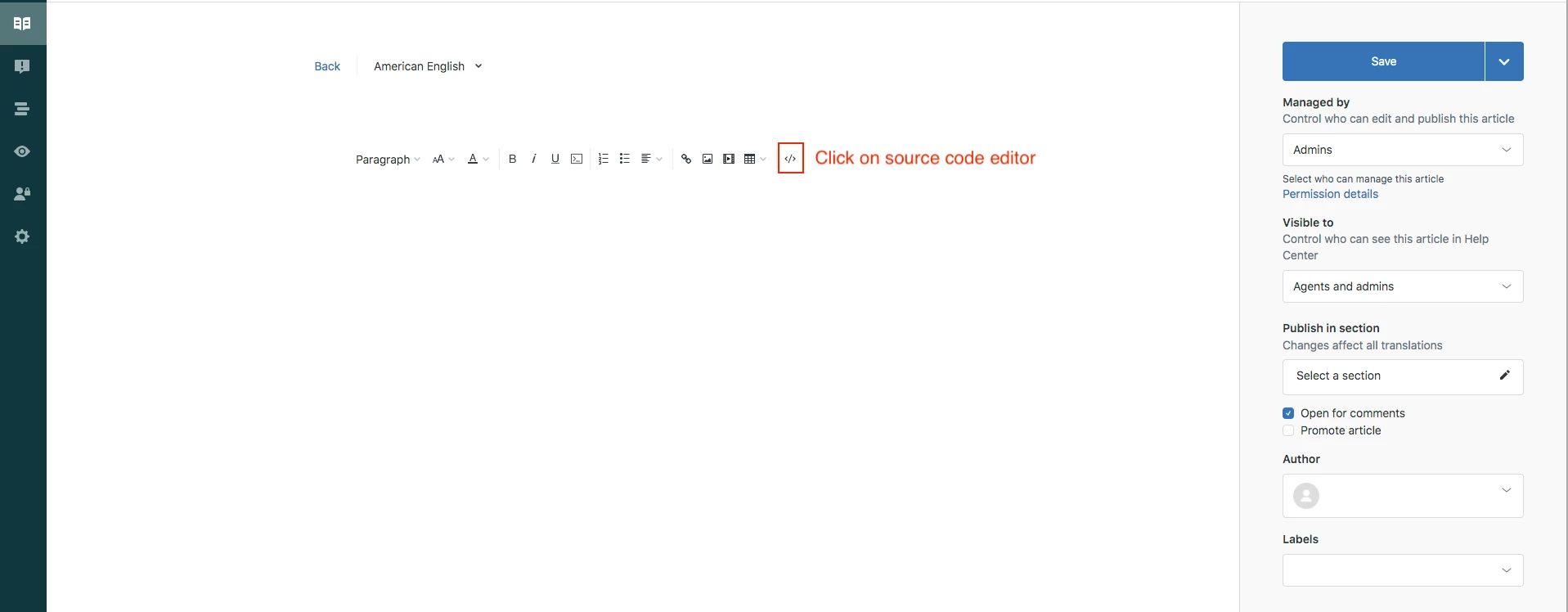
Click OK to save the progress.

NOTE: You can copy and paste the same snippet to add as many accordions as you want.

Step 2: Edit your theme to add the below code at the bottom of your style.css file

.accordion {
background-color: #eee;
color: #444;
cursor: pointer;
padding: 18px;
width: 100%;
border: none;
text-align: left;
outline: none;
font-size: 15px;
transition: 0.4s;
margin-bottom: 10px;
}

.accordion p {
  display: inline;
}

.active, .accordion:hover {
background-color: #ccc;
}

.accordion:after {
content: '\002B';
color: #777;
font-weight: bold;
float: right;
margin-left: 5px;
}

.active:after {
content: "\2212";
}

.panel {
padding: 0 18px;
background-color: white;
max-height: 0;
overflow: hidden;
transition: max-height 0.2s ease-out;
}

Step 3: Edit your theme to add the below code at the bottom of your script.js file

document.addEventListener('DOMContentLoaded', function() {
var acc = document.getElementsByClassName("accordion");
var i;

for (i = 0; i < acc.length; i++) {
acc[i].addEventListener("click", function() {
this.classList.toggle("active");
var panel = this.nextElementSibling;
if (panel.style.maxHeight) {
panel.style.maxHeight = null;
} else {
panel.style.maxHeight = panel.scrollHeight + "px";
}
});
}
});

Save and publish the changes.

YOU CAN USE THE ABOVE CODE TO ADD ACCORDION ANYWHERE THROUGHOUT THE THEME. YOU NEED TO PASTE THE HTML CODE SNIPPET (IN STEP 1) IN RESPECTIVE TEMPLATES WHERE IF YOU WANT TO ADD IT ANYWHERE OTHER THAN THE ARTICLE TEMPLATE. 

Let us know if you face any issues.

Thank you 544374443 for figuring out the issues in the tip and providing the fix for the same.

Thanks

141 replies

Trapta11
Trapta11Author
November 24, 2021

Hi @tony18,

Yes, it is possible. In order to achieve what you want, you need to tweak code a little bit to make it work accordingly.

Thanks

Lisa28
December 6, 2021

Does anyone have an answer for Montana Steele's question? 

I have accordions and they look awesome. But I would like to link to specific ones in other articles. 

In addition, is there a way to make accordions searchable? As in when they search on the site or do CTRL-F they can find the right accordion?

Thanks! 

January 6, 2022

Hello, is there a way to make an accordion within a accordion? As in one section that has more sub sections?

Dave12
Employee
January 7, 2022
Hi Eduardo,
 
I found this method combining HTML and CSS. Note that you will have to enable unsafe content in your help center in order for this method to work (see Allowing unsafe HTML in help center articles). It's possible that there may be other methods that don't require enabling unsafe content, though: https://www.cssscript.com/multilevel-accordion-menu-with-plain-html-css/
Realis
January 13, 2022

Hello there,

How to make collapsible to be in one place? I don't want to have space between them, not sure how to do that.Any idea how to make it like in the "line" example? My code is 

<p>
<span class="wysiwyg-font-size-x-large">Testing:<br>Test</span>
</p>
<div class="accordion">
<p>Section 1</p>
</div>
<div class="panel">
<p>
Lorem ipsum dolor sit amet, consectetur adipisicing elit, sed do eiusmod
tempor incididunt ut labore et dolore magna aliqua. Ut enim ad minim veniam,
quis nostrud exercitation ullamco laboris nisi ut aliquip ex ea commodo consequat.
</p>
</div>
<div class="accordion">
<p>Section 2</p>
</div>
<div class="panel">
<p>
<a href="https://our.web">Web</a> check this out!.
</p>
</div>
<div class="accordion">
<p>Section 3</p>
</div>
<div class="panel">
<p>
<a href="https://our.web">Web</a> check this out!.
</p>
</div>
Ifra
Contributor
January 14, 2022

Hey RasmonT,


Solution 1:

Go to your stylesheet > Press ctrl + f > Find .accordion class > Remove margin-bottom: 10px


Screenshot for the same:


Solution 2:

Go to your stylesheet > Paste the given code at the bottom on style.css file.

.accordion {
margin-bottom:0
}


Screenshot for the same:

Thanks


Thank You
February 2, 2022

Hello is there a way to change the 'Plus' and 'Minus" symbols to be something else? Or change the color of the symbol when the mouse is hovered over it? Thanks

Pulkit12
Newcomer
February 2, 2022

Hi Eduardo Escobar

You can update the content value according to your choice of font icon


Here are the below code where I have updated the  'Plus' and 'Minus" symbols to the Chevron icon, you can place the below code at the bottom of your style.css file

.accordion:after {
content: '\f078';
}

.active:after {
content: "\f077";
}

Let me know if need any further assistance on that

Thank You 

Pulkit

Team Diziana

February 7, 2022

Thank you @pulkit12, one last question. How do I change the color of the icon when I hover over the accordion? Like from gray to white. Thanks!

February 7, 2022

is there code to collapse all or expand all?