
Tip: Collapsible headers in articles or templates (accordions) | The place for Zendesk users to come together and share
Skip to main content
Trapta11
August 18, 2021

Tip: Collapsible headers in articles or templates (accordions)

  • August 18, 2021
  • 141 replies
  • 1021 views

The original tip was posted by Wes. I am simply updating the tip to make it work with the current theme version.

Let gets started without any further delay.

Demo: https://moderatortrapta.zendesk.com/hc/en-us

Step 1: Add the below code (HTML CODE SNIPPET) to the source code of your article.

<div class="accordion">
<p>Section 1</p>
</div>
<div class="panel">
<p>Lorem ipsum dolor sit amet, consectetur adipisicing elit, sed do eiusmod tempor incididunt ut labore et dolore magna aliqua. Ut enim ad minim veniam, quis nostrud exercitation ullamco laboris nisi ut aliquip ex ea commodo consequat.</p>
</div>
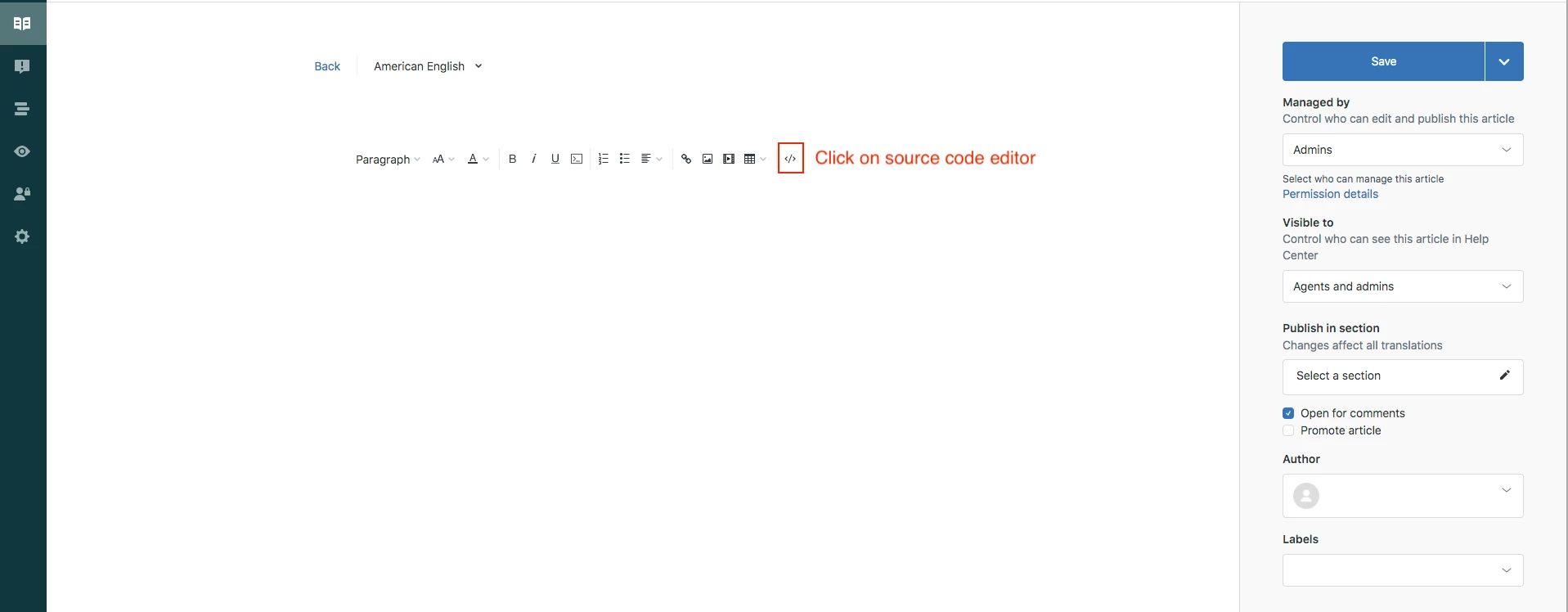
Click OK to save the progress.

NOTE: You can copy and paste the same snippet to add as many accordions as you want.

Step 2: Edit your theme to add the below code at the bottom of your style.css file

.accordion {
background-color: #eee;
color: #444;
cursor: pointer;
padding: 18px;
width: 100%;
border: none;
text-align: left;
outline: none;
font-size: 15px;
transition: 0.4s;
margin-bottom: 10px;
}

.accordion p {
  display: inline;
}

.active, .accordion:hover {
background-color: #ccc;
}

.accordion:after {
content: '\002B';
color: #777;
font-weight: bold;
float: right;
margin-left: 5px;
}

.active:after {
content: "\2212";
}

.panel {
padding: 0 18px;
background-color: white;
max-height: 0;
overflow: hidden;
transition: max-height 0.2s ease-out;
}

Step 3: Edit your theme to add the below code at the bottom of your script.js file

document.addEventListener('DOMContentLoaded', function() {
var acc = document.getElementsByClassName("accordion");
var i;

for (i = 0; i < acc.length; i++) {
acc[i].addEventListener("click", function() {
this.classList.toggle("active");
var panel = this.nextElementSibling;
if (panel.style.maxHeight) {
panel.style.maxHeight = null;
} else {
panel.style.maxHeight = panel.scrollHeight + "px";
}
});
}
});

Save and publish the changes.

YOU CAN USE THE ABOVE CODE TO ADD ACCORDION ANYWHERE THROUGHOUT THE THEME. YOU NEED TO PASTE THE HTML CODE SNIPPET (IN STEP 1) IN RESPECTIVE TEMPLATES WHERE IF YOU WANT TO ADD IT ANYWHERE OTHER THAN THE ARTICLE TEMPLATE. 

Let us know if you face any issues.

Thank you 544374443 for figuring out the issues in the tip and providing the fix for the same.

Thanks

141 replies

March 5, 2022

Hi @ifra

I would want the accordion to open up to the specific place I link a customer to or if a customer searches something and the answer is in one of the accordion I would like it to open it automatically after they click on their search results.

Second to that Im trying to update the colour block of the accordion so that its not white.

April 28, 2022

Hello! I am using the code exactly as listed above, it's working beautifully. Thank you.

Question - Is there any way to automatically close an open accordion when you click to open another one? So only one accordion is open at a time? Some of our articles have a lot of content in each accordion, and we would love it if when they click on another accordion that the previous open accordion closes. Is this possible?

April 28, 2022

Are there any plans to have accordions in the web widget?

Dave12
Employee
April 29, 2022
Hi Salim,
 
Not that I'm aware of. See Web Widget/Help Center : Is there anyway to have the accordions persist in the web widget?, and if you're interested in this being added, then for best visibility to our product team I'd suggest posting to our Feedback - Ticketing System (Support) community topic, using this template to format your feedback. Thanks!
Ifra
Contributor
April 29, 2022

Hey Carrie Boogaart,


Do the following steps:

I). Add a parent wrapper to your accordion HTML code.

<div class="accordion-div">  //Parent wrapper

<div class="accordion">
  <p>Section 1</p>
</div>

<div class="panel">
  <p>Lorem ipsum dolor sit amet, consectetur adipisicing elit, sed do eiusmod tempor incididunt ut labore et dolore magna aliqua. Ut enim ad minim veniam, quis nostrud exercitation ullamco laboris nisi ut aliquip ex ea commodo consequat.</p>
</div>


<div class="accordion">
<p>Section 2</p>
</div>

<div class="panel">
  <p>Lorem ipsum dolor sit amet, consectetur adipisicing elit, sed do eiusmod tempor incididunt ut labore et dolore magna aliqua. Ut enim ad minim veniam, quis nostrud exercitation ullamco laboris nisi ut aliquip ex ea commodo consequat.</p>
</div>


  <div class="accordion">
<p>Section 3</p>
</div>

<div class="panel">
  <p>Lorem ipsum dolor sit amet, consectetur adipisicing elit, sed do eiusmod tempor incididunt ut labore et dolore magna aliqua. Ut enim ad minim veniam, quis nostrud exercitation ullamco laboris nisi ut aliquip ex ea commodo consequat.</p>
</div>

</div>


Screenshot:


II). CSS code would be the same as given above.

III). Remove the JS code which you have added and copy-paste the given code.

var acc = document.getElementsByClassName("accordion");
var i;

for (i = 0; i < acc.length; i++) {
acc[i].addEventListener("click", function() {

var panel = this.nextElementSibling;
if (panel.style.maxHeight){
  panel.style.maxHeight = null;
} else {
  let active = document.querySelectorAll(".accordion-div .accordion.active");
  for(let j = 0; j < active.length; j++){
    active[j].classList.remove("active");
    active[j].nextElementSibling.style.maxHeight = null;
  }
  this.classList.toggle("active");
  panel.style.maxHeight = panel.scrollHeight + "px";
}
});
}


Test well and let me know :)

Thanks

Team

Thank You
Ifra
Contributor
April 29, 2022

@Salim Moumouni, did you get the solution to your query:-

I would want the accordion to open up to the specific place I link a customer to or if a customer searches something and the answer is in one of the accordion I would like it to open it automatically after they click on their search results.

Thank You
May 4, 2022

@ifra That worked amazingly! THANK YOU.

Ifra
Contributor
May 5, 2022

Great :)

Thank You
June 1, 2022

Hello @ifra and @trapta11 - I noticed a question by @elizabeth29 and had the same:

How would we make one auto-close when the next is clicked?

Essentially the same functionality that can be seen in the FAQ of Argos:

https://www.argos.co.uk/help/delivery-and-collection

Is there a way to do this with the code you have supplied/update it to make this work?

Forgive my naiveness - I'm not super codey and have been landed/given the job of making our Zendesk/articles look better!

Any help would be greatly appreciated!

Ifra
Contributor
June 2, 2022

Hi Nick Lane,

Follow the steps below:


I). Copy and paste it to your source while creating article.

<div class="accordion-div">
  <div class="accordion">
    <p>Section 1</p>
  </div>
  <div class="panel">
    <p>
      Lorem ipsum dolor sit amet, consectetur adipisicing elit, sed do eiusmod
      tempor incididunt ut labore et dolore magna aliqua. Ut enim ad minim
      veniam, quis nostrud exercitation ullamco laboris nisi ut aliquip ex
      ea commodo consequat.
    </p>
  </div>
  <div class="accordion">
    <p>Section 2</p>
  </div>
  <div class="panel">
    <p>
      Lorem ipsum dolor sit amet, consectetur adipisicing elit, sed do eiusmod
      tempor incididunt ut labore et dolore magna aliqua. Ut enim ad minim
      veniam, quis nostrud exercitation ullamco laboris nisi ut aliquip ex
      ea commodo consequat.
    </p>
  </div>
  <div class="accordion">
    <p>Section 3</p>
  </div>
  <div class="panel">
    <p>
      Lorem ipsum dolor sit amet, consectetur adipisicing elit, sed do eiusmod
      tempor incididunt ut labore et dolore magna aliqua. Ut enim ad minim
      veniam, quis nostrud exercitation ullamco laboris nisi ut aliquip ex
      ea commodo consequat.
    </p>
  </div>
</div>


Screenshot for the same:


II).  Copy and paste it to your script.js file at the bottom area.

var acc = document.getElementsByClassName("accordion");
var i;

for (i = 0; i < acc.length; i++) {
acc[i].addEventListener("click", function() {

var panel = this.nextElementSibling;
if (panel.style.maxHeight){
  panel.style.maxHeight = null;
} else {
  let active = document.querySelectorAll(".accordion-div .accordion.active");
  for(let j = 0; j < active.length; j++){
    active[j].classList.remove("active");
    active[j].nextElementSibling.style.maxHeight = null;
  }
  this.classList.toggle("active");
  panel.style.maxHeight = panel.scrollHeight + "px";
}
});
}


Screenshot for the same:


III). Copy and paste it to your style.css file at the bottom.


.accordion {
  background-color: #eee;
  color: #444;
  cursor: pointer;
  padding: 18px;
  width: 100%;
  border: none;
  text-align: left;
  outline: none;
  font-size: 15px;
  transition: 0.4s;
  margin-bottom: 10px;
}

.accordion p {
  display: inline;
}

.active, .accordion:hover {
  background-color: #ccc;
}

.accordion:after {
  content: '\002B';
  color: #777;
  font-weight: bold;
  float: right;
  margin-left: 5px;
}

.active:after {
  content: "\2212";
}

.panel {
  padding: 0 18px;
  background-color: white;
  max-height: 0;
  overflow: hidden;
  transition: max-height 0.2s ease-out;
}


Screenshot for the same:


Output: Auto close when next is clicked.


When you done, test it. If any issue, feel free to ask :)

Thanks

Thank You